6
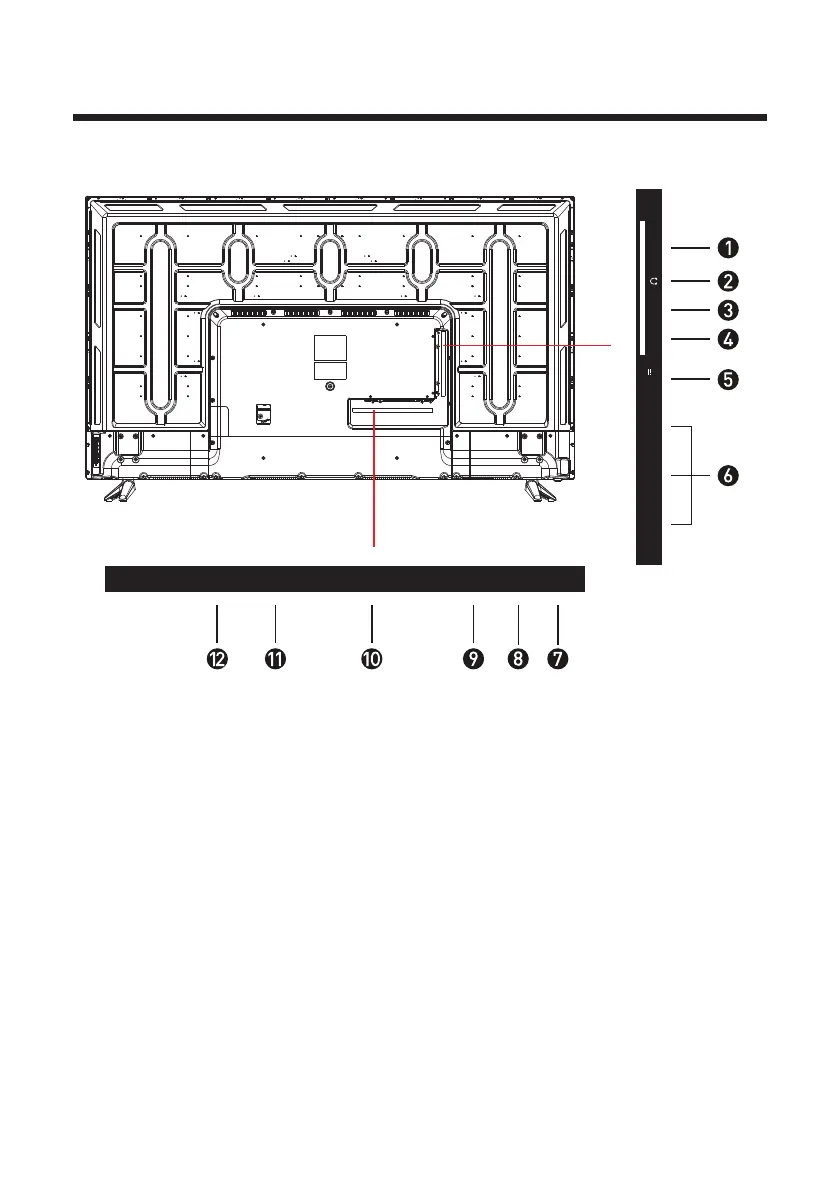
AV1: Connect to AV output on 10.
4. MINI AV2: Connect to AV output on
external devices
external devices
HEADPHONE
2.
MINI YPbPr: Connect to the YPbPr
output on external devices
3.
1.
CI
USB5.
COAXIAL7.
HDMI6.
DVB-S: Satellite connection9.
11. VGA: PC video input
12. RJ45: Network connection port
DVB-T: Antenna connection8.
NOTE:
Before making or changing cable connections, please make sure that power to the unit is
completely disconnected by switching off the power supply and unplugging the power
cable from the wall outlet.
Common Interface
USB1/USB2
DC
Max. 500 mA
5V
DC
MINI
YPbPr
MINI
AV2
HDMI1 HDMI2
HDMI3
(ARC)
VGA COA XDVB-S DVB-T
RJ45
L
RAV1



 To Next Page