Play
002.jpg
Digital Media Player
39
1. Photo
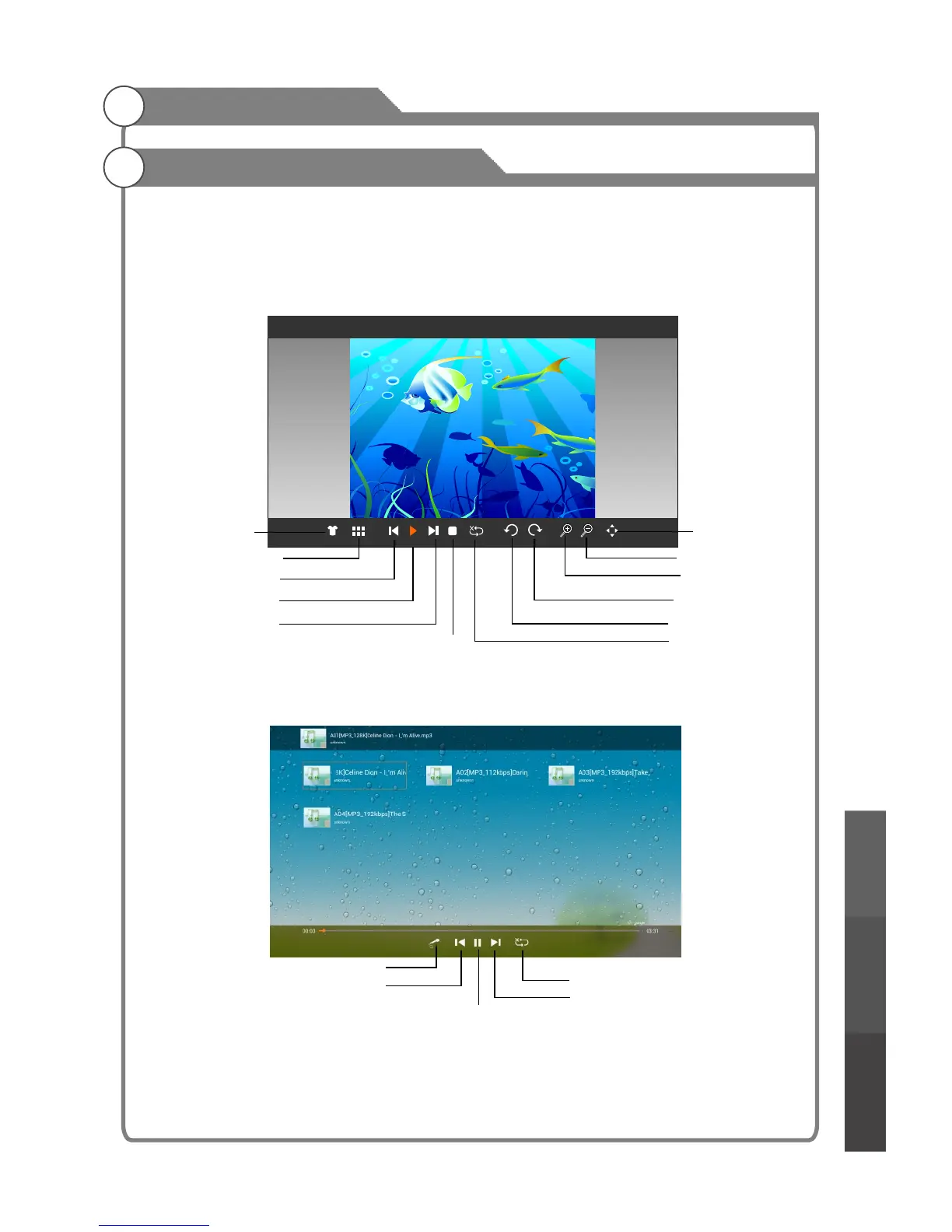
In the file browser, select a photo and press OK to pay it in full screen. Press menu button
to display/exit the "photo menu". Those menu items from left to right function as the following
in turn:
a.Wallpaper b.List c.Prev d.Play/Pause e.Next f.Stop g.Sequence h.Anticlockwise
i.Clockwise j.Zoom in k.Zoom out l.DragMode
2. Music
The functions of the menu items from left to right are:
a.Lyric b.Prev c.Play/Pause d.Next e.Play Mode
In the file browser, select a music file and press OK to play it. All music files found in the
folder will be displayed in a list.
musical photo slideshow
After starting music playback, press EXIT to return to the file browser without stopping the
music. Next, select a photo file and press OK to view in the full screen.
Media Playback
Wallpaper
List thumbnails
Prev
Play/Pause
Next
Stop
DragMode
Zoom out
Zoom in
Clockwise
Anticlockwise
Sequence/cycle
(Repeat on/off)
Lyric
Prev
Play/Pause
Play Mode
Next
Digital Media Player
Troubleshooting
Picture defects and
the reason



 To Next Page