11
Selecting an input source
The unit incorporates multiple input sources which can be
aSZSQbSRdWObVS7<>CBPcbb]\]\bVSbSZSdWaW]\^O\SZ]`
remote control. The following steps explain the procedures
involved.
>`SaabVS7<>CBPcbb]\b]S\bS`bVS7\^cb[S\cBVS
screen will display the Input Source menu.
CaSbVS16Pcbb]\]\bVSBDaSb]`▲ / ▼ direction
buttons to select the desired input source.
3. Press OK to enter the selected source.
NOTE: Please make sure the device is connected
before selecting the input source.
Move MENU: Return EXIT: Exit
Color Temp
Hue
Saturation
Sharpness
Contrast
Brightness
Picture Mode
Picture
Standard
50
50
50
50
51
0
Standard
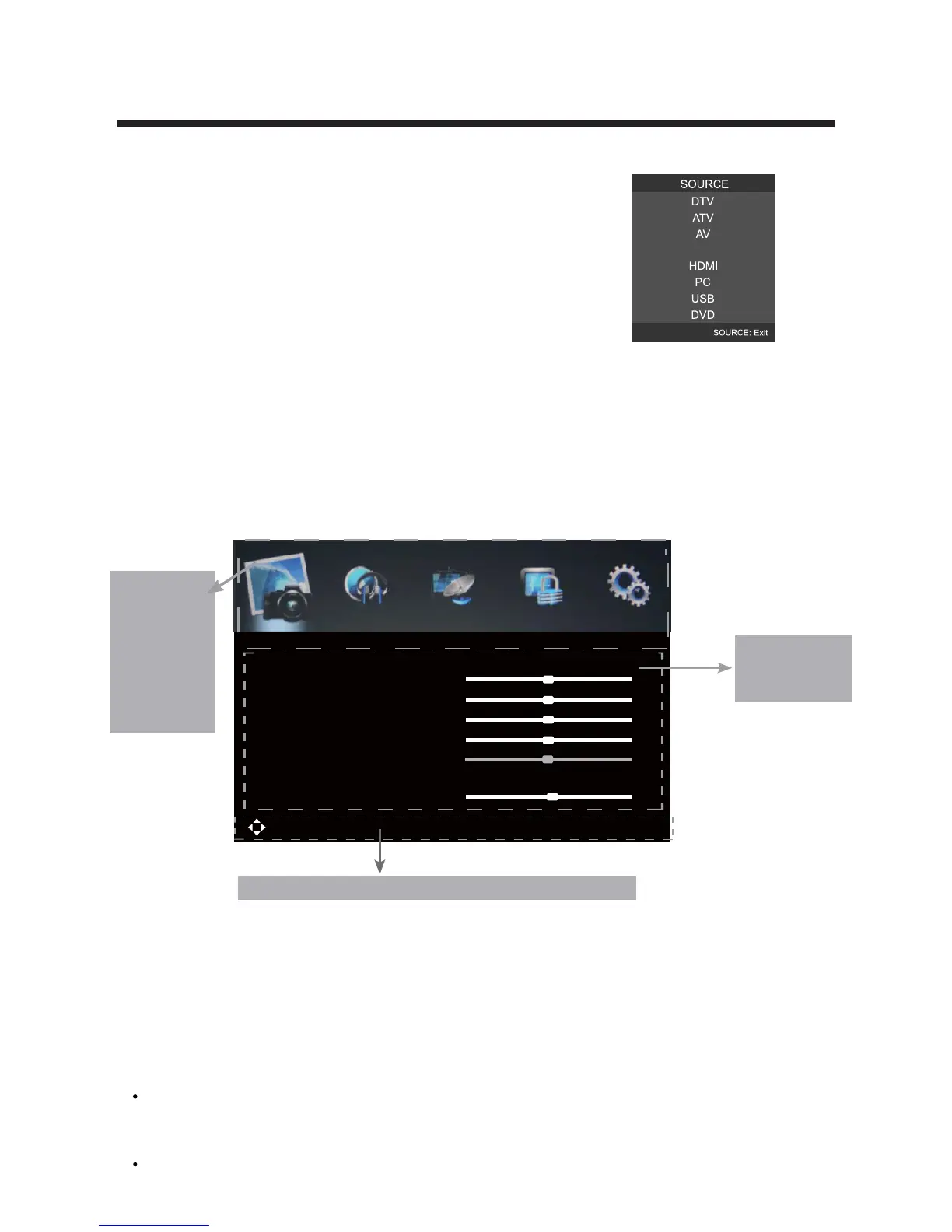
The On Screen Display (OSD) menu acts as the Main Menu and aids the user in browsing
bV`]cUVbVSRWTTS`S\b]^bW]\a^`]^S`bWSaOdOWZOPZS]\bVSbSZSdWaW]\c\Wb>`SaabVS;3<C
button on the remote control to access the OSD menu as shown below:
CaSbVS
ŻŹRW`SQbW]\Pcbb]\ab][OYSOaSZSQbW]\T`][bVS[OW\[S\c>71BC@3
A=C<216/<<3::=19]`A3BC>>`Saa▼ button to enter the submenu system.
Once in the submenu, use ▼ /▲ buttons to select an item. Press the OK button to
access the selected item to make changes to the settings.
B]`Sbc`\b]bVS[OW\[S\c^`SaabVS;3<CPcbb]\
To exit the menu display, press the EXIT button.
Using the On Screen Display Menu
NOTE:
A][S[S\cWbS[aQO\]\ZgPSOQbWdObSReVS\bVS`WUVb7<>CBaSZSQbW]\VOaPSS\
[ORSWSbVS16/<<3:aSZSQbW]\QO\]\ZgPSOQQSaaSRc\RS`2BDO\R/BDW\^cb
selections).
Operate the OSD menu according to the hints provided at the bottom of the screen.
Main menu
PICTURE
SOUND
LOCK
Submenu
(Picture menu
for example)
Hint---you should operate the OSD menu according to the hint.
CHANNEL
SETUP
YPbPr
Red



 To Next Page