MP3 Player MP-211 Basic Operation
ENGLISH
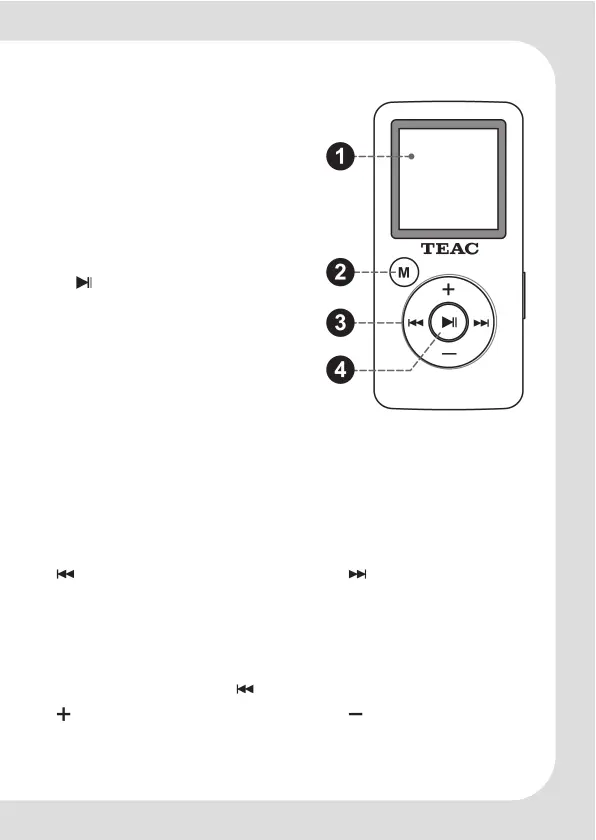
CSTN Display
M Menu button
– Press and hold: display the main menu
– While in music, picture, movie, and E-Book
mode: return to respective browser
– While in radio mode: display radio sub-menu
– While in recording mode: stop recording
– While in navigation and delete mode (main
menu option "Explorer"): activate the delete
menu for the selected item
Play, Pause / Confirm button
– Play, pause and resume music, voice and
movie playback
– Press and hold while in music mode: call the
music sub-menu (Quick Option menu)
– Press and hold while in voice mode (Record):
display the Record sub-menu
– Press and hold while in Music Browser:
add the selected track to the Play List
– While in menu function: activate a menu
option/activate current selected function
– While in the Browser: open selected folder / play resp. show selected file
– While in picture viewing (Photo) mode: start and stop auto slide show
– While in recording mode: pause/resume recording
– While in radio mode: switch between "Manual" and "Preset" tuning mode
– Press and hold while in radio mode: automatically save all stations within reception
range as preset stations
– While in text mode (E-Books): page down automatically / stop this mode
Control button with
previous track/voice file/picture/movie next track/voice file/picture...
– Press and hold: fast rewind fast forward
– While in main menu: previous menu option next menu option
– While in radio mode "Manual": receive frequency –0,1 +0,1 MHz
– Press and hold while in radio mode: search the next receivable radio station
– While in radio mode "Preset": previous
preset station next preset station
– While in the Photo Browser: move to the left move to the right
– While in sub-menus:
return to the previous screen ( only)
increase volume decrease volume
– While in Browser and in sub-menus:
move the selection up move the selection down
– While in text mode (E-Books): previous page next page


 To Next Page
 Loading...