Before making connections, be sure to
read the instruction manual of the stereo
amplifier carefully and turn the power of
the stereo amplifier and the player OFF.
Caution:
If the CD player interferes with the tuner,
TV receiver, etc., allow a reasonable
distance between them.
ª
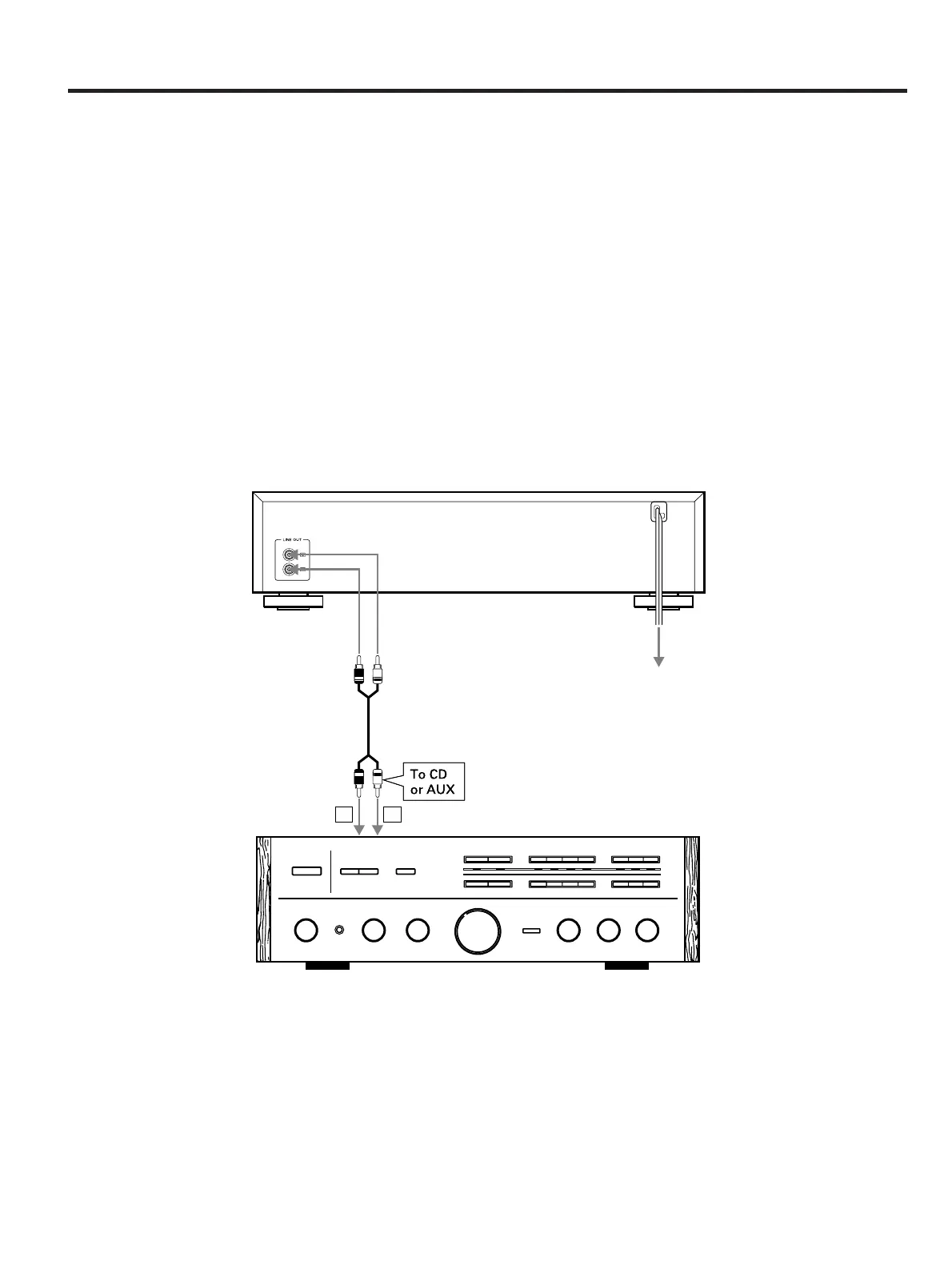
Connection with a stereo
amplifier
LINE OUT terminals
Connect the LINE OUT terminals to the CD
or AUX terminals of the stereo amplifier
using an RCA pin plug cord.
…
Make sure to match the color-coded
plugs to the appropriate jacks on the
components — white to white (L), and
red to red (R).
…
Be sure to insert each plug securely.
∑
Power cord
Be sure to connect the power cord to an AC
outlet which supplies the correct voltage.
…
Hold the power plug when plugging or
unplugging the power cord.
∑
Headphones
When using headphones, connect the
headphone plug into the PHONES jack.
O
Adjust the level of the signals output
from the phones jack.
Connections
– 4 –


 To Next Page