25
Connecting Equipment
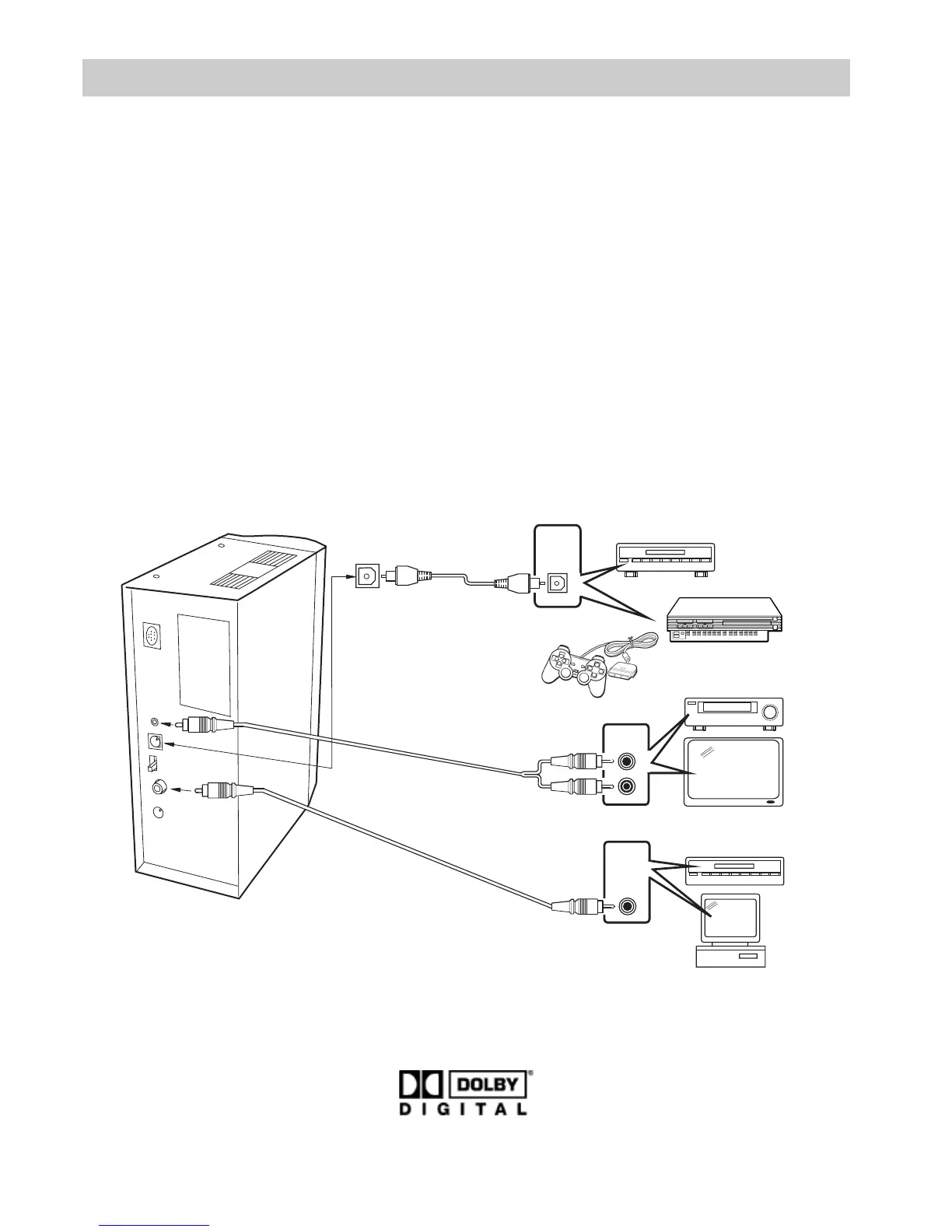
Your PowerMax-950 can be connected
to the following devices:
■ DVD player
■ XBOX / PS2 (see "How to connect
XBOX/PS2" on next page)
■ PC / notebook
■ TV / video
■ CD player / HiFi-Amplifier (Line Out)
■ MP3 player / discman etc.
To enjoy Dolby Digital Sound your sound
source has to be provided with a digital
output. PowerMax-950 offers two digital
inputs: coaxial and optical.
The unit receives its input signal over
both of the channels. To select the input
you have to set the little switch at the
back side of the unit to “COAXIAL” or
“OPTICAL”. If there is no digital input
signal available the unit sets itself auto-
matically to Dolby Pro • Logic respective-
ly to stereo. If you like to connect a stand-
ard analog signal source, you may
achieve this with a ø3,5mm stereo mini
plug.
Important: Dolby Digital may be reproduced from games and DVDs only
if they have been recorded in this audio format. The respective audio
format is indicated by this icon:
D V D , L D P , D A T
T V
V T R
R
L
P S 2 , X B O X , . . .
P C
D V D , L D P , D A T , C D P
Audio
output
Digital
optical
output
Digital
coaxial
or
S/PDIF
output
optical
Front Input
Analog / Stereo
coaxial



 To Next Page