EasyManua.ls Logo

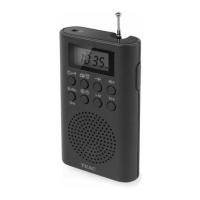
Teac PR130 - User Manual

Teac PR130
2 pages
Print Icon
To Next Page IconTo Next Page
Loading...
1. LCD display
2. / Tuning/ setting
3. Volume UP
4. Volume down
5. Preset up
6. Preset down
7. Speaker
8. Memorization
Setting the clock
Choose one of the power sources as below.
AC adapter (not included): Output DC 3V 300mA
• Batteries (not included): DC 3V 2x1.5V R03/ UM-4/AAA
Connecting power
Connect an AC adapter (not supplied) to the DC IN 3V jack of the unit and to the mains socket.
Caution!
• Check that the voltage marked on the adapter rating plate matches your local supply.
Never use an AC adaptor that is damaged, route power lead in a safe manner and make sure it is
not subjected to trapping or pinching. If the power lead is damaged refer to a qualied service agent.
The AC adaptor is used as the disconnect device and it shall remain readily operable. To be completely
disconnected from the power input, the AC adaptor shall be disconnected from the mains completely.
The AC adaptor should not be obstructed and should be easily accessible during intended use.
Note:
- The AC adaptor must be unplugged from the power outlet for the unit to run on the batteries.
- When the set is connected to the mains, the power source automatically switches to AC.
Battery operation
1. Remove the lid of the battery compartment.
9. St./Mo.: Stereo/Mono selection
: key lock
10. Band selection (AM/FM)
Alarm / (Snooze)
11. To turn unit ON/OFF
: Sleep
12. DC IN 3V jack
13. Phones jack
14. Telescopic antenna
15. Battery compartment
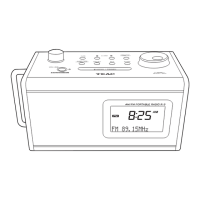
LOCATION AND DESCRIPTION OF CONTROLS
POWER SUPPLY
PR130
2 BAND POCKET RADIO PLL
R-3745A IB TEAC 001 REV0.indd 1 2017/6/26 13:49:08
Question and Answer IconNeed help?

Do you have a question about the Teac PR130 and is the answer not in the manual?

Summary

TEAC Warranty Information

TEAC Terms and Conditions

Details Australian Consumer Law guarantees and TEAC's warranty terms for product defects under normal use.

Radio Controls and Features

Location and Description of Controls

Identifies and describes the functions of all buttons, indicators, and ports on the radio unit.

Power Supply Options

Details options for powering the unit via AC adapter or batteries, including connection and safety notes.

Radio Operation and Settings

Setting the Time

Instructions on how to set the clock time, including 12/24 hour format selection.

Listening to the Radio

Guidance on selecting bands, tuning stations manually or automatically, and using preset stations.

Setting the Alarm

Steps to set, cancel, and manage alarm functions, including wake-up sources and snooze.

Sleep Function

How to use the sleep timer to automatically turn off the radio after a set period.

Key Lock Function

Instructions for activating and deactivating the key lock to prevent accidental button presses.

Using Headphones

Advice on connecting and using headphones with the unit, including volume recommendations.

Technical Specifications and Safety

Technical Specifications

Provides key technical details including power supply requirements and radio frequency ranges.

Important Safety Information

Covers crucial safety warnings related to electric shock, ventilation, and environmental disposal.

Summary

TEAC Warranty Information

TEAC Terms and Conditions

Details Australian Consumer Law guarantees and TEAC's warranty terms for product defects under normal use.

Radio Controls and Features

Location and Description of Controls

Identifies and describes the functions of all buttons, indicators, and ports on the radio unit.

Power Supply Options

Details options for powering the unit via AC adapter or batteries, including connection and safety notes.

Radio Operation and Settings

Setting the Time

Instructions on how to set the clock time, including 12/24 hour format selection.

Listening to the Radio

Guidance on selecting bands, tuning stations manually or automatically, and using preset stations.

Setting the Alarm

Steps to set, cancel, and manage alarm functions, including wake-up sources and snooze.

Sleep Function

How to use the sleep timer to automatically turn off the radio after a set period.

Key Lock Function

Instructions for activating and deactivating the key lock to prevent accidental button presses.

Using Headphones

Advice on connecting and using headphones with the unit, including volume recommendations.

Technical Specifications and Safety

Technical Specifications

Provides key technical details including power supply requirements and radio frequency ranges.

Important Safety Information

Covers crucial safety warnings related to electric shock, ventilation, and environmental disposal.

Teac PR130 Specifications

General IconGeneral
TypePortable
Tuner BandsAM/FM
Power SourceBatteries
SpeakerYes
Headphone JackYes

Related product manuals