CPS-121 Control Panel User Manual
4
Classroom Strategy for Securing Bluetooth
®
Connections
To prevent persons other than the teacher from connecting to the classroom audio system, namely
students acting contrary to a teacher’s wishes, TeachLogic recommends the following.
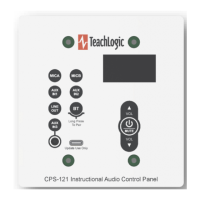
1. Maintain control of access to the control panel. If anyone can press the BT button, they can pair
their smartphone or other Bluetooth device to it.
2. Once you put the panel into pairing mode, immediately connect (or pair and connect) your
(teacher’s) Bluetooth device. This will keep it from being available to any previously paired
device. If you do not pair, then power cycle the system using a long press of the - Mute
button to power off, then another long press of it to power back on. Then the system will not be
in pairing mode, advertising its Bluetooth identity. (Note that previously paired devices may still
connect if no other device is connected to it.)
3. If you identify an unauthorized, undesired party that has paired with the audio system, require
their device “forget” the TeachLogic system Bluetooth pairing identity. And please note that the
BTR will remember the most recently connected device and try to connect with it, so pair and
connect your (teacher’s) device to override this. Having a device forget the BTR may be as
simple as clicking on “forget device” on an unauthorized Apple device. With Android devices, the
owner must first “forget device” then “rescan” to clear the pairing information from memory. If
theirs was the last device connected, the BTR will actively try to reestablish connection and the
unauthorized owner will need to decline to connect when prompted so that the Android device
“forgets” the pairing.
4. Finally, if you have problems with unauthorized connection
s, then when you are not using the
system to play audio from your desired Bluetooth-connected device, keep that BT input channel
muted. To do this, press the BT button, then the - Mute button. This will keep the Bluetooth
audio signal level at zero so if anyone else is connected, they may not send any sounds to the
classroom speakers. Do this also if you ever hear audio from your classroom speakers that is
from a device you do not intend have connected.
Additional Functions in Firmware Release 1.1 for Detection of RS-232 Connection Loss
Sometimes, the can be a disruption of the electronic communication link between the control panel (CPS-
121) and the amplifier (IMA-120/IMA-121). If this condition persists for a minute or more, the control
panel will display the message “Amplifier Offline.” This is a feature in release 1.1 and later, and the
release number is shown on the display shortly after connecting the control panel to power via the RJ-45
connectorized cable.
Troubleshooting Tips
My amplifier does not respond to commands from the CPS-12x control panel.
Check on the amplifier that the RS-232 switch is in the ON position. If OFF, the amplifier will only
respond to its commands from its own front panel buttons and dials. If ON, it will respond only to remote
volume change and mute commands from CPS-12x panels or other RS-232 controller devices (made by
3
rd
parties).
The CPS-121 screen is dark or dim when I want to enter a command or does not respond to my
commands at first.


 To Next Page
 Loading...