4
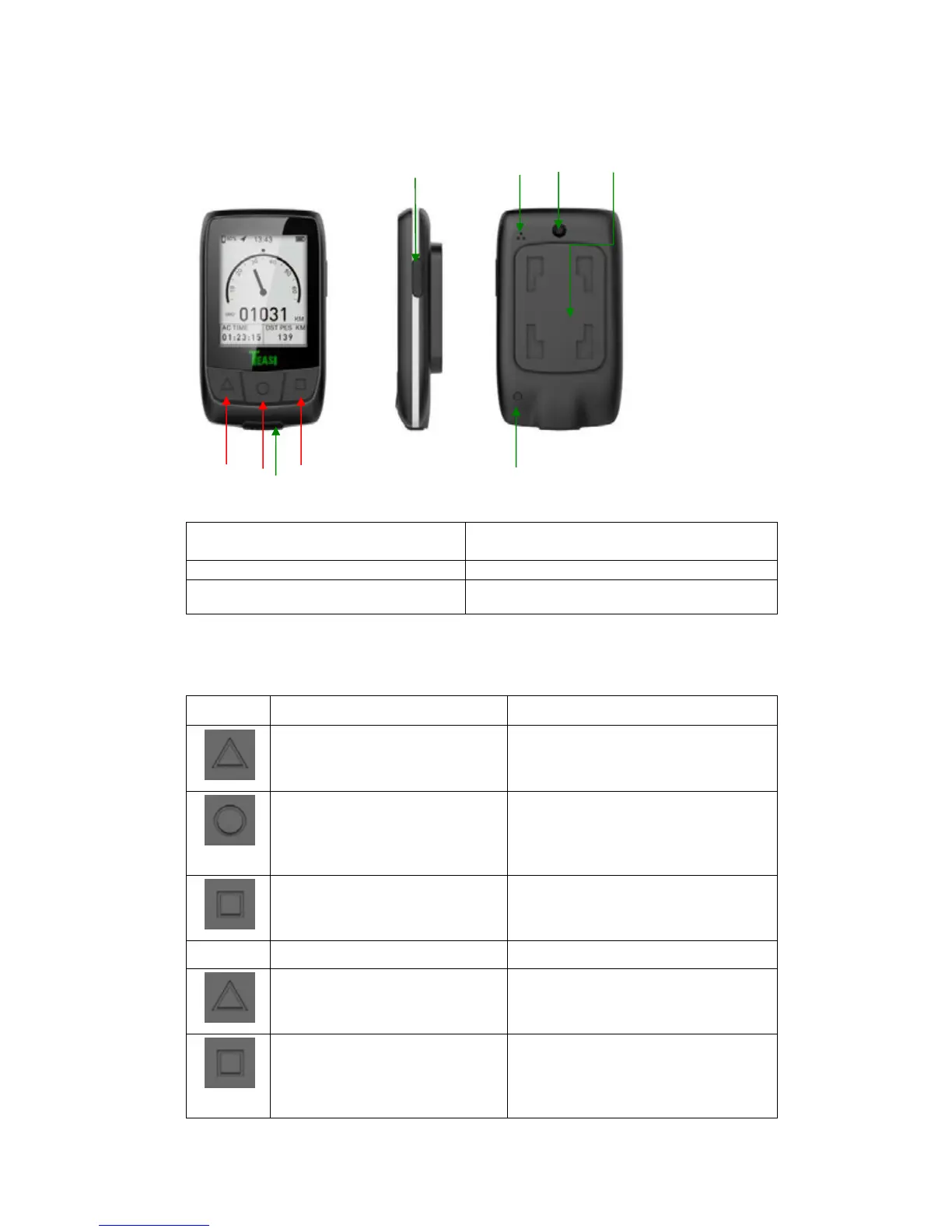
1. Getting to know your Core
1. USB charging interface/USB rubber
stopper
2. Long press: power on/off
short press: backlight on/off
5. Auto backlight on/off induction window
6. Mounting for HR bracket
A/B/C shown in the figure above are only the functional buttons of this product, please see
the table below for their specific functions:
Short press: change display mode
Long press 1 sec: go into settings
picture
Short press: change option,
backward/left direction
Long press 1 sec: exit the settings picture
Long press 1 sec: change to App
working mode
Long press 2 sec: go into pair
sensor mode
Short press: Change digit/confirm
(Yes/No)
Short press: start/pause recording
Long press: stop recording
Short press: select next digit or
option/right direction
Long press 1 sec: exit pair sensor
picture
Short press: exit smartphone search
Short press: start search
sensors/search next
sensor/exit if both
sensors are connected
Short press: start/pause recording
Long press 1 sec: stop recording



 To Next Page