
 Need help?
Do you have a question about the Tec-Innovation InnoMake v.1 and is the answer not in the manual?
Identifies the product name, serial numbers, and manufacturer details.
Explains common symbols used in the manual and on the product for better understanding.
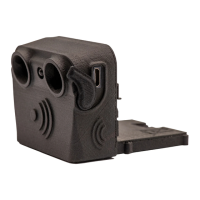
Details the physical components of the InnoMake system, including shoes and attachment parts.
Explains the buttons, ports, and LEDs on the attachment part for control and feedback.
Describes different versions of the product and available shoe models and customization options.
Introduces the InnoMake App as an accessory for adjusting settings and enhancing functionality.
Defines the target audience and user requirements for operating the InnoMake device safely.
Outlines the suitable environments and conditions for using the InnoMake product.
Instructions on how to power the InnoMake device on and off and understand its operational status.
Step-by-step guide on how to charge the InnoMake device's battery using the provided charger.
Explains how to check the remaining battery charge level via audio signals.
Guides users on preparing the shoes and attachment parts before initial use.
Provides initial guidance and examples for new users to familiarize themselves with the device.
Instructions on how to adjust the obstacle detection range to suit different environments.
How to enable and disable the intelligent mode for optimized battery usage and detection.
Instructions for activating the LED for enhanced visibility in low-light conditions.
Guidance on proper procedures to follow after finishing the use of the InnoMake device.
Explains the different warning tones emitted by the attachment parts and their meanings.
A summary table of all audio and LED signals used by the InnoMake system.
Provides advice on how to handle and react to any malfunctions or errors of the product.
Details how to protect the device from environmental factors and what measures to take.
Instructions on proper storage and transportation to maintain the product's condition.
Procedures for cleaning the InnoMake device and its components and how to dispose of it.
 General
| Category | Mobility Aid |
|---|---|
| Product Name | InnoMake v.1 |
| Technology | Ultrasonic Sensors |
| Functionality | Obstacle detection and alert |
| Target User | Visually Impaired Individuals |
| Detection Range | Up to 4 meters |
| Battery Life | Up to 8 hours |
| Power Source | Rechargeable Lithium-Ion battery |
| Intended Use | Navigation assistance for visually impaired individuals |
| Alert Method | Vibration |
| Alert Type | Haptic |
| Charging Time | Approximately 2 hours |

 To Next Page