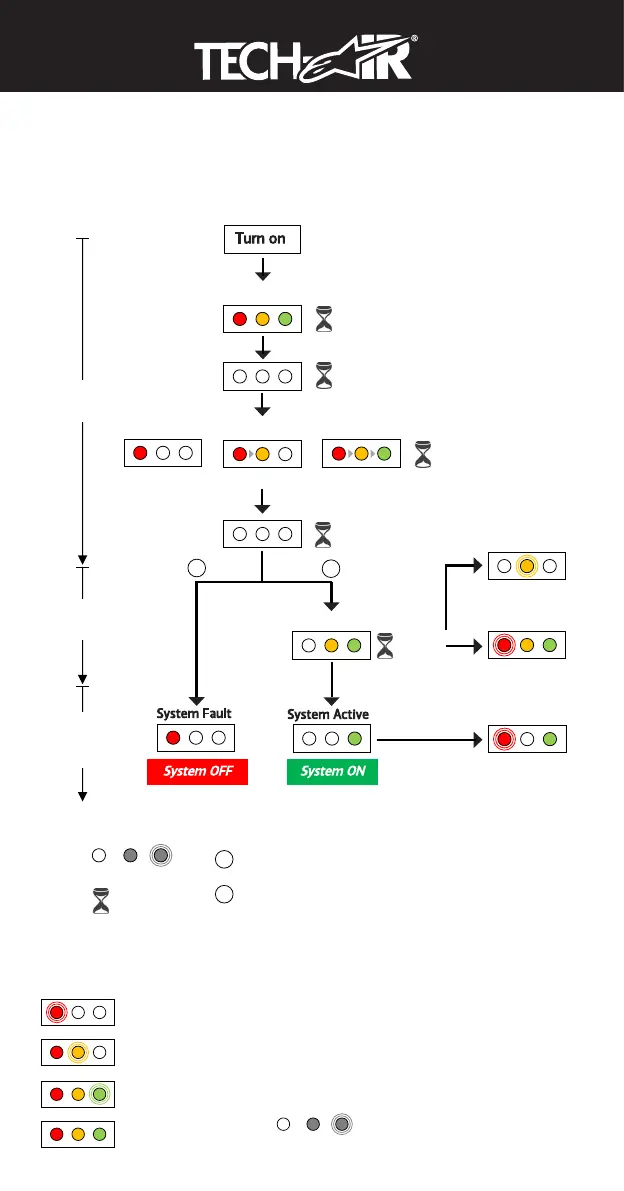
13. Display Indications
The LED Display (3) has three colored LEDs which are used to indicate the status of the
System.
LED Indications During Normal Use
B
a
t
t
e
r
y
R
e
c
h
a
r
g
e
Fully charged
Under 8 hours
8 to 18 hours
18 to 30 hours
BlinkOff On
GGlloossssaarryy
BBaatttteerryy RReecchhaarrggee
Fully charged
Under 8 hours
8 to 18 hours
18 to 30 hours
BlinkOff On
G
l
o
s
s
a
r
y
Turn on
System Fault
LED Check
Battery Level Indication
System Check
System Active
4 to 8 hours
Over 8 hoursUnder 4 hours
System OFF
3s
1s
3s
1s
In case of
Low Battery
System Off,
but Still connected
to the App
BlinkOff On
Glossary
Duration
System
Start Up
System
Check
Standard
Operating
Mode
System ON
1
2
1
2
System Fault: Operating Mode that verifies in case of “Empty
Gas Canister” or “System Error” (see Section 18,
“Troubleshooting”)
System Active: Operating Mode that verifies in case the System
Check is successfully passed (see Section 12, “System
Operation”)
In case of
Low Battery
Min 10s
Max 60s
LED Indications During Recharge
18 EN
TTuurrnn oonn
SSyysstteemm FFaauulltt
LED Check
Battery Level Indication
System Check
SSyysstteemm AAccttiivvee
4 to 8 hours
Over 8 hoursUnder 4 hours
SSyysstteemm OOFFFF
3s
1s
3s
1s
In case of
Low Battery
Min 10s
Max 60s
BlinkOff On
G
l
o
s
s
a
r
y
Duration
System
Start Up
System
Check
Standard
Operating
Mode
SSyysstteemm OONN
1
2
1
2
System Fault: Operating Mode that verifies in case of “Empty
Gas Canister” or “System Error” (see Section 18,
“Troubleshooting”)
System Active: Operating Mode that verifies in case the System
Check is successfully passed (see Section 12, “System
Operation”)


 To Next Page
 Loading...