Need help?
Do you have a question about the Tech Craft BAY6028 and is the answer not in the manual?
Information required when contacting customer service for assistance or missing/damaged parts.
List of tools necessary for assembly that are not provided with the product.
Instructions for cleaning the product using a soft cloth and mild detergent solution.
Prepares central shelves for assembly by attaching fittings and dowels.
Assembles the prepared central shelves using provided hardware.
Prepares side panels (gables) and the front apron for installation.
Installs the prepared side panels and front apron onto the unit.
Prepares the top shelf and interior upper gable panels for attachment.
Installs the top shelf and interior upper gable panels, ensuring leg contact with floor.
Installs the rear panels onto the assembled unit.
Installs the adjustable (loose) shelves into the unit.
Prepares the doors by attaching hinges and handles.
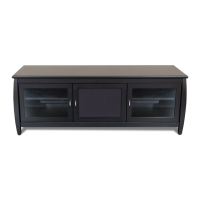
Installs the prepared doors onto the unit and provides adjustment guidance.
 General
| Brand | Tech Craft |
|---|---|
| Model | BAY6028 |
| Category | Indoor Furnishing |
| Language | English |

 To Next Page