EasyManua.ls Logo

Tech Works CI-ODC-1-B - User Manual

Tech Works CI-ODC-1-B
4 pages
Print Icon
To Next Page IconTo Next Page
Loading...
800-813-1080 www.techworks-usa.com 09/23
CI-ODC-1-B QUICK REFERENCE GUIDE
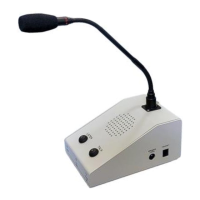
The Tech Works CI-ODC-1-B Operator Desk Console is part of the Collaborative Intercom product
group. The Console includes a professional cardioid, condenser, gooseneck microphone, and a speaker.
Buttons and indicators provide control to allow the operator to just listen to the CI-Buss communication or
to talk, and collaborate hands free. A headset jack on the side of the console allows connection of a local
operator headset such as the Plantronics wireless unit.
VOX
GATE
ANTI-VOX
VOX
VOX TRIPPED
CONSOLE MIC PRE OUT
MASTER INPUT
OR
VOX INHIBIT
HEADSET ON
PTT SWITCH
BUFFER
HEADSET
DETECTOR
MASTER INPUT
CI-BUSS MASTER
AUDIO INPUT
HEADSET
EARPHONE
HEADSET ON
PRE-AMP
PRE-AMP
BUFFER
OR
OR
AND
SELECT
MUX
“LISTEN
LEVEL”
DUCK
MUX
SUM
AND
BUFFER
CALL
TONE
GEN
ALWAYS
VOX TRIPPED
CONSOLE
MICROPHONE
HEADSET
MICROPHONE
HEADSET ON
MICROPHONE ENABLED
MASTER INPUT
CANCEL CALL TONE
CI-BUSS MASTER
CALL SWITCH
SELECT
MUX
CONSOLE MIC PRE OUT
ALC
CI-BUSS MASTER
AUDIO OUTPUT
CI-BUSS MASTER
ALERT OUTPUT
MICROPHONE ON
CONSOLE
SPEAKER
LISTEN
\HEADSET ON
MICRPHONE ENABLED
LISTEN
OR
PTT SWITCH
TOGGLE
FLIP-FLOP
OR
AND
TOGGLE
FLIP-FLOP
OFF
ON
MIKE SWITCH
LISTEN SWITCH
PTT SWITCH
LISTEN
MICROPHONE ENABLED
AND
OR
HEADSET ON
LISTEN
Basic Operator Console Block Diagram
Isolation Transformers not shown for simplicity.
The CI-BUSS interface allows connection of additional units. The Microphones are processed with ALC to
be of constant level and passed to other Units.
The ALC has an indicator for displaying the Microphone level.
Question and Answer IconNeed help?

Do you have a question about the Tech Works CI-ODC-1-B and is the answer not in the manual?

Overview

The Tech Works CI-ODC-1-B Operator Desk Console is a component of the Collaborative Intercom product group, designed for professional communication. It integrates a cardioid, condenser, gooseneck microphone and a speaker, providing comprehensive control for operators to listen to CI-Buss communication, engage in two-way conversations, or collaborate hands-free. A headset jack on the side of the console allows for the connection of a local operator headset, such as a Plantronics wireless unit.

Function Description:

The console facilitates communication through various modes:

  • Listening: Operators can monitor CI-Buss communication. The "LISTEN" switch (toggle action) activates listening, indicated by a red light. The Console Speaker Listening Level knob on the side adjusts the speaker volume, though it cannot be turned completely off. When the console microphone is enabled, the speaker listening level is reduced to prevent feedback.
  • Talking: Operators can talk and collaborate. The console supports two primary operational configurations for the microphone:
    • VOX (Voice Activated Microphone) Operation (Standard Option): In this mode, the microphone is voice-activated. Pushing the "LISTEN" switch turns on the red indicator. To end a conversation, pushing "LISTEN" again turns off the indicator. The "TALK" switch (toggle action) can disable the microphone for listen-only mode (indicator off) or enable it for voice-activated communication (red indicator). The operator must speak directly into the console microphone from approximately 6 inches for proper response. A green "LIMIT/VOX" indicator signifies VOX activation, while a flashing red "LEVEL/VOX" indicator shows proper microphone level. If the operator needs to continue talking, the microphone should be disabled and re-enabled.
    • Push-to-Talk Microphone Operation (Jumper Option): When the "LISTEN" switch is pushed, the red indicator lights up. Pushing "LISTEN" again turns off the indicator. Pressing the "TALK" switch activates the console microphone and forces the speaker to listening mode. Releasing the "TALK" switch keeps the console in listening mode. To discontinue listening, the "LISTEN" switch should be pressed. The "LIMIT/VOX" indicator lights green when the microphone is on, and flashes red for proper microphone level.
  • Headset Operation: A headset can be connected via the RJ-22 jack. When a headset is connected and "ON" (indicated by a green "Headset On" light), the console microphone, speaker, and switches are disabled, and the headset takes priority for communication. The headset requires initial adjustments (refer to Headset Datasheet) with configuration switch "A", earphone switch "4", and microphone switch "6".
  • Remote Call Switch: A remote call switch in the procedure room can alert the operator. A call tone is emitted through the console speaker, but only if the console microphone is not enabled. If a conversation is active, the call switch is assumed not to be used.
  • Footswitch (Optional): A 1/4" TRS jack allows for an optional footswitch for 'Push-to-Talk' operation. This provides hands-free operation and overrides VOX in noisy environments. When pressed, the console microphone activates immediately; when released, the console returns to listening mode.

Important Technical Specifications:

  • Microphone Type: Professional cardioid, condenser, gooseneck.
  • Connectors:
    • CI-BUSS: RJ-45, "Master" Connector.
    • PA-BUSS: RJ-45, "Output" Connector.
    • Footswitch: 1/4" TRS Jack (Optional).
    • Power Connector: 3.5mm Barrel Connectors.
    • Headset Connector: RJ-22 (Plantronics, Wireless Headset Optional).
  • Power Requirements: 24Volts, 1 Amps Maximum.
  • Chassis Ground: Hex Nut, connected to Circuit Common through a 1-Meg-Ohm resistor.
  • Isolation Transformers: Not shown in the block diagram for simplicity, but are implied for the CI-BUSS interface.
  • ALC (Automatic Level Control): Microphones are processed with ALC to maintain a constant level, with an indicator for displaying the microphone level.

Usage Features:

  • Front, Vertical Face Controls:
    • Power Indicator: Green when operating normally.
    • Microphone Input Level Indicator/VOX Indicator: Off (VOX not tripped, microphone off); Red (low audio level); Flashing Green (normal audio level).
    • Headset On Indicator: Green when the operator wireless headset is ON. When ON, the console microphone, speaker, and switches are disabled.
  • Sloped Face Controls:
    • LISTEN Switch: Toggle action.
    • Remote Station Selected Indicator: Red when selected, controlling both listening and talking to the remote station.
    • Console TALK Switch: Toggle action with VOX, or momentary when Push-to-Talk.
    • TALK Indicator: Red when microphone is enabled, allowing listening without interrupting the remote conversation.
  • Side Controls:
    • Console Speaker Listening Level: Knob potentiometer.
  • Configuration Jumpers (Console Cover Removed): Allow for customization of various functions:
    • P7 PA-ALERT: Determines if the PA-Buss Alert signal is sent all the time or only when the operator is enabled (MONITOR: ON / OPERATOR: OFF).
    • P5 Call Tone: Controls if the Call Tone is sent to the PA-Buss (MONITOR: ON / OPERATOR: OFF).
    • P6 Operator: Adjusts the operator's loudness from the PA-Buss (0dB: Full / -6dB: Down Slightly / OFF: Not at All).
    • P9 CI-Alert: Defines when the CI-Alert Signal is sent (LISTENING / TALKING).
    • P2 Mic. Enable: Configures console mic activation (VOX: Automatic / PTT: Only when button is held).
    • P4 Talk Button: Sets talk button behavior (LATCH: Push On/Push Off / PTT: Push and Hold).

Maintenance Features:

  • Cleaning: For cleaning, DO NOT USE CHEMICALS such as 409, Simple Green, or other solvents. Use water with a damp soft cloth and rub lightly to preserve the finish. For further cleaning or disinfecting, isopropyl alcohol on a soft cloth can be used, though it may dull the finish without harming the electronics.

Tech Works CI-ODC-1-B Specifications

General IconGeneral
BrandTech Works
ModelCI-ODC-1-B
CategoryIntercom System
LanguageEnglish

Related product manuals