5.1 .1 Steos to sta uo
Connectthe battery
that meets lhe requirements
(battery
voltage needs to beyond 23V) orAC
(AC
needs lo confirm the suitable
input range depend on the outpul mode), lhen
you
can starl up the
rnve el.
)
Mains
pow.t
on
Connecl to normal AC
power, press
the switch, the system will automatically turn on. lf
you
set Ac
output
power priority,
afterwaiting for a
period
oftime, the
panel
will display
AC mode
that represents
turn on the machine successf{rlly, then
willenter theAC mode.
when the noamal mains
power
is
connected and
press
the
power-on
button then lhe system will
automatically
powe.
on. lf it
is
set as
AC output
priority,
after a
period
of time, the
panel
will display
the AC mode
to indicate that the
power-on
is complete and enter
theAC mode.
>
Batiery boot
connect to battery,
press
the
power-on
bution io establish
€ working
power
source.
The syslem will automatically
turn on, afterwaiting fora
period
of time, the
panel
will display battery
mode that represenls tum on lhe machine successfully, then will enter
the battery mode.
5.1.2 Shutdown
steps
When the system
is in battery mode orAC mode output,
press
the switch again, then the system
will be turned off.
5.2 Operation and Display
Panel
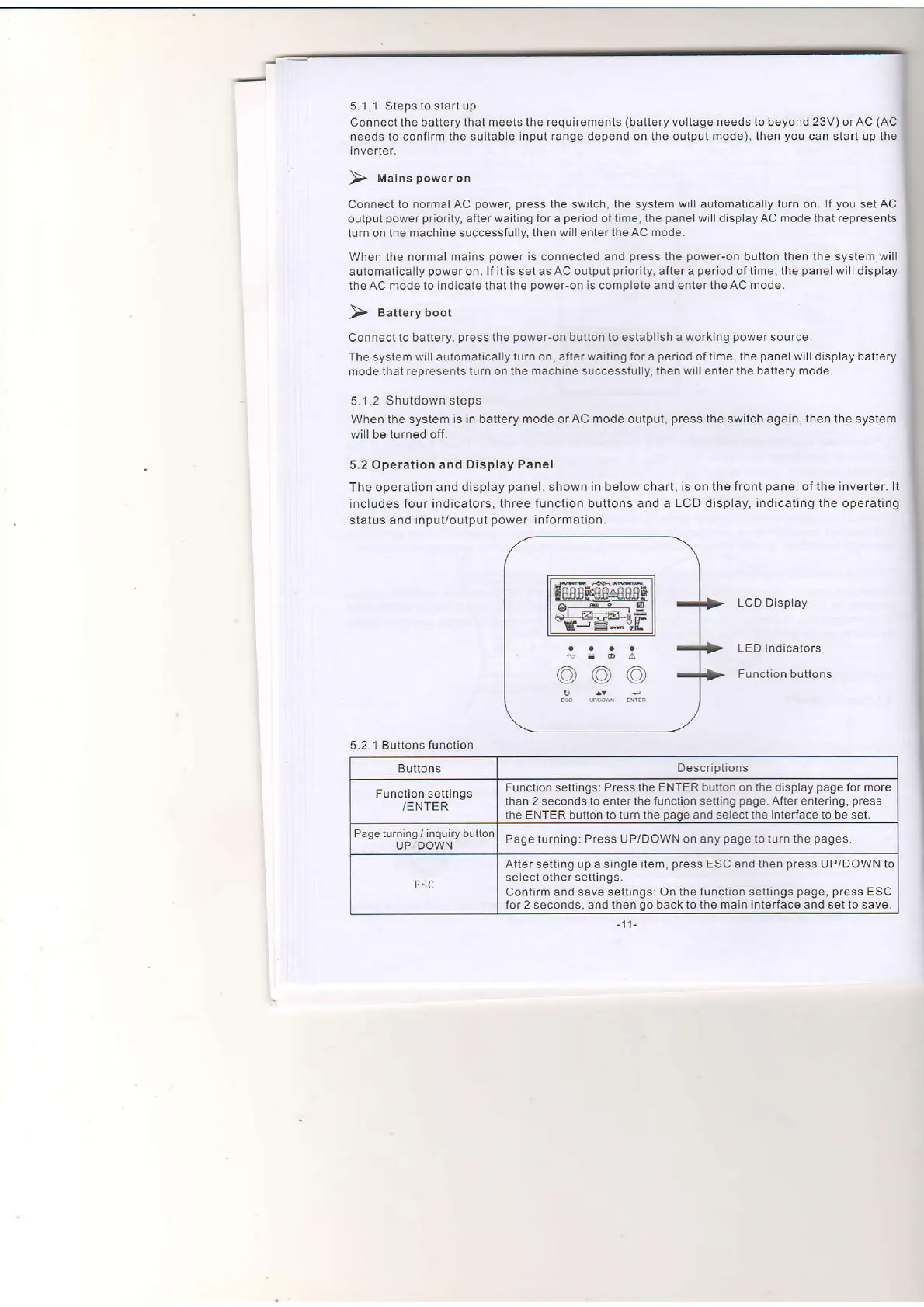
The operation and display
panel,
shown in below chart, is on the front
panel
of the inverter. lt
includes
four indicators, three tunction buttons and a
LCD
display,
indicating the
operating
status and input/output
power
information.
LCD Display
LED Indicators
Function buttons
5.2.1 Buttonsfunction
Buttons
Oescriptions
Function settings
/ENTER
Function settings: Press the ENTER
button on lhe disp,ay
page
for more
than 2
seconds
to
enter
the functign setting
page.
After entering,
press
the ENTER button to turn the
page
and select
the interface to be set.
Page
turning
/
inquiry button
UPlDOWN
Page lurning: Press UP/DOWN on any
page
to turn the
pages.
ESC
After setting up a single
item,
press
ESC and then
press
uP/DOWN to
select other settings.
Confirm
and save settings: On the function settings
page, press
ESC
for2 seconds, and then
go
backtothe main interface and setto save.


 To Next Page
 Loading...