WWW.TECHLY.COM
HDMI EXTENDER OVER
CAT.6/7 CABLE WITH EDID
EN - 5
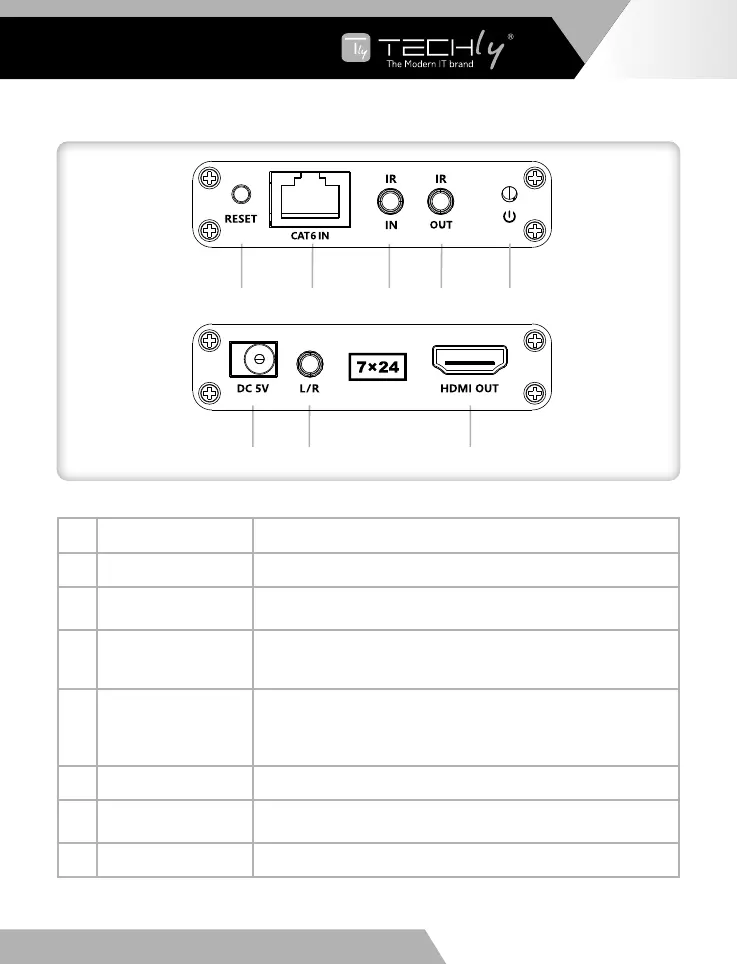
2. Receiver (RX)
➊
➏ ➐ ➑
➋ ➌ ➍ ➎
➊
Reset button Press to restart the device
➋
RJ45 signal input Input modulated HDMI signal
➌
IR in
Connect the IR receiver extension cable to ensure that the
remote control used is within the range of the IR receiving device
➍
IR out
Connect the IR blaster extension cable, please keep the infrared
transmitter as close as possible to the signal source device when
using
➎
Power/Signal
indicator
a. When power is on and no HDMI signal is transmitted,
the indicator ashes
b. When power is on and HDMI signal is transmitted,
the indicator is always on
➏
DC 5V input Connect to the 5V 500mA DC power adapter
➐
3.5mm L/R out
Connect the headphone or power ampliers to output stereo
audio
➑
HDMI output Connect to a HDMI display device













 To Next Page