WWW.TECHLY.COM
HDMI EXTENDER OVER
CAT.6/7 CABLE WITH EDID
EN - 6
INSTALLATION PROCEDURES
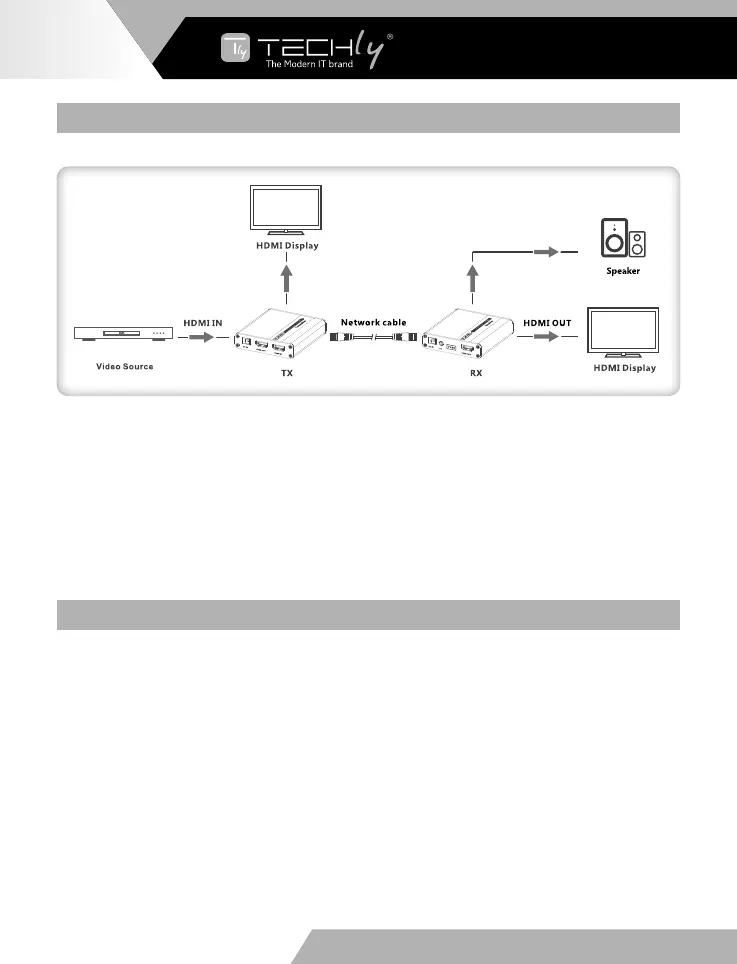
Connection
Note: when using the 3.5 mm stereo audio jack, please switch the audio output format of the signal
source to PCM format.
The network cable should follow the standard EIA-568B. It is recommended to select a network cable
with less loss and crosstalk.
1-Orange/white 2-Orange 3-Green/white
4-Blue 5-Blue/white 6-Green
7-Brown/white 8-Brown
CONNECTION INSTRUCTION
1) Connect the source device to HDMI in port of the transmitter with an HDMI cable and connect the
HDMI out port of the receiver to the display device with another HDMI cable
2) Connect the CAT out port of the transmitter and CAT IN port of the receiver via a network cable
(CAT6/CAT6A/CAT7)
3) If using HDMI loop out, connect the display device to the HDMI OUT port of the transmitter
4) Plug the power supply into the device to get started
Note: It is recommended to use a length range within 2~70m network cable. If the cable is too short,
there may be no display output because the signal is too strong. If the cable is too long, the output
may be with poor quality.













 To Next Page