HDMI 4K2K Audio Inserter
USER'S MANUAL
EN
www.techly.com
Dear customer
Thank you for purchasing this product. For optimum performance and safety,
please read these instructions carefully before connecting, operating or adjusting
thisproduct.Pleasekeepthismanualforfuturereference.
Our series of HDMI converters, switchers, extenders, matrixes and splitters are
designedtomakeyourA/Vdeviceusemoreconvenient,morecomfortable,more
productive and more cost-efficient.
IntroduCtIon
The HDMI 4K2K Audio Inserter lets you insert an external audio signal into your
HDMI or DVI (with DVI to HDMI adaptor) signal path. The unit allows you to insert
stereo or multi-channel surround sound signals to give users the capability to
select audio formats while extending your HDMI signal. Further, both input and
output HDMI support HD resolution up to 3D and 4K2K allowing a full enjoyment
over synchronize video and audio.
APPLICAtIonS
• EmbedsexternalaudiointoHDMIsignal
• Integrates audio and DVI (with DVI to HDMI adaptor) video to HDMI signal
output
• ReplacesaudiointheoriginalHDMIsignalbyotheraudioinputsources
PACKAge ContentS
• HDMI4K2KAudioInserter
• 5VPowerAdaptor
• UserManual
SYSteM reQuIreMentS
Input source equipment such as PC/Laptop or Blu-ray/DVD player and output
display TV/monitor or amplifier with connection cables.
FeAtureS
• CompliantwithHDMI,HDCP1.2andDVI1.0
• SupportsHDMIaudiosamplingrateupto192kHz
• SupportsOpticalS/PDIFaudiosamplingrateupto192kHz
• SupportsexternalHDMI,DigitalorAnalogaudiosignalembedsintoHDMI
• HDMIsupportshigh-bit-rate(HBR)audio
• SupportsDVIconversionwithDVItoHDMIadaptor
• SupportsCECbypass
• Supports4K2Kresolutionand3Dsignal
Note: When displaying HDMI 4K2K signal, equivalent source signal, output display
and HDMI cables are required in order to secure the best image display.
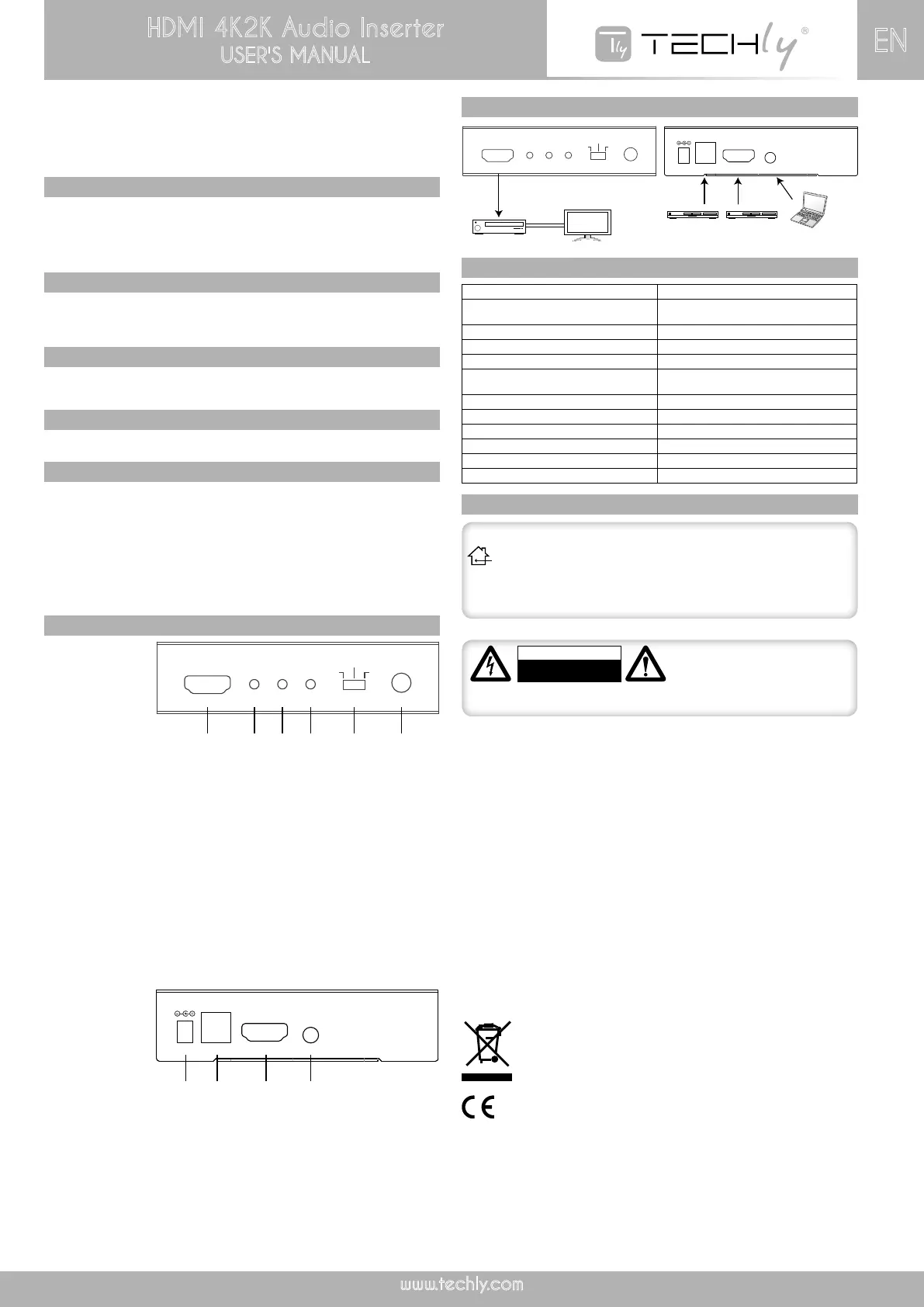
oPerAtIon ControLS And FunCtIonS
Front Panel:
1. HDMI OUT:
Connect to the display (TV/monitor) with an HDMI cable for video and audio signal
output.For4K2Kor3Dimagedisplay,anequivalentstandarddisplayisrequired.
2. Bypass:
ThisLEDwillilluminatewhentheinputaudioisswitchtoHDMI.
3. Link:
ThisLEDwillilluminatewheninputsourceisconnectedwithHDMIsignal,
4. Power:
ThisLEDwillilluminatewhentheunitisconnectedwithpowersupplyandswitched
ON.
5. HDMl/Optical/L/R:
Audio in selection allows users to select among 3 of different audio input options.
SwitchamongtheoriginalHDMIaudio,Digitalaudio(Optical)andAnalogstereo
(L/R).
6. Power:
Press this button to switch on the device or to set it into standby mode.
Back Panel:
1. DC 5V:
Plugwith5VDCpoweradaptorfromtheACwalloutletforpowersupply.
2. Optical In:
Connect from audio source equipment such as AV receiver or DVD player with
optical signal output.
3. HDMI In:
ThisslotistoconnectwithsourceequipmentsuchasBlu-ray/PS3playerorPC/
laptop with HDMI signal sending.
4. L/R In:
Connect from audio source equipment such as PC/Laptop or DVD/Blu-ray player
withL/Raudiosignaloutput.
HDMI Out
Bypass Link Power
Power
Optical
L/R
HDMI
5V/DC
Optical HDMI In L/R
HDMI Out
Bypass Link Power
Power
Optical
L/R
HDMI
5V/DC
Optical HDMI In L/R
DVD Player Blu-ray Player PC/Laptop
HDTV or Monitor
AV Receiver
1 2 3 4
5 6
HDMI Out
Bypass Link Power
Power
Optical
L/R
HDMI
5V/DC
Optical HDMI In L/R
HDMI Out
Bypass Link Power
Power
Optical
L/R
HDMI
5V/DC
Optical HDMI In L/R
DVD Player Blu-ray Player PC/Laptop
HDTV or Monitor
AV Receiver
1 2 3 4
1 2 3 4
HDMI Out
Bypass Link Power
Power
Optical
L/R
HDMI
5V/DC
Optical HDMI In L/R
HDMI Out
Bypass Link Power
Power
Optical
L/R
HDMI
5V/DC
Optical HDMI In L/R
DVD Player Blu-ray Player PC/Laptop
HDTV or Monitor
AV Receiver
HDMI Out
Bypass Link Power
Power
Optical
L/R
HDMI
5V/DC
Optical HDMI In L/R
HDMI Out
Bypass Link Power
Power
Optical
L/R
HDMI
5V/DC
Optical HDMI In L/R
DVD Player Blu-ray Player PC/Laptop
HDTV or Monitor
AV Receiver
1 2 3 4
1 2 3 4
5 6
Video Bandwidth 300Mbps/10.2Gbps
Input Ports
1xHDMI,1xOptical(DigitalAudio),
1X3.5mmPhoneJack(L/R)
OutputPort 1xHDMI
HDMIAudioSamplingRate Upto192kHz
OpticalS/PDIFAudioSamplingRate Upto192kHz
HDMIAudioFormat
LPCM2/5.1/7.1CH,DTS2-5.1CH
TrueHD,andDTS-HDMasterAudio
OpticalAudioFormal LPCM2CH,andDTS2~5.1CH
L/RAudioFormat AnalogStereo2CH
Power supply 5V/DC
Dimensions (mm) 95*83*24mm
OperatingTemperature 0°C~40°C/32°F~104°F
StorageTemperature -20°C~60°C/-4°F~140°F
ConneCtIon dIAgrAM
SPeCIFICAtIonS
IMPortAnt SAFetY InForMAtIon
INTENDED USE
We do not permit using the device in other ways like described in this
user’smanual.Usetheproductonlyindryinteriorrooms.Notattendingto
these regulations and safety instruction might cause fatal accidents,
injuries, and damages to persons and property. The manufacturer/supplier
assumes no liability for damages caused by failure to comply with the
intended use.
Toreduceriskofelectricshock,this
product should ONLY be opened
by an authorized technician when
service is required. Disconnect the
product from mains and other equipment if a problem should occur. Do not
expose the product to water or moisture.
CAUTION
RISK OF ELECTRIC SHOCK
DO NOT OPEN
• Yourproductisnotatoyandisnotmeantforchildren,becauseitcontainssmall
parts which can be swallowed and can injure when used inappropriately!
• Pleaseinstallthesystemanddevicesattachedtoitinawaythatpersonscannot
be injured, or objects not be damaged for example by dropping or stumbling.
• Pleaseremovethepackingmaterials,becausechildrenmaycutthemselveson
themwhileplaying.Furthermore,thereisariskofswallowingandinhalationof
incidentals and insulating material.
• Avoidplaceswithhightemperatures,orhumidity,orplaceswhichmightcome
into contact with water. Do not install the product close to openings of air
conditioners,oratplaceswithanexcessiveamountofdustorsmoke.
• Donotinstalltheproductatplacessubjecttovibration,oroscillation
• Do not modify and alter the product and any accessories! Do not use any
damaged parts.
• Keepenoughspacearoundalldevicesforagoodventilationandfreemotion
andtoavoiddamages.ABLE
• Donotunplugthedevicewhenitisinusing,keepdistancefromflammableand
explosive devices.
• Powersupply:DC5V,usageonlythesuppliedpowerunit,donotusethepower
supply if it is damaged.
Maintenance:
Clean only with a dry cloth. Do not use cleaning solvents or abrasives.
Warranty:
No guarantee or liability can be accepted for any changes and modifications of the
product or damage caused due to incorrect use of this product.
IncompliancewithEUDirective WEEEthisproductis marked with this
symbol. It means that used electrical and electronic products should not
be mixed with general household waste. There is a separate collections
systemfortheseproductsincompliancewithWEEEdirective,otherwise
contaminative and hazardous substances can pollute the environment.
WiththeCEsign,Techly
®
ensures that the product is conformed to the basic
Europeanstandardsanddirectives


 To Previous Page
 Loading...