10
EN VGA UTP EXTENDER 1X8 SPLITTER WITH AUDIO
Additional receiver sold separately (IDATA EX-DL45):
VGA UTP Extender
with Audio
Power UTP Input DC/5V
GAIN PEAK
Receiver
VGA OutputAudio Out
5.0 CONNECTION AND OPERATION
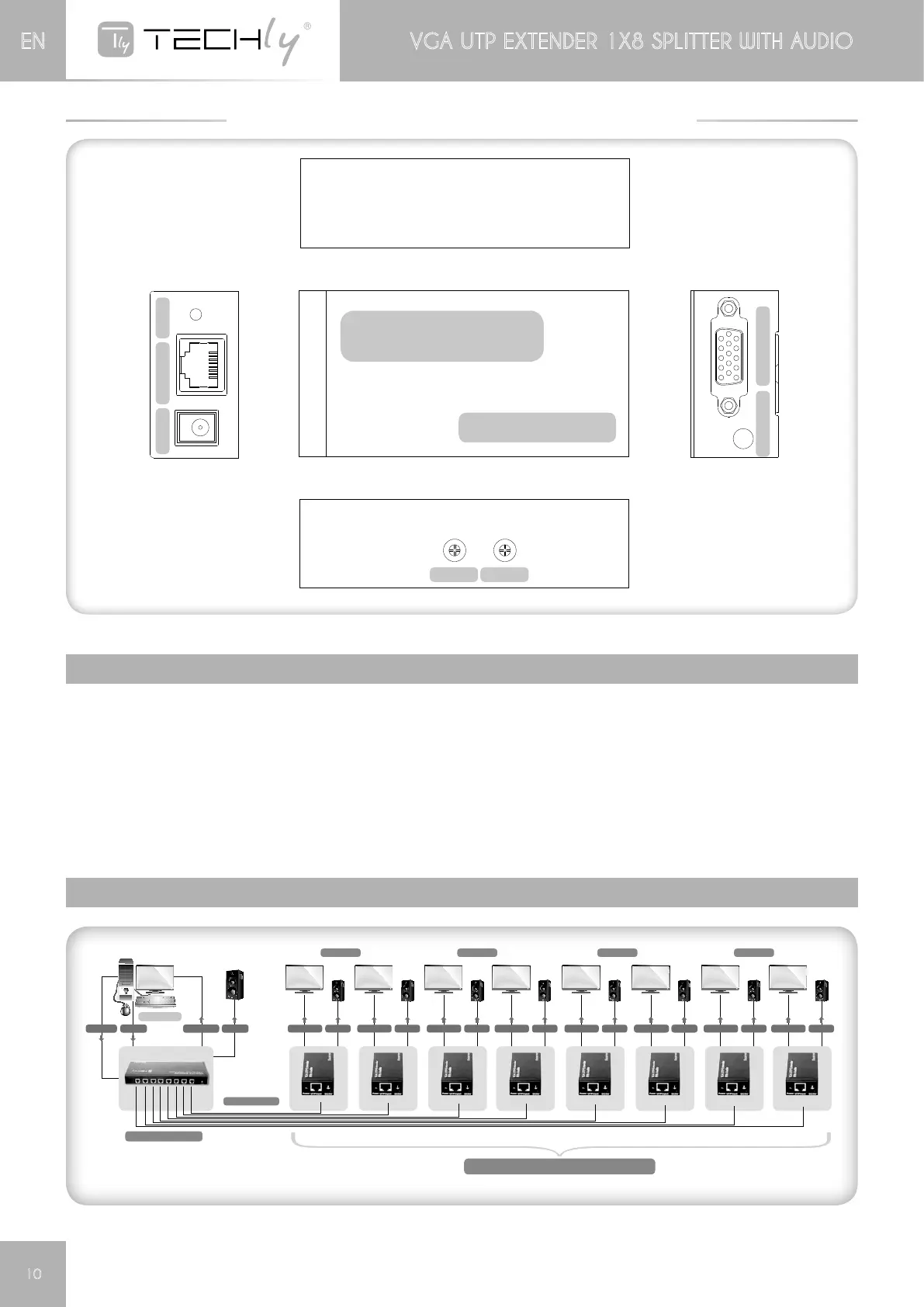
1) ConnectthesingleVGAsourcetothemainVGAinputusingapieceofVGAcable.
2) ConnectVGAoutputoftheSendertoalocaldisplayandAudiooutputoftheSendertoalocalSounder
3) ConnectSenderandeachReceiverusingapieceofeachpiecesofCAT-5e/6
4) ConnectVGAoutputsofReceiverstoremotedisplaysandAudiooutputofReceiverstoremotesounders.
5) Plugthe5V@4ApowersupplyintotheVGAUTP1X8Splitterand5V@2ApowersupplierstoeachReceiver
individually.
Attention: Insert / Extract cable gently.
5.1 CONNECTION DIAGRAM
Computer
Cat 5E/6 Cable
VGA IN
VGA OUT VGA OUT VGA OUT VGA OUT VGA OUT VGA OUTVGA OUT VGA OUT VGA OUT
AUDIO
AUDIO AUDIO AUDIO AUDIO AUDIO AUDIOAUDIO AUDIO AUDIO
VGA OUT AUDIO
Display DisplayDisplay Display
Optional Additional Receiver IDATA EX-DL45
IDATA MSV-AU8B
SOLD SEPARATELY









 To Next Page