EN - 6
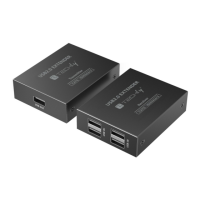
150 M 4-PORTS HIGH-SPEED
USB 2.0 EXTENDER OVER CAT6
WWW.TECHLY.COM
CONNECTION INSTRUCTIONS
1. Connect the transmitter to the signal device via USB cable and then
connect the USB device to the receiver.
2. Connect the transmitter and receiver with Cat5e/6/7 network cables.
If the transmission distance needs to be further extended, connect
the switch between the transmitter and receiver.
3. Plug the power supply into the receiver to get started.
Q&A
Q: There is no response after USB device is connected
A: 1) Please check whether the driver is installed properly.
2) Please check whether the network cable conforms to IEEE-568B
standard and whether the cables are rmly connected.
3) Reset the receiver by pressing the reset button or repower it.
Q: The receiver is instable when connected to an external web
camera
A: When connecting high-power USB device, it is necessary to supply
additional power to external devices.
MAINTENANCE
Clean only with a dry cloth. Do not use cleaning solvents or abrasives.
WARRANTY
No guarantee or liability can be accepted for any changes and
modications of the product or damage caused due to incorrect use of
this product.










 To Next Page