EasyManua.ls Logo

Technaxx TX-272 - User Manual

Technaxx TX-272
4 pages
Print Icon
To Next Page IconTo Next Page
Loading...
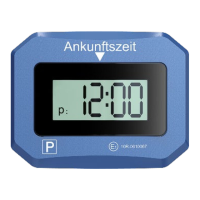
Electronic parking disc TX-272 - EN Item no.: 5119 Prod. ID.: 11/23
Technaxx® user manual
Electronic parking disc TX-272
Before using the device for the first time, please read the instructions for use and the
safety instructions carefully.
Please keep this user manual carefully for future reference or sharing of products. Do
the same with the original accessories for this product. In the event of a warranty claim,
please contact the dealer or store where you purchased this product.
* Share your experiences and opinions on one of the well-known internet portals.
Features
Motion detector
Sets the parking time automatically
2 displays
Backlit display
SOS light function
ECE licensed
Technical specification
ECE license no.
E1 10R-0610067
Parking detection response
time
Approx. 60 seconds
Time accuracy
±2min. / year
Parking time interval
15 minutes & 30 minutes (adjustable)
Battery
3V button cell CR2450
(included)
Battery life
Approx. 1 year
material
ABS+PC
Operating temperature
-20°C 75°C
Weight of the device
84g
Dimensions of the device
(L) 10.2 x (W) 7.9 x (H) 2.5 cm
Packaging contents
Electronic parking disc TX-272,
CR2450 battery, user manual
IMPORTANT
The TX-272 electronic parking disc should not be left loose in the vehicle. To be legally
recognized, it must be attached to the windshield.
Note: The parking disc does not automatically switch between winter and summer time.
Question and Answer IconNeed help?

Do you have a question about the Technaxx TX-272 and is the answer not in the manual?

Overview

The Technaxx® TX-272 is an electronic parking disc designed to automatically set the parking time for vehicles. It features a motion detector that enables it to automatically set the parking time, eliminating the need for manual adjustment. The device is equipped with two displays, one of which is backlit, enhancing visibility. Additionally, it includes an SOS light function for emergency situations and is ECE licensed (E1 10R-0610067), ensuring compliance with European regulations.

Function Description:

The primary function of the TX-272 is to simplify parking by automatically setting the arrival time. When the vehicle comes to a stop, the motion detector triggers the device to display the current parking time, rounded up to the next 15 or 30-minute interval (adjustable). This feature helps drivers comply with parking regulations that require the display of an arrival time. The device also includes a delayed parking function, allowing for a brief grace period before the parking time is set. The SOS light function provides an additional safety feature, which can be activated in emergencies.

Important Technical Specifications:

  • ECE License No.: E1 10R-0610067
  • Parking Detection Response Time: Approximately 60 seconds
  • Time Accuracy: ±2 minutes per year
  • Parking Time Interval: Adjustable between 15 minutes and 30 minutes
  • Battery: 3V button cell CR2450 (included)
  • Battery Life: Approximately 1 year
  • Material: ABS+PC
  • Operating Temperature: -20°C to 75°C
  • Weight: 84g
  • Dimensions: (L) 10.2 x (W) 7.9 x (H) 2.5 cm
  • Packaging Contents: Electronic parking disc TX-272, CR2450 battery, user manual

Usage Features:

The TX-272 is designed for ease of use and must be securely attached to the windshield to be legally recognized.

  • Assembly: Ensure the mounting area on the windshield is clean, dry, and at least +15°C for proper adhesion. Peel off the protective film from the pads and press firmly for at least 20 seconds. Avoid using alcohol-based cleaning products on the mounting surface.
  • Time and Date Setting: To set the time, press and hold button 4 with a pointed object to enter setting mode. The "Hour" digits will flash. Use button 3 repeatedly to adjust the hours. Press button 4 again to switch to minutes, and use button 3 to set them. The same procedure applies to setting the current date.
  • Changing Time Interval: The parking time interval can be set to either 15 or 30 minutes. Press button 2 and button 3 simultaneously for 3 seconds to switch between intervals. The default setting is 30 minutes.
  • Battery Replacement: To replace the battery, press the battery compartment open button (6) to eject the battery compartment (7). Replace the CR2450 battery with a new, unused battery, ensuring the positive pole faces up in the compartment. Turn the tray upside down and carefully slide it back in. Remember to reset the time and date after battery replacement.
  • Automatic Time Setting: The device automatically sets the parking time, rounded up to the next 15 or 30-minute increment, once the vehicle has been stationary for approximately 60 seconds. The desired time is displayed on the small display (1). The "P" symbol in display 1 indicates that the parking disc is in parking mode.
  • Winter/Summer Time: The parking disc does not automatically switch between winter and summer time, requiring manual adjustment if necessary.

Maintenance Features:

  • Cleaning: Regularly clean the device with a damp cloth. Do not use cleaning agents or solvents that could damage the device.
  • Environmental Protection: Protect the device from shock, dust, moisture, or extreme temperatures to ensure its longevity.
  • Battery Safety: The device contains a battery. Keep it out of reach of children. Observe safety instructions during use. Never attempt to open the device as this will void any guarantee or warranty. Do not use if the battery compartment does not close securely.
  • Disposal: Packaging materials should be sorted for recycling. Old devices must not be disposed of with household waste; they should be taken to a collection point in the municipality or district for proper recycling. Batteries and accumulators must also be disposed of at designated collection points, not with household waste, especially if they contain harmful substances like cadmium (Cd), mercury (Hg), or lead (Pb). Return the product with the completely discharged battery to a collection point.

Technaxx TX-272 Specifications

General IconGeneral
BrandTechnaxx
ModelTX-272
CategoryAutomobile Accessories
LanguageEnglish

Related product manuals