3
TX-311 5228 / 0924
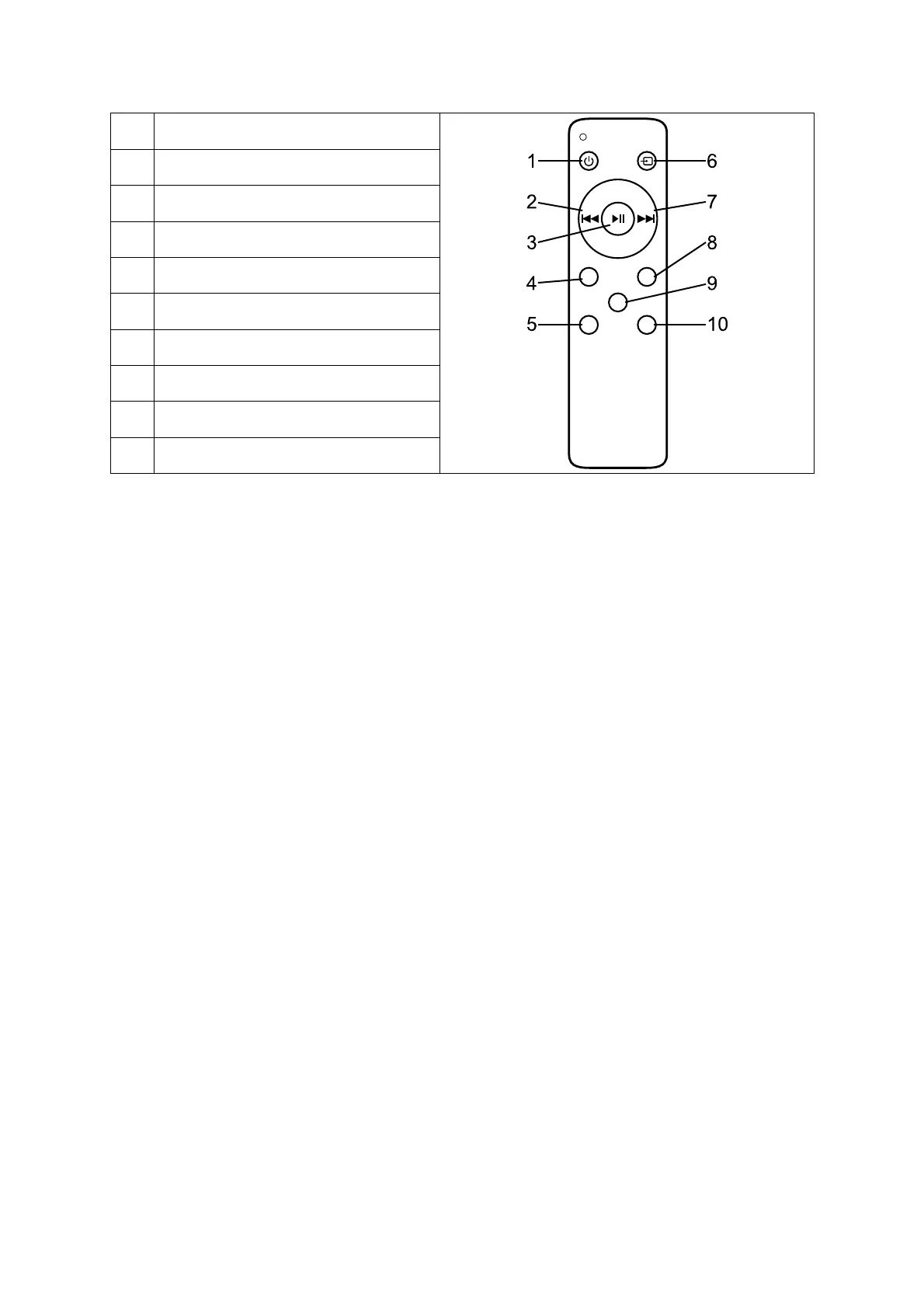
Remote control
1 Power
2 Previous song
3 Play / pause
4 Unpair
5 Volume -
6 Mode
7 Next song
8 Equalizer
9 Mute
10 Volume +
Button settings
• Power on/off button: Press to power on / power off the device.
• Mode button: Press to change the modes: Bluetooth / HDMI-ARC /
OPTICAL / AUX1 / AUX2.
• Mute: The sound will be muted. Press again to reactivate the sound.
• Unpair button: Press to unpair current Bluetooth device. Press again to
reconnect last device (If reachable). Note: You have to be in BT-Mode.
• Equalizer: Change the sound settings by press this button, according:
Normal, Pop, Rock, Jazz, Classic, Country, Bass.
Power on/off
Connect the DC output of the AC adapter to the DC input port of the
soundbar (8) and plug the AC power outlet into the power socket.
Long press the power button (4 at device or 1 at remote) to power on the
device, the default will automatically enter the BT mode. Blue light flashes.
Long press the power button (4 at device or 1 at remote) again to shut
down.
Modes
Bluetooth
After power on or change the mode of the speaker to Bluetooth mode, it is
automatically in the paring state. The blue light flashes quickly. To pair the
soundbar with your smartphone, tablet or PC, start the Bluetooth search
function on your device and connect it with “Technaxx TX-311”.
The speaker will automatically reconnect the last paired device if it is
reachable. To unpair press the “UNPAIR” button (4) at the remote control.
To force the device into the pairing mode to add a new device, press and



 To Next Page