142
6.2.5 PARAMETERS
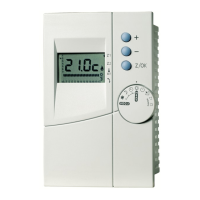
1-Press and hold buttons , and
simultaneously for 4 seconds or longer.
2-
, “unit N° 1-1”, set data (parameter value)
and item code are displayed blinking.
3-Check that unit N° is 1.
4-Use temperature setting buttons and to select
the item code of the chosen parameter.
5-Use timer time buttons to select value
for parameter.
Refer to the following table for parameters values.
6-Press button value validation; display stops blinking and remains lit.
Setting is completed.
7-To return to normal display, press button .
Item code Parameter Remark Setting
10
Type of unit 30 = Air to Water unit
11
Capacity of unit 9 = 095 (2HP)
12 = 125 (3HP)
15 = 155 or 157 (4HP)
17 = 175 or 177 (5HP)
18 = 195 or 167 (6HP)
21 = 257 (8HP)
23 = 307 (10HP)
12
System adress Not used
0001
13
Board address
0001
14
Group address 0000 = individual
Others
Others Not to be changed !
1F
Remote ctrl temperature set range
Upper limit in cooling
0018 = 18°C
20
Remote ctrl temperature set range
Lower limit in cooling
0010 = 10°C
21
Remote ctrl temperature set range
Upper limit in heating
0055 = 55°C
22
Remote ctrl temperature set range
Lower limit in heating
0016 = 16°C
Others
Others Not to be changed !
28
Automatic restart 01 = YES
Others
Others Not to be changed !
2C
Additional expansion valve 02 = NO
2D
Modes selection on remote ctrl 10 = Heating + Cooling
Others
Others Not to be changed !
Note: These parameters have to be checked in case of board or EEPROM replacement.
These following parameters can also be checked in case of problem:
15
Type of unit control 0022 = “PAC-i” type
19
0000


 To Next Page
 Loading...