Pair in g
1 5
2
3
4
6 7
8
9
10
BLUEDECK2
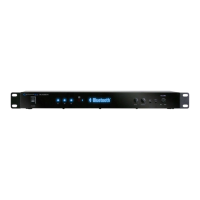
BLUEDECK2 Front Panel
1.Power: Press this button to power the unit on and off.
2.
Play / Pause & Pairing
: Press this button to pause the signal from the bluetooth. Press this button
again to play.
Unpairing: Press this button and hold for several seconds to make the unit disconnect from the
current bluetooth connection and go back into standby status. The Bluedeck2 will then be able to
connect to another Bluetooth compatible device.
3.Previous Button: Press this button to go back to the beginning of the current track or to the previous track
on the bluetooth device
.
4.Next Button: Press this button to go to the beginning of the next track on
the bluetooth device
.
5.Bluetooth Indicator:
This indicator will light up if a bluetooth device is successfully paired and
connected to the BLUEDECK2.
6.Bass Control:Use this knob to adjust the bass on the main output.
7.Treble Control: Use this knob to adjust the treble on the main output.
8.Headphone Output:
Connect your headphones here. Make sure the volume level of the unit is turned
down before making the connection.
9.MP3 Input: Connect your MP3 player here. The unit will play MP3 signal firstly if both MP3 and bluetooth
device are connected to the unit. Remove the MP3 to play bluetooth audio signal.
10.Volume: Use this knob to adjust the master volume output.


 To Next Page