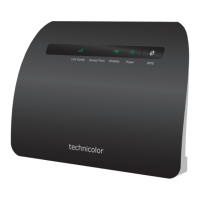
This manual describes the Technicolor TG588 Router, a device designed to provide internet connectivity for homes and businesses. It details the setup process, connection options, and support resources offered by Home Telecom.
Function Description:
The Technicolor TG588 Router serves as the central hub for internet connectivity within a home or office environment. It allows users to connect to the internet via a Digital Subscriber Line (DSL) connection and then distribute that connection to multiple devices both wirelessly and via Ethernet cables. The router is designed to be user-friendly, with clear instructions for installation and a range of support options to assist users with setup and troubleshooting. It facilitates both wired and wireless network connections, enabling devices like computers, smartphones, tablets, and smart home devices to access the internet. The router also supports voice services when connected to a house phone through a microfilter, integrating communication capabilities with internet access.
Important Technical Specifications:
While specific detailed technical specifications like processor speed, RAM, or Wi-Fi standards (e.g., 802.11ac/n) are not explicitly listed in the provided pages, the manual highlights several key aspects:
- Model: Technicolor TG588 Router.
- Connectivity Type: DSL (Digital Subscriber Line) for internet access.
- Ports:
- DSL port (grey) for connecting to the Master Socket.
- Ethernet ports (yellow) for wired connections to devices.
- Power socket for electricity supply.
- Wireless Connectivity: Supports Wi-Fi, with a Network Name (SSID) and Wireless Key for secure access. These credentials are found on a sticker on the base of the router.
- Power: Requires connection to an electricity supply.
- Indicators: Features a power light that turns orange initially and then solid green (or flashing green) when fully powered up and connected.
- Included Accessories:
- Technicolor TG588 router (A)
- Microfilter (B)
- DSL cable (grey) (C)
- Ethernet cable (yellow) (D)
- Power cable (E)
- Openreach Master Socket (F) (Note: This is a component of the telecommunications infrastructure, not an accessory provided with the router, but essential for connection).
Usage Features:
The Technicolor TG588 Router offers straightforward usage features, primarily focused on ease of installation and connectivity:
- Simple Setup: The manual provides step-by-step guides for connecting the router, catering to both "Dual Socket" and "Single Socket" setups, as well as "Option 1" and "Option 2" configurations.
- Wired Connection: Users can connect devices like desktop PCs directly to the router using the provided yellow Ethernet cable, plugging one end into a yellow port on the router and the other into the device's Ethernet port.
- Wireless Connection:
- Users can find the router's Network Name (SSID) and Wireless Key on a sticker on the base of the router.
- Devices can then search for available wireless networks, select the matching SSID, and input the Wireless Key to connect.
- Power Management: The router has a black on/off button on the back for easy power control. It requires approximately 10 minutes to fully power up and establish a stable connection, indicated by the power light turning solid green.
- Microfilter Integration: For users with a house phone, the microfilter ensures that both the phone and the router can operate without interference on the same line. The phone connects to the microfilter, which then connects to the Master Socket.
- Online Account Management: Users can manage their Home Telecom account, check bills, and access older statements by visiting the Hometelecom.co.uk website and navigating to the "Help & Support" section.
- Bundles & Deals: Home Telecom offers additional services such as TV Deals (in partnership with Sky and NOW TV), Fibre Broadband (with average speeds of 67Mbps and unlimited usage), and a "Recommend a Friend" program that offers a month of free broadband.
Maintenance Features:
While the manual does not detail specific hardware maintenance, it emphasizes support and troubleshooting resources:
- Self-Help Video Guides: A QR code is provided to redirect users to a video set-up guide for visual assistance with installation.
- Specialist Video Support: For more complex issues, Home Telecom offers a unique "Specialist Video Support" service. This allows a support agent to access the rear camera of the user's mobile phone (securely and without accessing other phone data) to visually guide them through the router installation process.
- To access this, users visit Hometelecom.co.uk, use the webchat service ("Talk to us Online" button), select "Router Set-up Support," and an agent will send an SMS link to initiate the video call.
- A strong 4G/5G connection is recommended for this service.
- Online Support: Users can reach Home Telecom via their website (Hometelecom.co.uk) for general inquiries and support.
- Social Media Support: Home Telecom provides support through Twitter (@hometelecomcare) and Facebook (@hometelecomuk).
- Webchat Support: A webchat option is available online for immediate assistance.
- Automated Billing: Payments are handled automatically via direct debit, simplifying account maintenance for users.
The Technicolor TG588 Router, as presented in this manual, is designed for straightforward installation and reliable internet service, backed by comprehensive customer support options.

 Need help?
 General

 To Next Page