EasyManua.ls Logo

Technics QUARTZ SP-15 - Page 3

Technics QUARTZ SP-15
25 pages
Print Icon
To Next Page IconTo Next Page
To Previous Page IconTo Previous Page
Loading...
m@
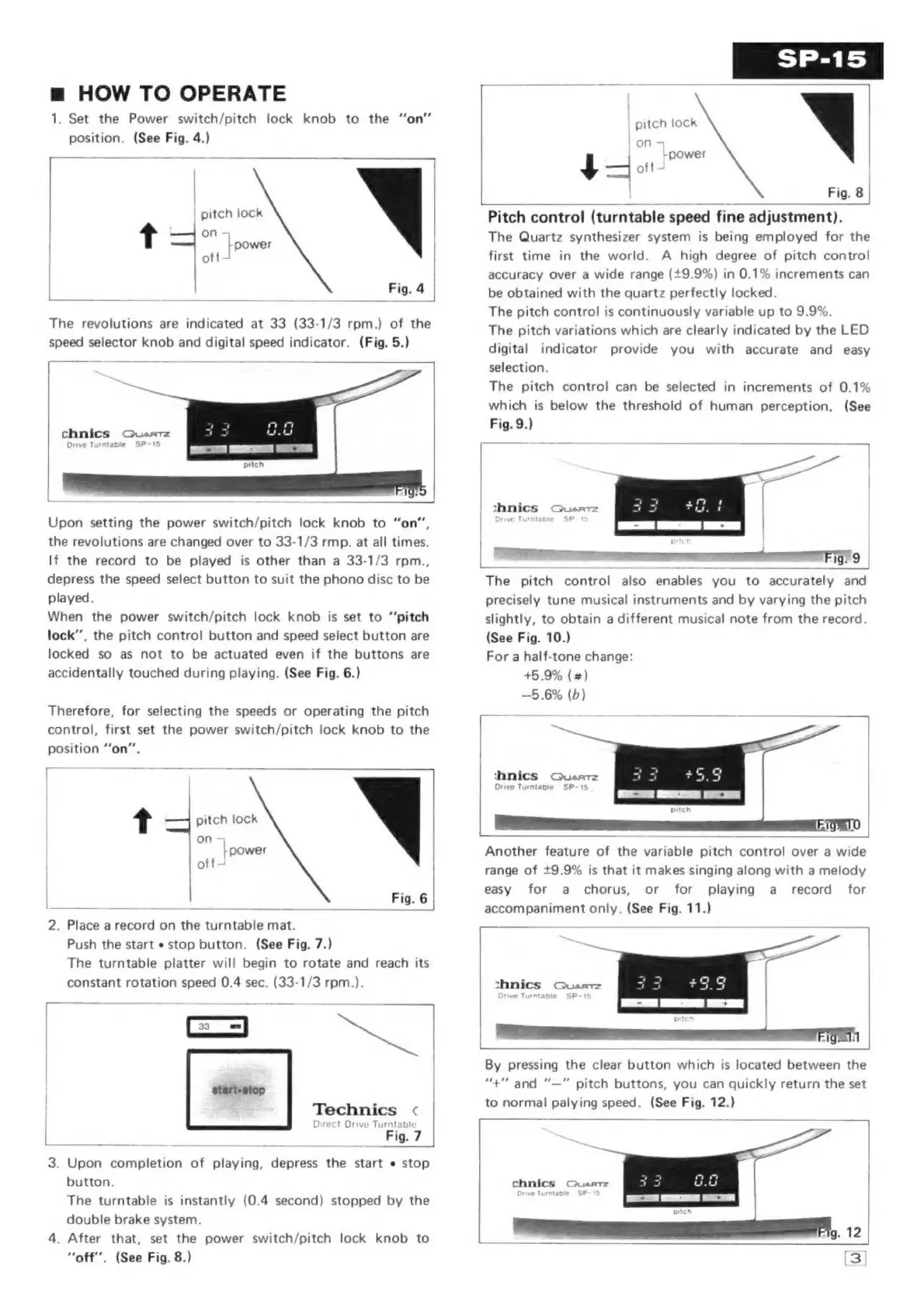
HOW
TO
OPERATE
1.
Set
the
Power
switch/pitch
lock
knob
to
the
“on”
position.
(See
Fig.
4.)
[
_
pitch
lock
t
on
-
power
off
J
Fig.
4
|
The
revolutions
are
indicated
at
33
(33-1/3
rpm.)
of
the
speed
selector
knob
and
digital
speed
indicator.
(Fig.
5.)
chnics
Quartz
Drive
Turntable
SP-15
Upon
setting
the
power
switch/pitch
lock
knob
to
“on”,
the
revolutions
are
changed
over
to
33-1/3
rmp.
at
all
times.
If
the
record
to
be
played
is
other
than
a
33-1/3
rpm.,
depress
the
speed
select
button
to
suit
the
phono
disc
to
be
played.
When
the
power
switch/pitch
lock
knob
is
set
to
“pitch
lock”,
the
pitch
control
button
and
speed
select
button
are
locked
so
as
not
to
be
actuated
even
if
the
buttons
are
accidentally
touched
during
playing.
(See
Fig.
6.)
Therefore,
for
selecting
the
speeds
or
operating
the
pitch
control,
first
set
the
power
switch/pitch
lock
knob
to
the
position
“on”.
r
t
pitch
lock
on
L
power
off
Fig.
6
2.
Place
a
record
on
the
turntable
mat.
Push
the
start
«
stop
button.
(See
Fig.
7.)
The
turntable
platter
will
begin
to
rotate
and
reach
its
constant
rotation
speed
0.4
sec.
(33-1/3
rpm.).
_
a
-
=
on
i
|
start+stop
Technics
<
Direct
Drive
Turntable
ee
oe
Fig.
7
3.
Upon
completion
of
playing,
depress
the
start
«
stop
button.
The
turntable
is
instantly
(0.4
second)
stopped
by
the
double
brake
system.
4.
After
that,
set
the
power
switch/pitch
lock
knob
to
“off”.
(See
Fig.
8.)
pitch
lock
Fig.
8
|
Pitch
control
(turntable
speed
fine
adjustment).
The
Quartz
synthesizer
system
is
being
employed
for
the
first
time
in
the
world.
A
high
degree
of
pitch
control
accuracy
over
a
wide
range
(+9.9%)
in
0.1%
increments
can
be
obtained
with
the
quartz
perfectly
locked.
The
pitch
control
is
continuously
variable
up
to
9.9%.
The
pitch
variations
which
are
clearly
indicated
by
the
LED
digital
indicator
provide
you
with
accurate
and
easy
selection.
The
pitch
control
can
be
selected
in
increments
of
0.1%
which
is
below
the
threshold
of
human
perception.
(See
Fig.
9.)
thnics
Quartz
ve
T
bie
P-1
ig.
9
The
pitch
control
also
enables
you
to
accurately
and
precisely
tune
musical
instruments
and
by
varying
the
pitch
slightly,
to
obtain
a
different
musical
note
from
the
record.
(See
Fig.
10.)
For
a
half-tone
change:
+5
9%
(
#)
—5.6%
(b)
tanics
Quartz
Orive
Turntabie
SP-
Another
feature
of
the
variable
pitch
control
over
a
wide
range
of
+9.9%
is
that
it
makes
singing
along
with
a
melody
easy
for
a
chorus,
or
for
playing
a_
record
for
accompaniment
only.
(See
Fig.
11.)
shnics
Quart
rive
Turntable
SP-15
}
By
pressing
the
clear
button
which
is
located
between
the
“+""
and
“—"
pitch
buttons,
you
can
quickly
return
the
set
to
normal
palying
speed.
(See
Fig.
12.)
chnics
Queatz
Drwe
Turntable
SP-
15
ap

Related product manuals