EasyManua.ls Logo

Technics QUARTZ SP-15 - Page 7

Technics QUARTZ SP-15
25 pages
Print Icon
To Next Page IconTo Next Page
To Previous Page IconTo Previous Page
Loading...
m=
DISASSEMBLY
PROCEDURE
How
to
remove
bottom
cover
and
shielding
plate.
1.
Remove
the
turntable
rubber
and
turntable,
and
then
turn
the
main
body
upside
down.
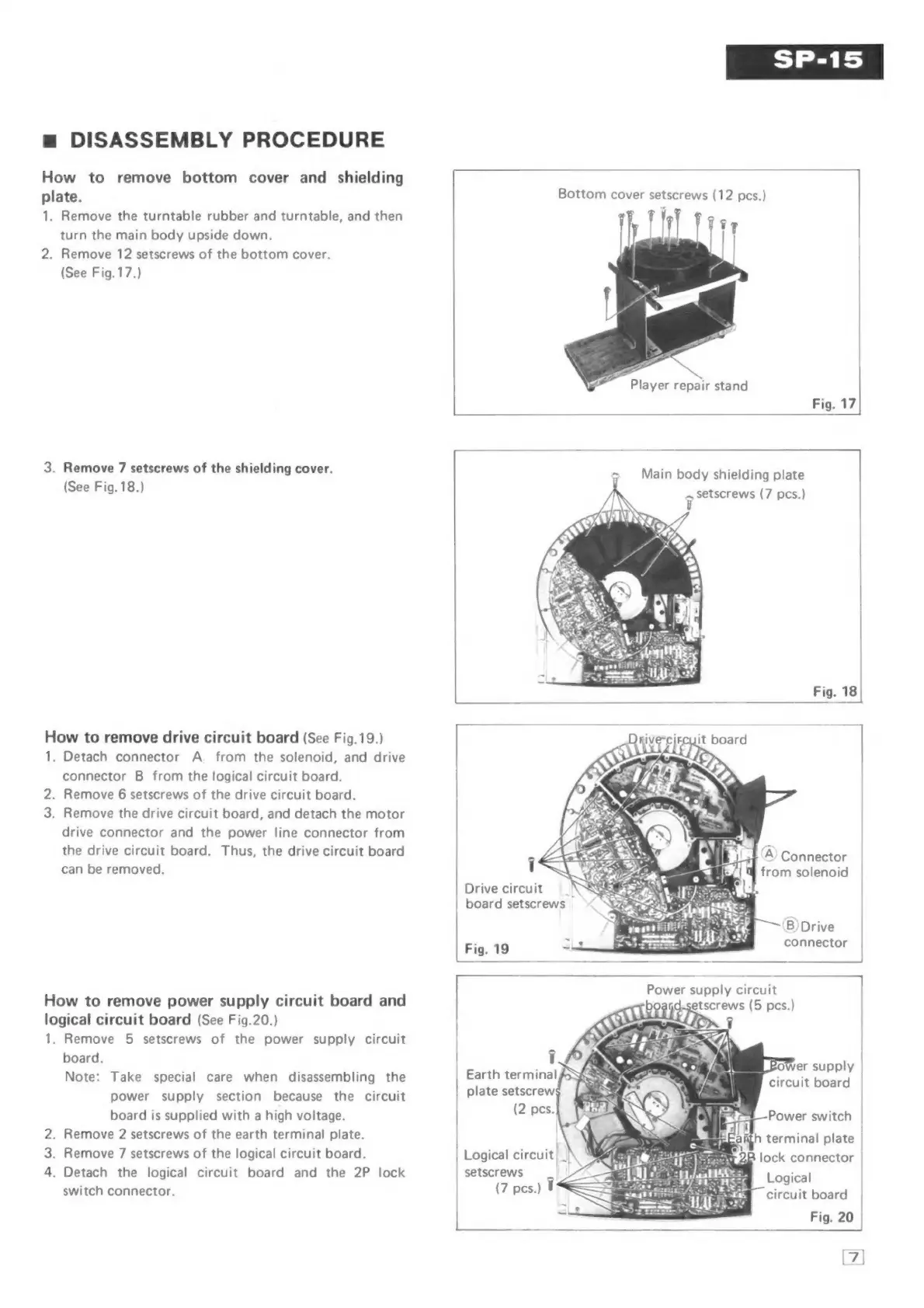
2.
Remove
12
setscrews
of
the
bottom
cover.
(See
Fig.17.)
3.
Remove
7
setscrews
of
the
shielding
cover.
(See
Fig.
18.)
How
to
remove
drive
circuit
board
(See
Fig.
19.)
1.
Detach
connector
A
_
from
the
solenoid,
and
drive
connector
B
from
the
logical
circuit
board.
.
Remove
6
setscrews
of
the
drive
circuit
board.
3.
Remove
the
drive
circuit
board,
and
detach
the
motor
drive
connector
and
the
power
line
connector
from
the
drive
circuit
board.
Thus,
the
drive
circuit
board
can
be
removed.
NO
How
to
remove
power
supply
circuit
board
and
logical
circuit
board
(See
Fig.20.)
1.
Remove
5
setscrews
of
the
power
supply
circuit
board.
Note:
Take
special
care
when
disassembling
the
power
supply
section
because
the
circuit
board
is
supplied
with
a
high
voltage.
.
Remove
2
setscrews
of
the
earth
terminal
plate.
.
Remove
7
setscrews
of
the
logical
circuit
board.
4.
Detach
the
logical
circuit
board
and
the
2P
lock
switch
connector.
WN
Fig.
17
=
Main
body
shielding
plate
Fig.
18
‘©’
Connector
from
solenoid
Drive
circuit
_'
board
setscrews
‘B)Drive
Fig.
19
connector
—————
1
Earth
terminal
plate
setscrew
(2
pes.
setscrews
7
Logical
(7
pes.)
circuit
board
Fig.
20
——_—
[7]

Related product manuals