EasyManua.ls Logo

Technics SA-X800L - Page 12

Technics SA-X800L
34 pages
Print Icon
To Next Page IconTo Next Page
To Previous Page IconTo Previous Page
Loading...
Mi
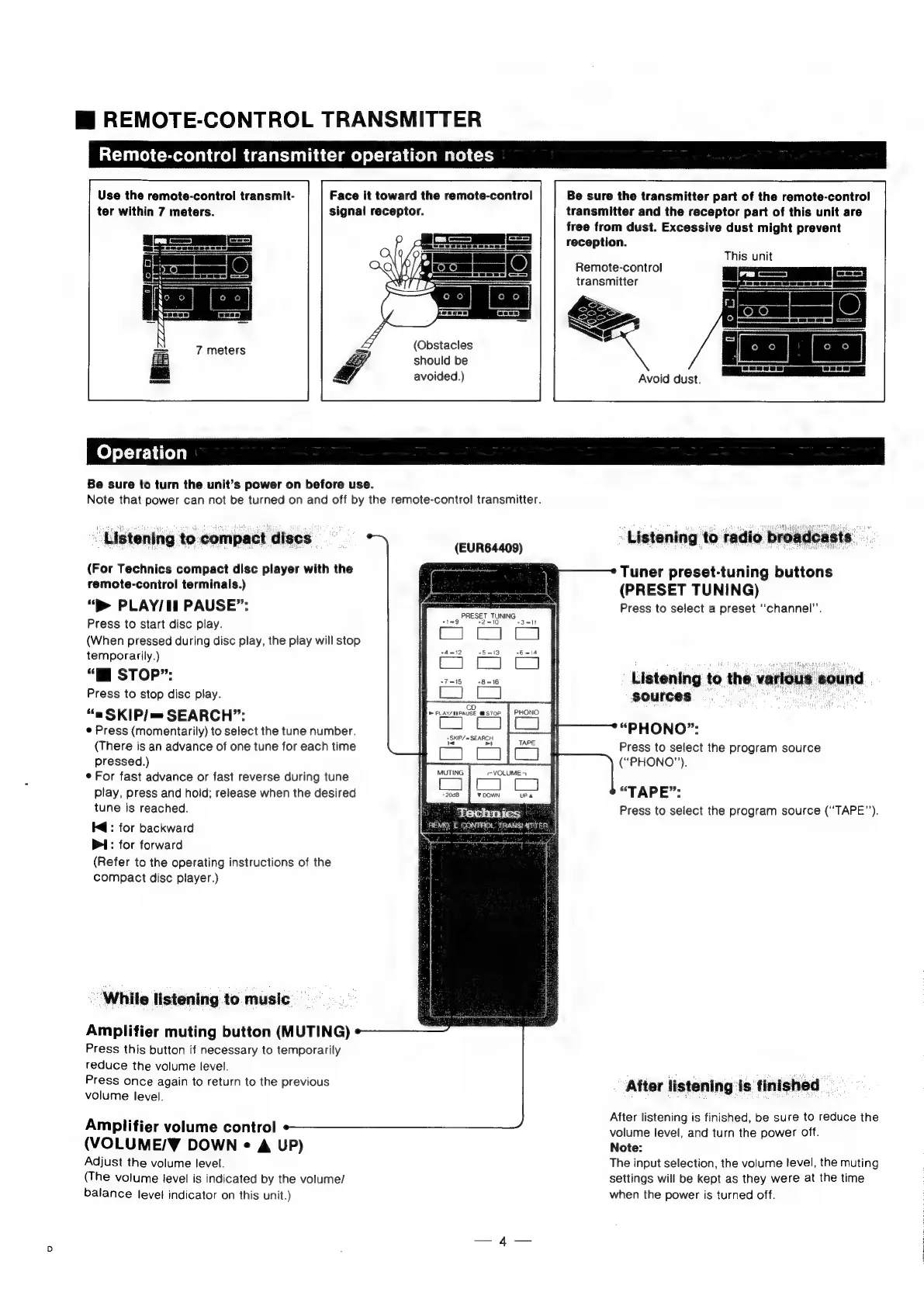
REMOTE-CONTROL
TRANSMITTER
Remote-control
transmitter
operation
notes
Face
it
toward
the
remote-control
signal
receptor.
Use
the
remote-control
transmit-
ter
within
7
meters.
Aa
a
ie
a
o
S
(
i a a
if
Gi
Z
hk
LL
(Obstacles
should
be
avoided.)
Be
sure
the
transmitter
part
of
the
remote-control
transmitter
and
the
receptor
part
of
this
unit
are
free
from
dust.
Excessive
dust
might
prevent
reception.
This
unit
Remote-control
transmitter
&
Avoid
dust.
Be
sure
to
turn
the
unit’s
power
on
before
use.
Note
that
power
can
not
be
turned
on
and
off
by
the
remote-control
transmitter.
Listening
to
compact
discs
(EURG«408)
(For
Technics
compact
disc
player
with
the
remote-control
terminals.)
“p>
PLAY/Il
PAUSE”:
Press
to
start
disc
play.
(When
pressed
during
disc
play,
the
play
will
stop
temporarily.)
“lM
STOP”:
Press
to
stop
disc
play.
“a
SKIP/
=
SEARCH”:
e
Press
(momentarily)
to
select
the
tune
number.
(There
is
an
advance
of
one
tune
for
each
time
pressed.)
*
For
fast
advance
or
fast
reverse
during
tune
play,
press
and
hold;
release
when
the
desired
tune
is
reached.
Kd:
for
backward
PI:
for
forward
(Refer
to
the
operating
instructions
of
the
compact
disc
player.)
MUTING
-
2008
¥
DOWN
Pa
Technics
REMQ’
E
CONTROL
TRANS!
AT
TER:
|
While
listening
to
music
Amplifier
muting
button
(MUTING)
Press
this
button
if
necessary
to
temporarily
reduce
the
volume
level.
Press
once
again
to
return
to
the
previous
volume
level.
Amplifier
volume
control
(VOLUME/Y¥
DOWN
«
A
UP)
Adjust
the
volume
level.
(The
volume
level
is
indicated
by
the
volume/
balance
level
indicator
on
this
unit.)
Listening
to
radio
broadcast:
Tuner
preset-tuning
buttons
(PRESET
TUNING)
Press
to
select
a
preset
‘‘channel”’.
Listening
to
the
various
sound
sources
:
ue
“PHONO”:
Press
to
select
the
program
source
(“PHONO”).
“TAPE”:
Press
to
select
the
program
source
(‘‘TAPE’’).
After
listening
is
finished
After
listening
is
finished,
be
sure
to
reduce
the
volume
level,
and
turn
the
power
off.
Note:
The
input
selection,
the
volume
level,
the
muting
settings
will
be
kept
as
they
were
at
the
time
when
the
power
is
turned
off.

Related product manuals