EasyManua.ls Logo

Technics SA-X800L - Measurements and Adjustmentg

Technics SA-X800L
34 pages
Print Icon
To Next Page IconTo Next Page
To Previous Page IconTo Previous Page
Loading...
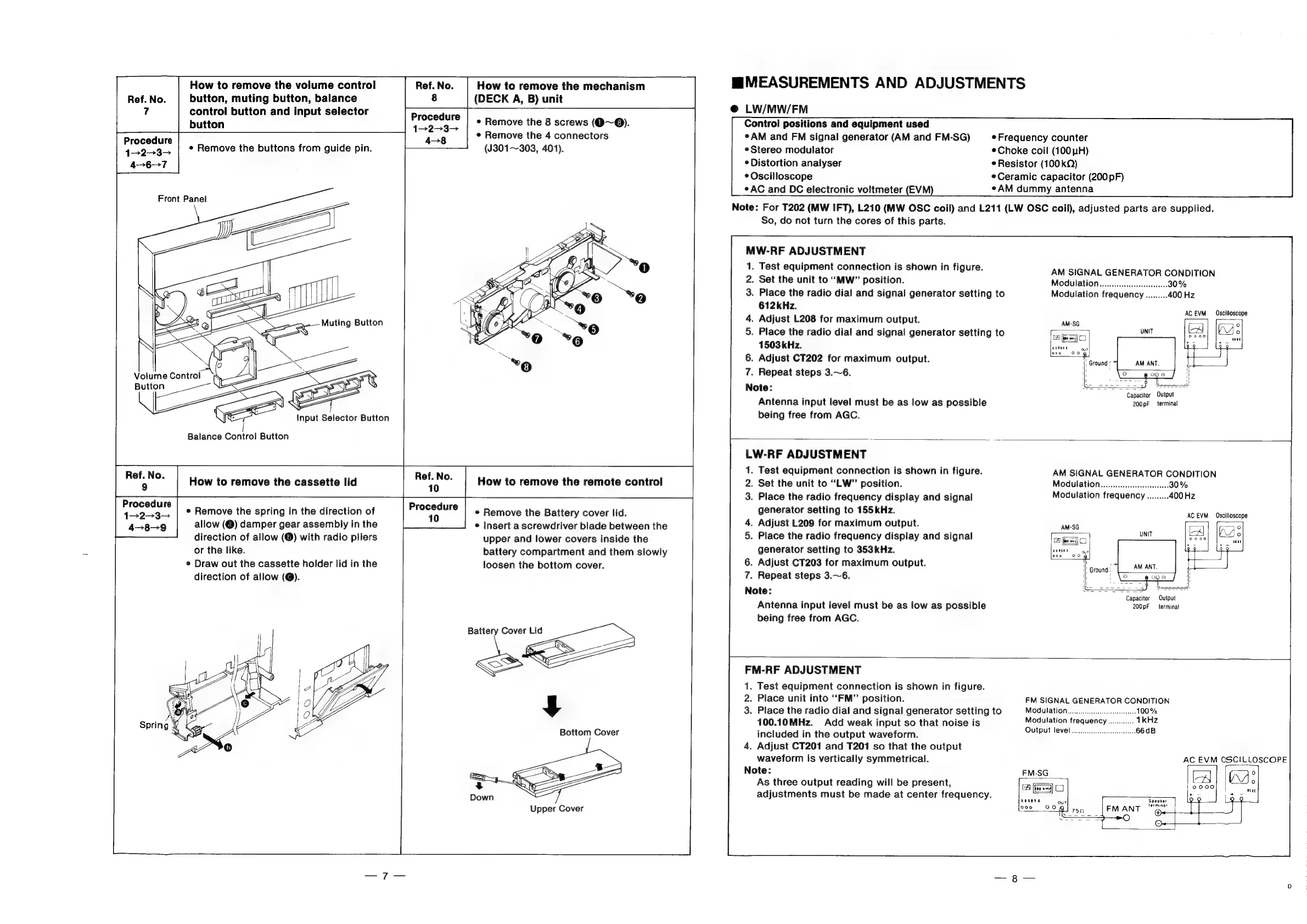
Procedure
How
to
remove
the
volume
control
button,
muting
button,
balance
control
button
and
input
selector
button
¢
Remove
the
buttons
from
guide
pin.
Front
Panel
Ref.
No.
9
Procedure
1—2-3—
4-8-9
Balance
Control
Button
How
to
remove
the
cassette
lid
e
Remove
the
spring
in
the
direction
of
allow
(@)
damper
gear
assembly
in
the
direction
of
allow
(®)
with
radio
pliers
or
the
like.
¢
Draw
out
the
cassette
holder
lid
in
the
direction
of
allow
(@).
Ref.
No.
How
to
remove
the
mechanism
8
(DECK
A,
B)
unit
Procedure
1-2-3—
4-8
e
Remove
the
8
screws
(Q9~®).
¢
Remove
the
4
connectors
(J301~303,
401).
aia
How
to
remove
the
remote
control
Procedure
10
e
Remove
the
Battery
cover
lid.
¢
Insert
a
screwdriver
blade
between
the
upper
and
lower
covers
inside
the
battery
compartment
and
them
slowly
loosen
the
bottom
cover.
Battery
Cover
Lid
Upper
Cover
MMEASUREMENTS
AND
ADJUSTMENTS
@
LW/MW/FM
Control
positions
and
equipment
used
¢
AM
and
FM
signal
generator
(AM
and
FM-SG)
eStereo
modulator
*
Distortion
analyser
*
Oscilloscope
¢AC
and
DC
electronic
voltmeter
(EVM)
So,
do
not
turn
the
cores
of
this
parts.
MW-RF
ADJUSTMENT
1.
Test
equipment
connection
is
shown
in
figure.
2.
Set
the
unit
to
“MW”
position.
3.
Place
the
radio
dial
and
signal
generator
setting
to
612kHz.
4.
Adjust
L208
for
maximum
output.
5.
Place
the
radio
dial
and
signal
generator
setting
to
1503
kHz.
6.
Adjust
CT202
for
maximum
output.
7.
Repeat
steps
3.~6.
Note:
Antenna
input
level
must
be
as
low
as
possible
being
free
from
AGC.
e
Frequency
counter
Choke
coil
(100
WH)
e
Resistor
(100kQ)
Ceramic
capacitor
(200
pF)
eAM
dummy
antenna
Note:
For
T202
(MW
IFT),
L210
(MW
OSC
coil)
and
L211
(LW
OSC
coil),
adjusted
parts
are
supplied.
AM
SIGNAL
GENERATOR
CONDITION
Modulation..........cccccesessecees
30%
AC
EVM
Oscilloscope
ee
‘Capacitor
Output
200pF
terminal
LW-RF
ADJUSTMENT
1.
Test
equipment
connection
is
shown
in
figure.
2.
Set
the
unit
to
“LW”
position.
3.
Place
the
radio
frequency
display
and
signal
generator
setting
to
155kHz.
4.
Adjust
L209
for
maximum
output.
5.
Place
the
radio
frequency
display
and
signal
generator
setting
to
353kHz.
6.
Adjust
CT203
for
maximum
output.
7.
Repeat
steps
3.~6.
Note:
Antenna
input
level
must
be
as
low
as
possible
being
free
from
AGC.
AM
SIGNAL
GENERATOR
CONDITION
Modulation..........c.cccsecees
30
%
Capacitor
Output
200pF
terminal
FM-RF
ADJUSTMENT
1.
Test
equipment
connection
is
shown
in
figure.
2.
Place
unit
into
“FM”
position.
3.
Place
the
radio
dial
and
signal
generator
setting
to
100.10MHz.
Add
weak
input
so
that
noise
is
included
in
the
output
waveform.
4.
Adjust
CT201
and
T201
so
that
the
output
waveform
is
vertically
symmetrical.
Note:
As
three
output
reading
will
be
present,
adjustments
must
be
made
at
center
frequency.
FM
SIGNAL
GENERATOR
CONDITION
Modulation...
cece
100%
Modulation
frequency............
1kHz
Output
level...
eee
66dB
AC
EVM
OSCILLOSCOPE

Related product manuals