EasyManua.ls Logo

Technics SA-X800L - Page 16

Technics SA-X800L
34 pages
Print Icon
To Next Page IconTo Next Page
To Previous Page IconTo Previous Page
Loading...
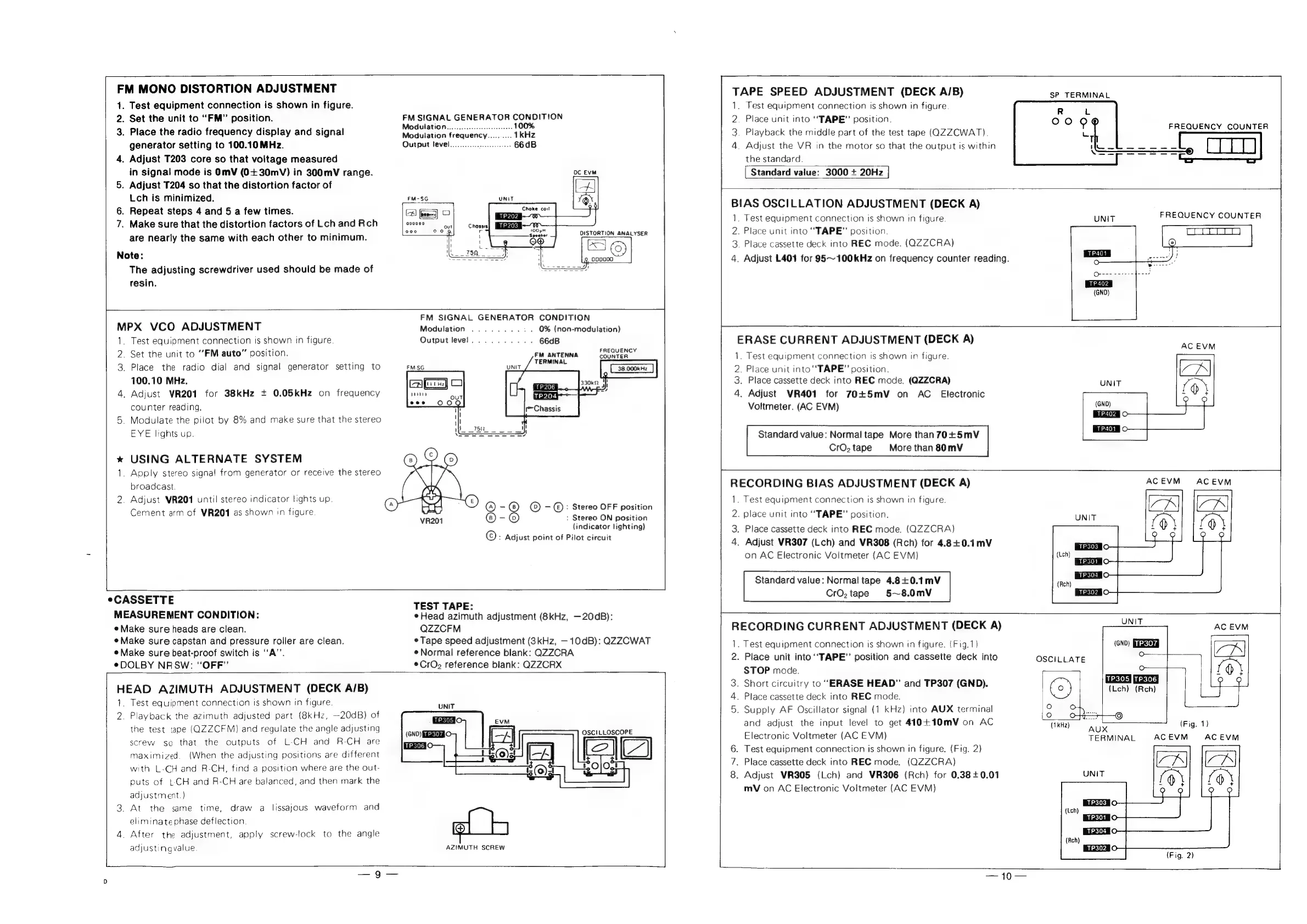
FM
MONO
DISTORTION
ADJUSTMENT
1.
Test
equipment
connection
is
shown
in
figure.
2.
Set
the
unit
to
“FM”
position.
3.
Place
the
radio
frequency
display
and
signal
generator
setting
to
100.10MHz.
4.
Adjust
T203
core
so
that
voltage
measured
in
signal
mode
is
OmV
(0+30mV)
in
300mV
range.
5.
Adjust
T204
so
that
the
distortion
factor
of
Lch
is
minimized.
6.
Repeat
steps
4
and
5
a
few
times.
7.
Make
sure
that
the
distortion
factors
of
Lch
and
Rch
are
nearly
the
same
with
each
other
to
minimum.
Note:
The
adjusting
screwdriver
used
should
be
made
of
resin.
FM
SIGNAL
GENERATOR
CONDITION
Modulation..........0.....
ee
100%
Modulation
frequency..........
1kHz
Output
level.............
66dB
MPX
VCO
ADJUSTMENT
1.
Test
equipment
connection
is
shown
in
figure.
2.
Set
the
unit
to
“FM
auto”
position.
3.
Place
the
radio
dial
and
signal
generator
setting
to
100.10
MHz.
4.
Adjust
VR201
for
38kHz
+
0.05kHz
on
frequency
counter
reading.
5.
Modulate
the
pilot
by
8%
and
make
sure
that
the
stereo
EYE
lights
up.
*
USING
ALTERNATE
SYSTEM
1.
Apply
stereo
signa!
from
generator
or
receive
the
stereo
broadcast.
2.
Adjust
VR201
until
stereo
indicator
lights
up.
Cement
arm
of
VR201
as
shown
tn
figure
FM
SIGNAL
GENERATOR
CONDITION
Modulation
........:.
0%
(non-modulation)
Output
level...
0.0.00;
66dB
FREQUENCY
FM
ANTENNA
COUNTER
TERMINAL
ars)
OS
—S—
:
Stereo
ON
position
©)
®
=
©
=
©:
Stereo
OFF
position
-@
(indicator
lighting)
©:
Adjust
point
of
Pilot
circuit
CASSETTE
MEASUREMENT
CONDITION:
¢
Make
sure
heads
are
clean.
¢
Make
sure
capstan
and
pressure
roller
are
clean.
e
Make
sure
beat-proof
switch
is
‘‘A’’.
eDOLBY
NRSW:
“OFF”
TEST
TAPE:
Head
azimuth
adjustment
(8kHz,
—20dB):
QZZCFM
¢
Tape
speed
adjustment
(3kHz,
10dB):
Q2ZZCWAT
eNormal
reference
blank:
QZZCRA
*CrO2
reference
blank:
QZZCRX
HEAD
AZIMUTH
ADJUSTMENT
(DECK
A/B)
1.
Test
equipment
connection
is
shown
in
figure.
2.
Playback
the
azimuth
adjusted
part
(8kHz,
—20dB)
of
the
test
tage
(QZZCFM}
and
regulate
the
angle
adjusting
screw
so
that
the
outputs
of
L-CH
and
R-CH
are
maximized.
(When
the
adjusting
positions
are
different
with
L-CH
and
R-CH,
find
a
position
where
are
the
out-
puts
of
L-CH
and
R-CH
are
balanced,
and
then
mark
the
adjustment.)
3.
At
the
same
time,
eliminate
phase
deflection.
4.
After
the
adjustment,
apply
screw-lock
to
the
angle
adjusting
value.
draw
a
lissajous
waveform
and
iO
(GNO)
SiGET
O
OSCILLOSCOPE
AZIMUTH
SCREW
TAPE
SPEED
ADJUSTMENT
(DECK
A/B)
1.
Test
equipment
connection
is
shown
in
figure.
2.
Place
unit
into
‘‘TAPE”
position.
3.
Playback
the
middle
part
of
the
test
tage
(QZZCWAT).
4.
Adjust
the
VR
in
the
motor
so
that
the
output
is
within
the
standard.
|
Standard
value:
3000
+
20Hz
|
SP
TERMINAL
FREQUENCY
COUNTER
gers]
BIAS
OSCILLATION
ADJUSTMENT
(DECK
A)
1.
Test
equipment
connection
is
shown
:n
figure.
2.
Place
unit
into
“TAPE”
position.
3.
Place
cassette
deck
into
REC
mode.
(QZZCRA)
4.
Adjust
L401
for
95~100kHz
on
frequency
counter
reading.
ERASE
CURRENT
ADJUSTMENT
(DECK
A)
1.
Test
equipment
connection
is
shown
in
figure.
2.
Place
unit
into
‘‘TAPE”
position.
3.
Place
cassette
deck
into
REC
mode.
(QZZCRA)
4.
Adjust
VR401
for
70+5mV
on
AC
Electronic
Voltmeter.
(AC
EVM)
Standard
value:
Normal
tape
More
than
70+5mV
CrO,tape
More
than
80mV
RECORDING
BIAS
ADJUSTMENT
(DECK
A)
1.
Test
equipment
connection
is
shown
in
figure.
2.
place
unit
into
‘‘TAPE”
position.
3.
Place
cassette
deck
into
REC
mode.
(QZZCRA)
4.
Adjust
VR307
(Lch)
and
VR308
(Rch)
for
4.8+0.1mV
on
AC
Electronic
Voltmeter
(AC
EVM)
Standard
value:
Normal
tape
4.8+0.1mV
CrO,
tape
5~8.0mV
UNIT
FREQUENCY
COUNTER
AC
EVM
RECORDING
CURRENT
ADJUSTMENT
(DECK
A)
.
Test
equipment
connection
is
shown
in
figure.
(Fig.1)
2.
Place
unit into
‘‘TAPE”’
position
and
cassette
deck
into
STOP
mode.
3.
Short
circuitry
to
“ERASE
HEAD”
and
TP307
(GND).
4.
Place
cassette
deck
into
REC
mode.
5.
Supply
AF
Oscillator
signal
(1
kHz)
into
AUX
terminal
and
adjust
the
input
level
to
get
410+10mV
on
AC
Electronic
Voltmeter
(AC
EVM)
6.
Test
equipment
connection
is
shown
in
figure.
(Fig.
2)
.
Place
cassette
deck
into
REC
mode.
(QZZCRA)
8.
Adjust
VR305
(Lch)
and
VR306
(Rch)
for
0.38+0.01
mV
on
AC
Electronic
Voitmeter
(AC
EVM)
pany
~
UNIT
TERMINAL
EKIK)
(Lech)
(Reh)
AC
EVM
(Fig.
2)
AC
EVM

Related product manuals