EasyManua.ls Logo

Technics SA-X800L - Page 14

Technics SA-X800L
34 pages
Print Icon
To Next Page IconTo Next Page
To Previous Page IconTo Previous Page
Loading...
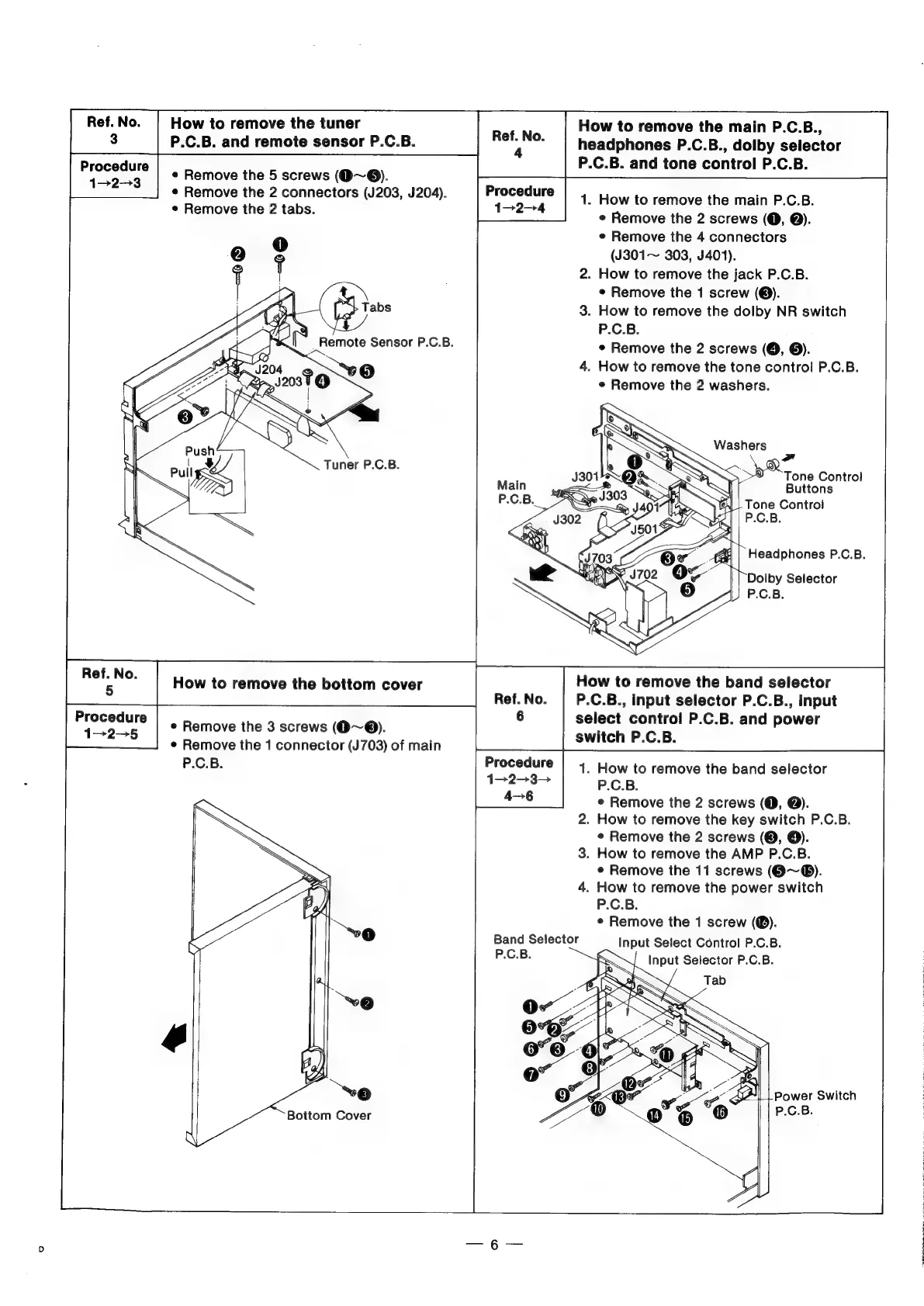
Ref.No.
|
How
to
remove
the
tuner
How
to
remove
the
main
P.C.B.,
3
P.C.B.
and
remote
sensor
P.C.B.
a
a
headphones
P.C.B.,
dolby
selector
P.C.B.
and
tone
control
P.C.B.
e
Remove
the
5
screws
(Q~®@).
e
Remove
the
2
connectors
(J203,
J204).
1.
How
to
remove
the
main
P.C.B.
*
Remove
the
2
tabs:
Usa
¢
Remove
the
2
screws
(O,
@).
e
Remove
the
4
connectors
(J301~
303,
J401).
2.
How
to
remove
the
jack
P.C.B.
e
Remove
the
1
screw
(®).
3.
How
to
remove
the
dolby
NR
switch
P.C.B.
e
Remove
the
2
screws
(@,
©).
4.
How
to
remove
the
tone
control
P.C.B.
e
Remove
the
2
washers.
Washers
Tuner
P.C.B.
.
ni
;
Tone
Control
Main
fF
|
Buttons
P.C.B
|
|
Tone
Contro!
P.C.B.
Dolby
Selector
P.C.B.
ba
How
to
remove
the
bottom
cover
How
to
remove
the
band
selector
Ref.
No.
P.C.B.,
input
selector
P.C.B.,
input
6
peas
tees
*
Remove
the
3
screws
(@~®).
panied
oe
P.C.B.
and
power
¢
Remove
the
1
connector
(J703)
of
main
rare
P.C.B.
Procedure
|
4
How
to
remove
the
band
selector
1>2>3-
P.C.B.
4-6
*
Remove
the
2
screws
(@,
@).
2.
How
to
remove
the
key
switch
P.C.B.
¢
Remove
the
2
screws
(@,
©).
3.
How
to
remove
the
AMP
P.C.B.
e
Remove
the
11
screws
(@~®).
4.
How
to
remove
the
power
switch
P.C.B.
;
e
Remove
the
1
screw
(®).
Sy
°
(©)
Band
Selector
Input
Select
Control
P.C.B.
P.C.B.
se
Bottom
Cover
Power
Switch
P.C.B.
Headphones
P.C.B.

Related product manuals