Need help?
Do you have a question about the Technics SC-EH550 and is the answer not in the manual?
Instructions for placing the main system units side-by-side or stacked.
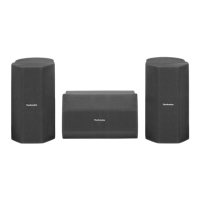
Recommendations for optimal placement of surround sound speakers.
Detailed instructions on connecting speakers, tuner, and cassette deck.
How to insert batteries into the remote control.
Guidelines for aiming the remote and avoiding interference.
Specific connection types for the SC-EH750 model.
Specific connection types for the SC-EH550 model.
Guidance on using outdoor antennas for better reception.
Controls for the tuner and amplifier functions.
Controls for operating the CD changer and player.
Controls specific to the cassette deck operation.
Controls for sound quality and field effects.
Listing of remote control buttons and their corresponding functions.
How to disable the demonstration mode.
Manual method to preset individual radio stations.
Displaying the station name received via RDS.
Showing the program type of the received radio station.
Steps for correctly inserting CDs into the player trays.
Playing CDs in order from the first track to the last.
Starting playback from a specific track on any disc.
Setting the unit to repeat all tracks or selected tracks.
Playing tracks in a random sequence.
Creating a custom playback sequence of up to 24 tracks.
Playing CDs in order from the first track to the last.
Starting playback from a specific track on any disc.
Setting the unit to repeat all tracks or selected tracks.
Playing tracks in a random sequence.
Creating a custom playback sequence of up to 24 tracks.
How to reset the tape counter for tracking tape position.
Methods for fast forwarding or rewinding tapes.
Using TPS to locate the start of tracks on a tape.
How to enhance the bass response with the super woofer.
Selecting preset sound modes like HEAVY, CLEAR, or HALL.
Customizing sound by adjusting specific frequency bands.
Adjusting sound quality using pre-defined AI EQ settings.
Explains different surround sound modes available.
Creating a surround effect when speakers are placed at the front.
Focusing center channel audio for clearer dialogue.
Simulating multiple surround speakers for an immersive experience.
Adjusting soundstage based on listener position.
How to enjoy 5.1 channel surround sound from DVD sources.
Utilizing Dolby Pro Logic for enhanced surround sound from compatible sources.
Adding 5-channel surround effects to normal stereo sources.
Simulating surround sound from stereo sources.
Focusing center channel audio for clearer dialogue.
Creating a surround effect when speakers are placed at the front.
Simulating multiple surround speakers for an immersive experience.
Adding stereo-like effects to monaural sound sources.
Optimizing soundstage by adjusting listener position.
Explains the different sound level display modes.
Temporarily reduces or silences the audio output.
Preparation steps for recording on the cassette deck.
Recording audio from CDs onto cassette tapes for SC-EH750.
Simplifies recording by automatically handling track transitions for SC-EH750.
Recording audio from CDs onto cassette tapes for SC-EH550.
Simplifies recording by automatically handling track transitions for SC-EH550.
Recording audio directly from radio stations onto cassette tapes.
Copying audio from one cassette tape to another.
Scheduling automatic playback of a selected source.
Scheduling automatic recording of radio broadcasts.
Checking set timers and understanding their behavior.
Setting the unit to turn off automatically after a set period.
Guidance on connecting and using headphones.
How to play audio from connected external devices.
Instructions for recording audio from external sources.
Important notes and precautions for using compact discs.
Advice on selecting and handling cassette tapes.
General safety guidelines for using the system.
Detailed technical data and features of the system.
Solutions for common problems and operational issues.
Instructions for cleaning and maintaining the unit.
 General
| Type | Speaker System |
|---|---|
| Manufacturer | Technics |
| Tweeter Unit | 6 cm Cone Type |
| Impedance | 6 Ohms |
| Sensitivity | 88 dB/W/m |
| Speaker Unit | 2-Way |
| Power Handling | 100 W |

 To Next Page