o o
0
0
0 m
VOLUME
i_r_[i_
CENTER
I-I_+l
SURROUND
I -I l
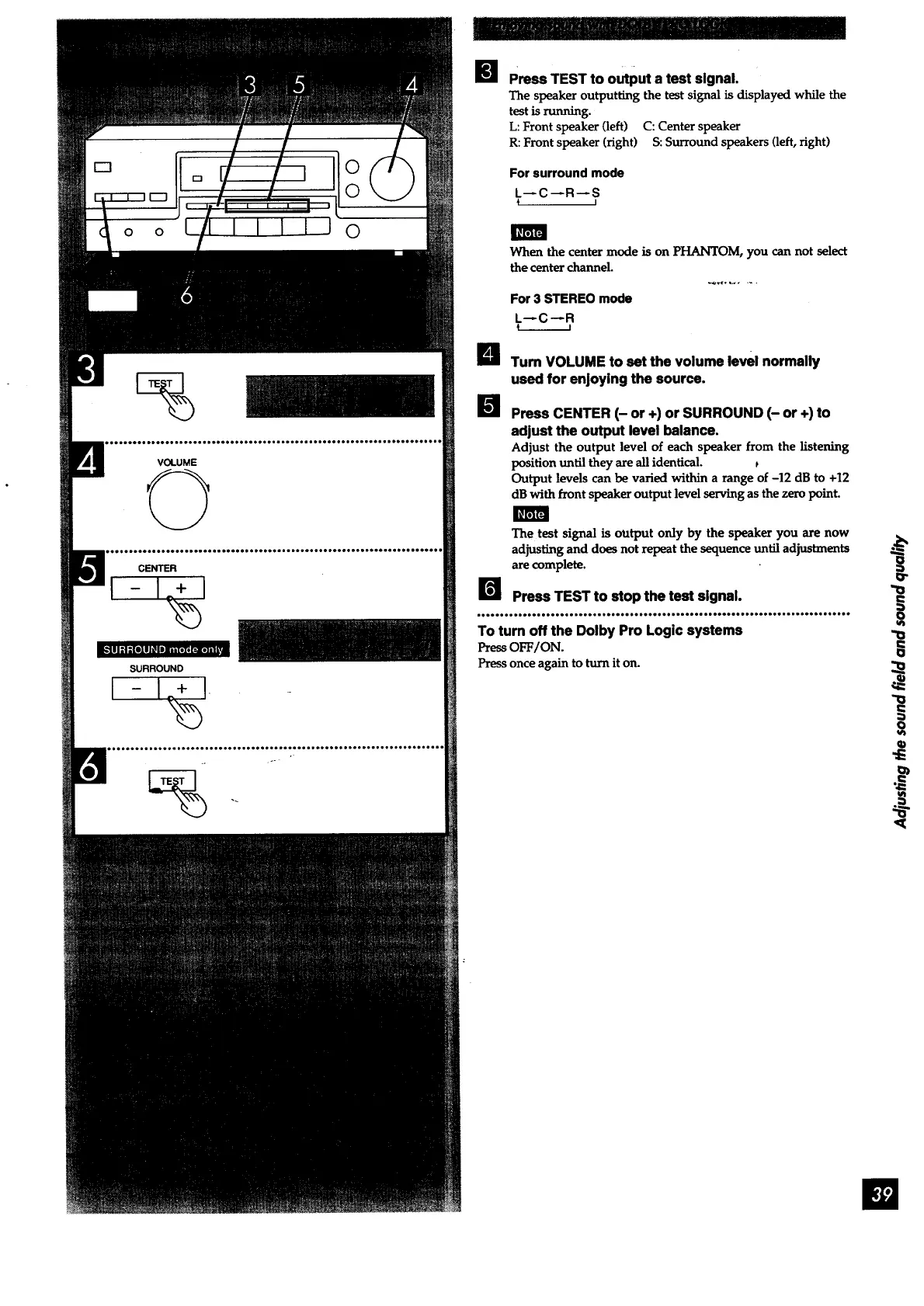
Press TEST to output a test signal.
The speaker outputting the test signal is displayed while the
test is running.
L: Front speaker (left) C: Center speaker
R: Front speaker (right) S: Surround speakers (left, right)
For surround mode
L--C--R--S
I
When the center mode is on PHANTOM, you can not select
the center channel
For 3 STEREO mode
L--C--R
B Tum VOLUME to set the volume level normally
used for enjoying the source.
I
[] Press CENTER (- or +) or SURROUND (- or +) to
adjust the output level balance.
Adjust the output level of each speaker from the listening
position until they are all identical.
Output levels can be varied within a range of -12 dB to +12
dB with front speaker output level serving as the zero point.
The test signal is output only by the speaker you are now
adjusting and does not repeat the sequence until adjustments _--_
are complete.
B Press TEST to stop the test signal.
___'_'____''''__.''__'_''___'''_'''_.'''___'_e_''''_''_''___'O'______'_''__'''_''
To turn off the Dolby Pro Logic systems
PressOFF/ON.
Press once again to turn it on.
o
1
i



 To Next Page