Reference pages Indicated in black circles. (For example: 0)
I Problem I Probable cause(s)
Suggested remedy
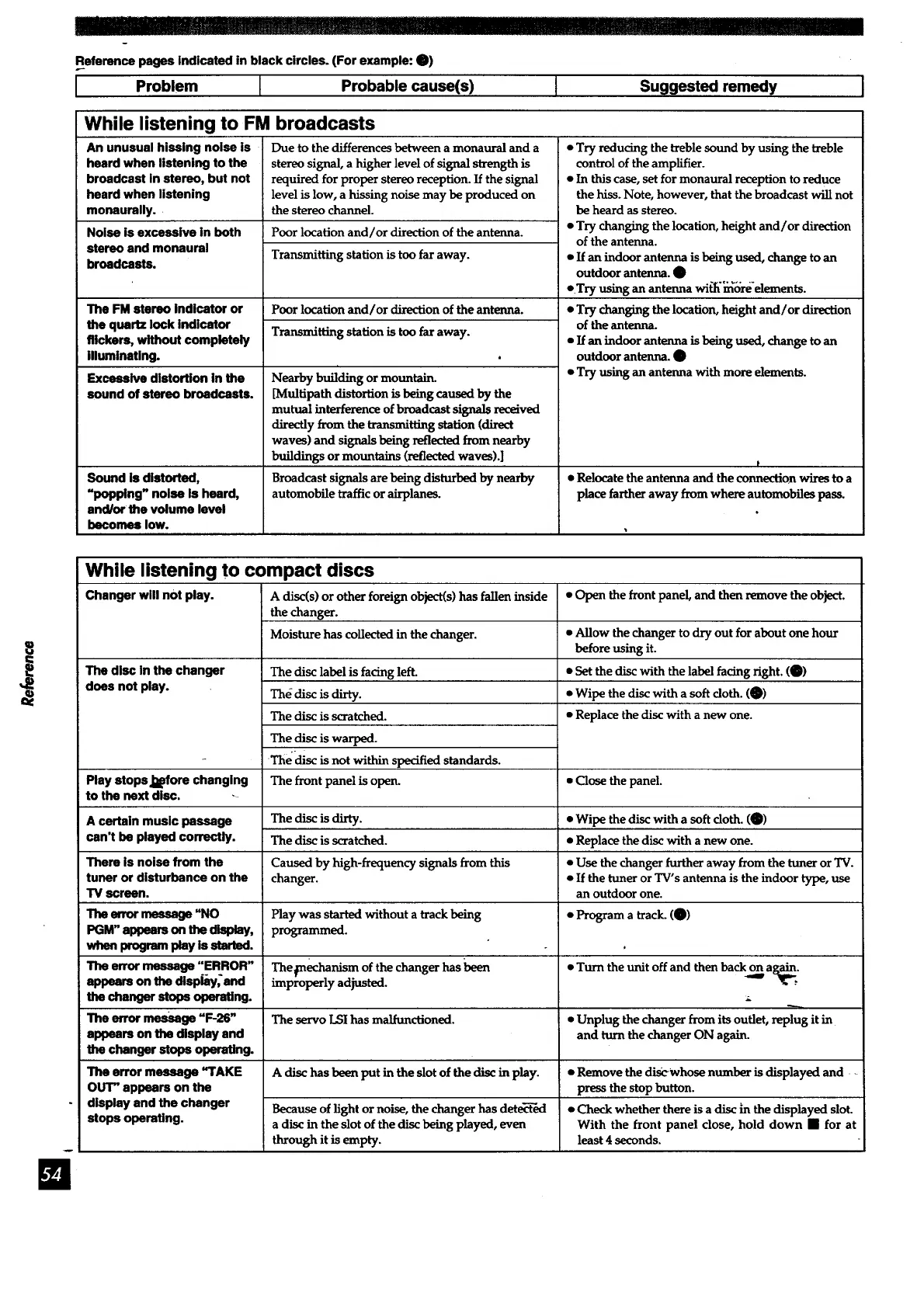
While listening to FM broadcasts
An unusual hissing noise is
heard when listening to the
broadcast in stereo, but not
heard when listening
monaurally.
Noise is excessive in both
stereo and monaural
broadcasts.
The FM stereo indicator or
the quartz lock indicator
flickers, without completely
illuminating.
Excessive distortion in the
sound of stereo broadcasts.
Sound is distorted,
"popping" noise is heard,
and/or the volume level
becomes low.
Due to the differences between a monaural and a
stereo signal, a higher level of signal strength is
required for proper stereo reception. If the signal
level is low, a hissing noise may be produced on
the stereo channel.
Poor location and/or direction of the antenna.
Transmitting station is too far away.
Poor location and/or direction of the antenna.
Transmitting station is too far away.
Nearby building or mountain.
[Mul6path distortionisbeing caused by the
mutual interference of broadcast signals reodved
directly from the transmitting station(direct
waves) and signals being reflected from nearby
buildings or mountains (reflected waves).]
Broadcast signals are being disturbed by nearby
automobile traffic orairplanes.
• Try reducing the treble sound by using the treble
control of the amplifier.
• In this case, set for monaural reception to reduce
the hiss. Note, however, that the broadcast will not
be heard as stereo.
• Try changing the location, height and/or direction
of the antenna.
• If an indoor antenna is being used, change to an
outdoor antenna. O
• .Try using an antenna wi_'_ore'elements.
• Try changing the location, height and/or direction
of the ante_ua.
• If an indoor antenna is being used, change to an
outdoor antenna. O
• Try using an antenna with more elements.
t
• Relocate the antenna and the connection wires to a
place farther away from where automobiles pass.
While listening to compact discs
Changer will not play. A disc(s) or other foreign object(s) has fallen inside • Open the front panel, and then remove the object.
the changer.
Moisture has collected in the changer. • Allow the changer to dry out for about one hour
before using it.
The disc in the changer • Set the discwith the label facing right. (0)
does not play. • Wipe the disc with a soft cloth. (0)
• Replace the disc with a new one.
The disc label is facing left.
The disc is dirty.
The disc is scratched.
The disc is warped.
The(tisc is not within specified standards.
The front panel is open.Play stops J_Bfora changing • Close the panel.
to the next disc. --
A certain music passage The disc is dirty. • Wipe the disc with a soft cloth. (0)
can't be played correctly. The disc is scratched. • Replace the disc with a new one.
There is noise from the Caused by high-frequency signals from this • Use the changer further away from the tuner or TV.
tuner or disturbance on the changer. • If the tuner or TV's antenna is the indoor type, use
TV screen, an outdoor one.
The error message "NO Play was started without a track being • Program a track. (0)
PGM" appears on the display, programmed.
when program play is started.
The error message "ERROR" Thefnechanism of the changer has been • Turn the unit off and then back oonnag___.
appears on the dispkly, and improperly adjusted.
the changer stops operating.
The error mes_ge "F-26" The servo LSI has malfunctioned. • Unplug the changer from its outlet, replug it in
appears on the display and and turn the changer ON again.
the changer stops operating.
The error messsge "TAKE A disc has been put in the slot of the disc in play. • Remove the discwhose number is displayed and
OUT" appears on the press the stop button.
display and the changer Because of light or noise, the changer has dete_"ed • Check whether there is adisc ;n the displayed slot.
stops operating, a disc in the slot of the disc being played, even With the front panel close, hold down • for at
through it is empty, least 4 seconds.


 To Next Page
 Loading...