EasyManua.ls Logo

Technics SL-P222A - Page 9

Technics SL-P222A
47 pages
Print Icon
To Next Page IconTo Next Page
To Previous Page IconTo Previous Page
Loading...
SL-P222A
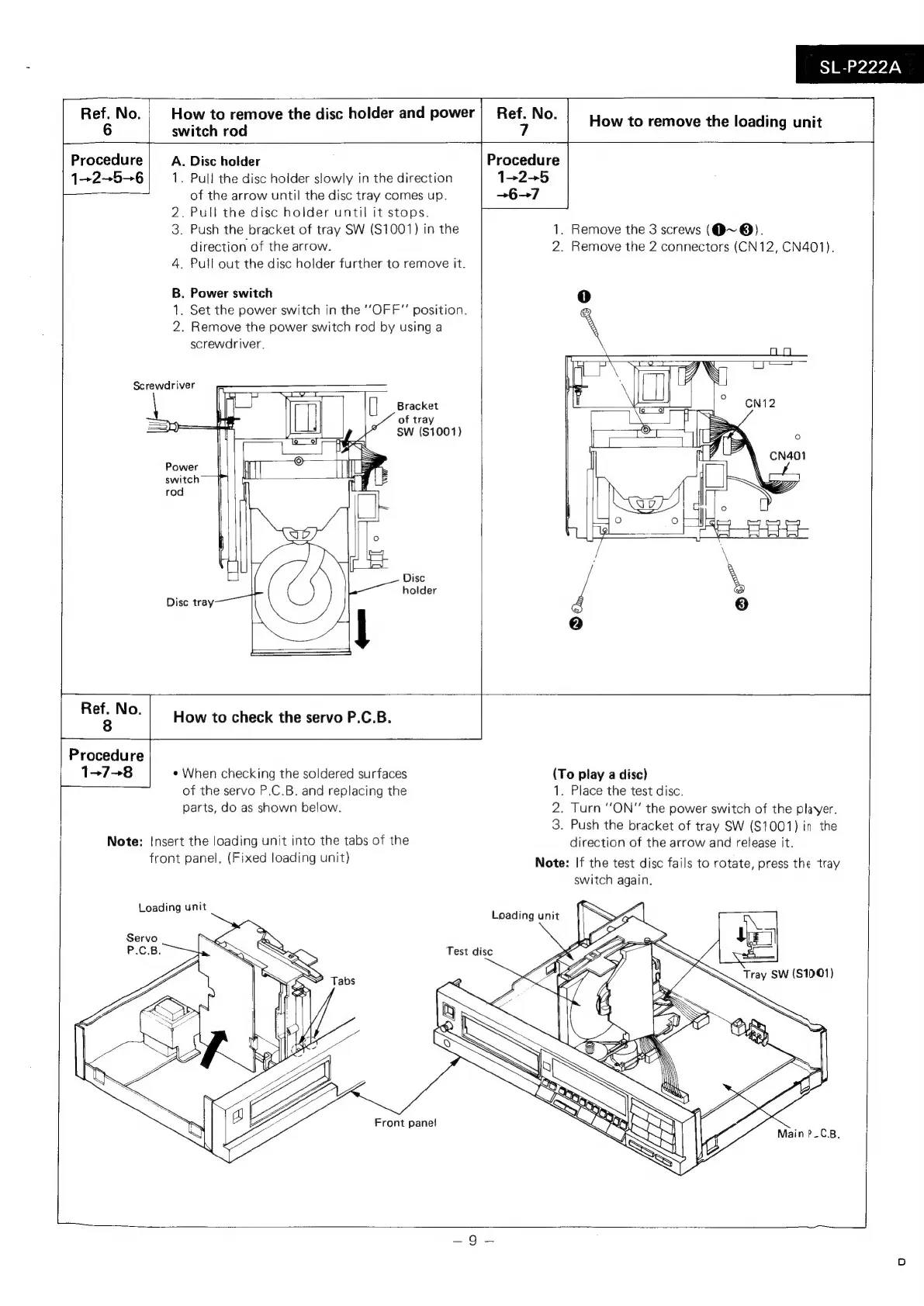
Screwdriver
Ref.
No.
How
to
remove
the
disc
holder
and
power
How
to
remove
the
loading
unit
6
switch
rod
Procedure
A.
Disc
holder
Procedure
1-256
1.
Pull
the
disc
holder
slowly
in
the
direction
122+5
of
the
arrow
until
the
disc
tray
comes
up.
.
Pull
the
disc
holder
until
it
stops.
Push
the
bracket
of
tray
SW
($1001)
in
the
direction
of
the
arrow.
.
Pull
out
the
disc
holder
further
to
remove
it.
wn
.
Power
switch
.
Set
the
power
switch
in
the
“OFF”
position.
.
Remove
the
power
switch
rod
by
using
a
screwdriver.
Nr?wW
Ff
&
Bracket
al
of
tray
ea
SW
($1001)
Power
©
T]
switch
‘|
rod
I
i
j
°
Disc
ae.
holder
Disc
tray
+67
1.
Remove
the
3
screws
(Q@~
@).
2.
Remove
the
2
connectors
(CN12,
CN401).
How
to
check
the
servo
P.C.B.
Procedure
137-8
e
When
checking
the
soldered
surfaces
of
the
servo
P.C.B.
and
replacing
the
parts,
do
as
shown
below.
Note:
Insert
the
loading
unit
into
the
tabs
of
the
front
panel.
(Fixed
loading
unit)
Loading
unit
Front
panel
(To
play
a
disc)
1.
Place
the
test
disc.
2.
Turn
“ON”
the
power
switch
of
the
player.
3.
Push
the
bracket
of
tray
SW
(S1001)
in
the
direction
of
the
arrow
and
release
it.
Note:
If
the
test
disc
fails
to
rotate,
press
the
tray
switch
again.
~

Related product manuals