EasyManua.ls Logo

Technics SL-P250 - Page 10

Technics SL-P250
56 pages
Print Icon
To Next Page IconTo Next Page
To Previous Page IconTo Previous Page
Loading...
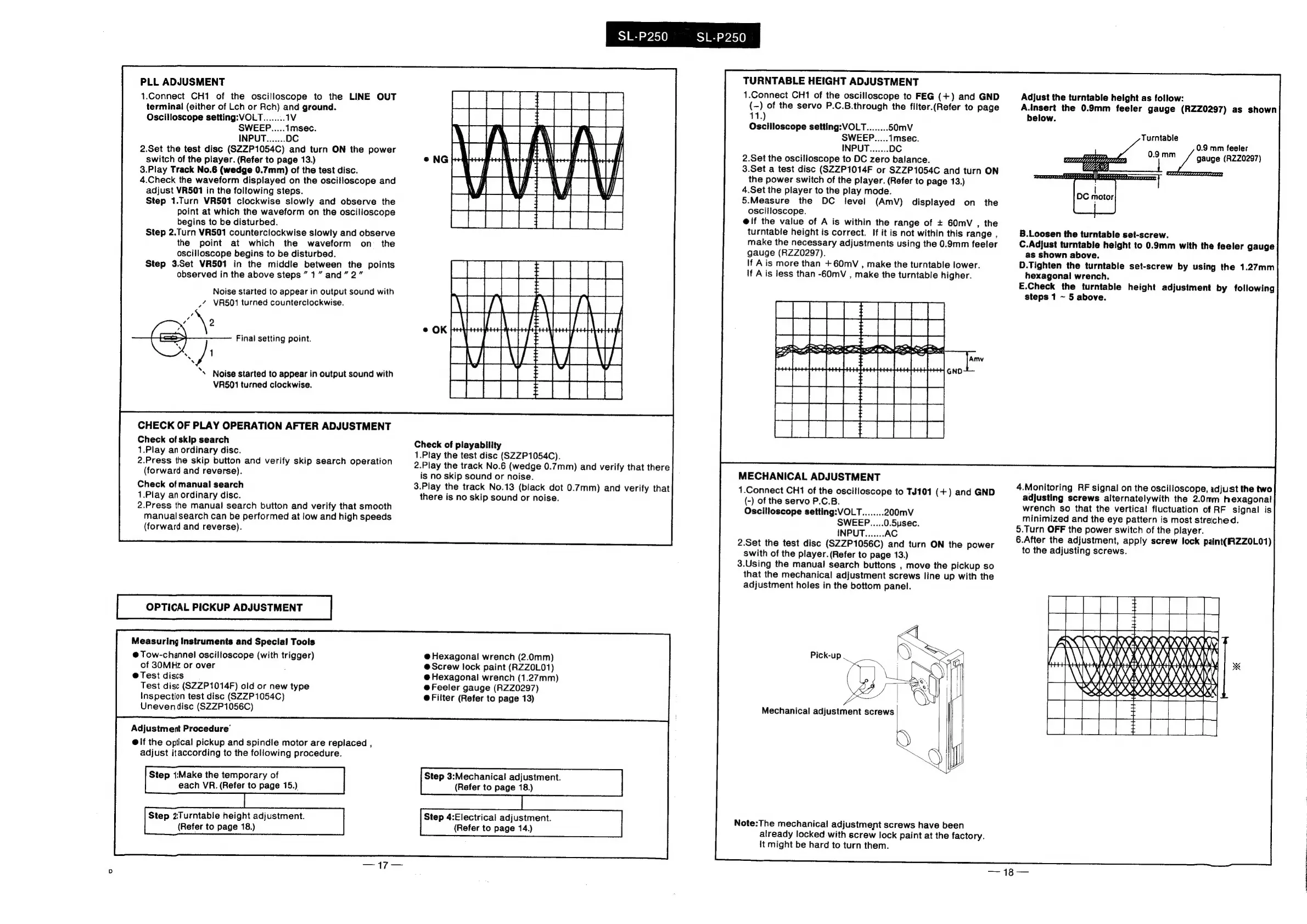
PLL
ADJUSMENT
1.Connect
CH1
of
the
oscilloscope
to
the
LINE
OUT
terminal
(either
of
Lch
or
Rch)
and
ground.
Oscilloscope
setting:
VOLT
2.Set
the
test
disc
(SZZP1054C)
and
turn
ON
the
power
switch
of
the
player.
(Refer
to
page
13.)
3.Play
Track
No.6
(wedge
0.7mm)
of
the
test
disc.
4.Check
the
waveform
displayed
on
the
oscilloscope
and
adjust
VR501
in
the
following
steps.
Step
1.Turn
VR501
clockwise
slowly
and
observe
the
point
at
which
the
waveform
on
the
oscilloscope
begins
to
be
disturbed.
Step
2.Turn
VR501
counterclockwise
slowly
and
observe
the
point
at
which
the
waveform
on
_
the
oscilloscope
begins
to
be
disturbed.
Step
3.Set
VR501
in
the
middle
between
the
points
observed
in
the
above
steps
1”
and”
2”
Noise
started
to
appear
in
output
sound
with
_’
VR501
turned
counterclockwise.
Final
setting
point.
‘\
Noise
started
to
appear
in
output
sound
with
VR501
turned
clockwise.
CHECK
OF
PLAY
OPERATION
AFTER
ADJUSTMENT
Check
of
skip
search
1.Play
an
ordinary
disc.
2.Press
the
skip
button
and
verify
skip
search
operation
(forward
and
reverse).
Check
of
manual
search
1.Play
an
ordinary
disc.
2.Press
the
manual
search
button
and
verify
that
smooth
manual
search
can
be
performed
at
low
and
high
speeds
(forward
and
reverse).
OPTICAL
PICKUP
ADJUSTMENT
Measuring
Instruments
and
Special
Tools
@
Tow-channel
oscilloscope
(with
trigger)
of
30MHz
or
over
@
Test
discs
Test
disc
(SZZP1014F)
old
or
new
type
Inspection
test
disc
(SZZP1054C)
Unevendisc
(SZZP1056C)
Adjustment
Procedure’
@
if
the
optical
pickup
and
spindle
motor
are
replaced
,
adjust
itaccording
to
the
following
procedure.
Step
1:Make
the
temporary
of
each
VR.
(Refer
to
page
15.)
Step
2Turntabie
height
adjustment.
(Refer
to
page
18.)
SL-P250
SL-P250
E
|
MViAVER
VRE
Hse
DR
iS
2
Ree
Se
Check
of
playability
1.Play
the
test
disc
(SZZP1054C).
2.Play
the
track
No.6
(wedge
0.7mm)
and
verify
that
there
is
no
skip
sound
or
noise.
3.Play
the
track
No.13
(black
dot
0.7mm)
and
verify
that
there
is
no
skip
sound
or
noise.
@
Hexagonal
wrench
(2.0mm)
@Screw
lock
paint
(RZZ0L01)
@
Hexagonal
wrench
(1.27mm)
@Feeler
gauge
(RZZ0297)
@Filter
(Refer
to
page
13)
Step
3:Mechanical
adjustment.
(Refer
to
page
18.)
Step
4:Electrical
adjustment.
(Refer
to
page
14.)
TURNTABLE
HEIGHT
ADJUSTMENT
1.Connect
CH1
of
the
oscilloscope
to
FEG
(+)
and
GND
Adjust
the
turntable
height
as
follow:
(-)
of
the
servo
P.C.B.through
the
filter.(Refer
to
page
A.Insert
the
0.9mm
feeler
gauge
(RZZ0297)
as
shown
41.)
below.
Oscilloscope
setting:VOLLT.........
0.9
mm
feeler
gauge
(RZZ0297)
2.Set
the
oscilloscope
to
DC
zero
balance.
3.Set
a
test
disc
(SZZP1014F
or
SZZP1054C
and
turn
ON
the
power
switch
of
the
player.
(Refer
to
page
13.)
4.Set
the
player
to
the
play
mode.
5.Measure
the
DC
level
(AmV)
displayed
on
the
oscilloscope.
@lf
the
value
of
A
is
within
the
range
of
+
60mvV
,
the
turntable
height
is
correct.
If
it
is
not
within
this
range
,
make
the
necessary
adjustments
using
the
0.9mm
feeler
gauge
(RZZ0297).
If
Ais
more
than
+60mvV
,
make
the
turntable
lower.
if
Ais
less
than
-60mV
,
make
the
turntable
higher.
B.Loosen
the
turntable
set-screw.
C.Adjust
turntable
height
to
0.9mm
with
the
feeler
gauge
as
shown
above.
D.Tighten
the
turntable
set-screw
by
using
the
1.27mm
hexagonal
wrench.
E.Check
the
turntable
height
adjustment
by
following
steps
1
~
5
above.
MECHANICAL
ADJUSTMENT
1.Connect
CH1
of
the
oscilloscope
to
TJ101
(+)
and
GND
(-)
of
the
servo
P.C.B.
Oscilloscope
setting:VOLT........
200mV
SWEEP.....0.5usec.
4.Monitoring
RF
signal
on
the
oscilloscope,
adjust
the
two
adjusting
screws
alternatelywith
the
2.0m™m
hexagonal
wrench
so
that
the
vertical
fluctuation
of
RF
signal
is
minimized
and
the
eye
pattern
is
most
stretched.
5.Turn
OFF
the
power
switch
of
the
player.
6.After
the
adjustment,
apply
screw
lock
paint(RZZOL01)
to
the
adjusting
screws.
2.Set
the
test
disc
(SZZP1056C)
and
turn
ON
the
power
swith
of
the
player.
(Refer
to
page
13.)
3.Using
the
manual
search
buttons
,
move
the
pickup
so
that
the
mechanical
adjustment
screws
line
up
with
the
adjustment
holes
in
the
bottom
panel.
Pick-up
|
Sea
sil
{
Note:The
mechanical
adjustment
screws
have
been
already
locked
with
screw
lock
paint
at
the
factory.
It
might
be
hard
to
turn
them.
SN
[AAS
TARY
eh
XA
0.914,
DOU
Xt
SOS
OI8
COCO
NEN,
pes
(tests
Lele,
HH
Mechanical
adjustment
screws

Related product manuals