EasyManua.ls Logo

Technics SL-P250 - Page 3

Technics SL-P250
56 pages
Print Icon
To Next Page IconTo Next Page
To Previous Page IconTo Previous Page
Loading...
Mi
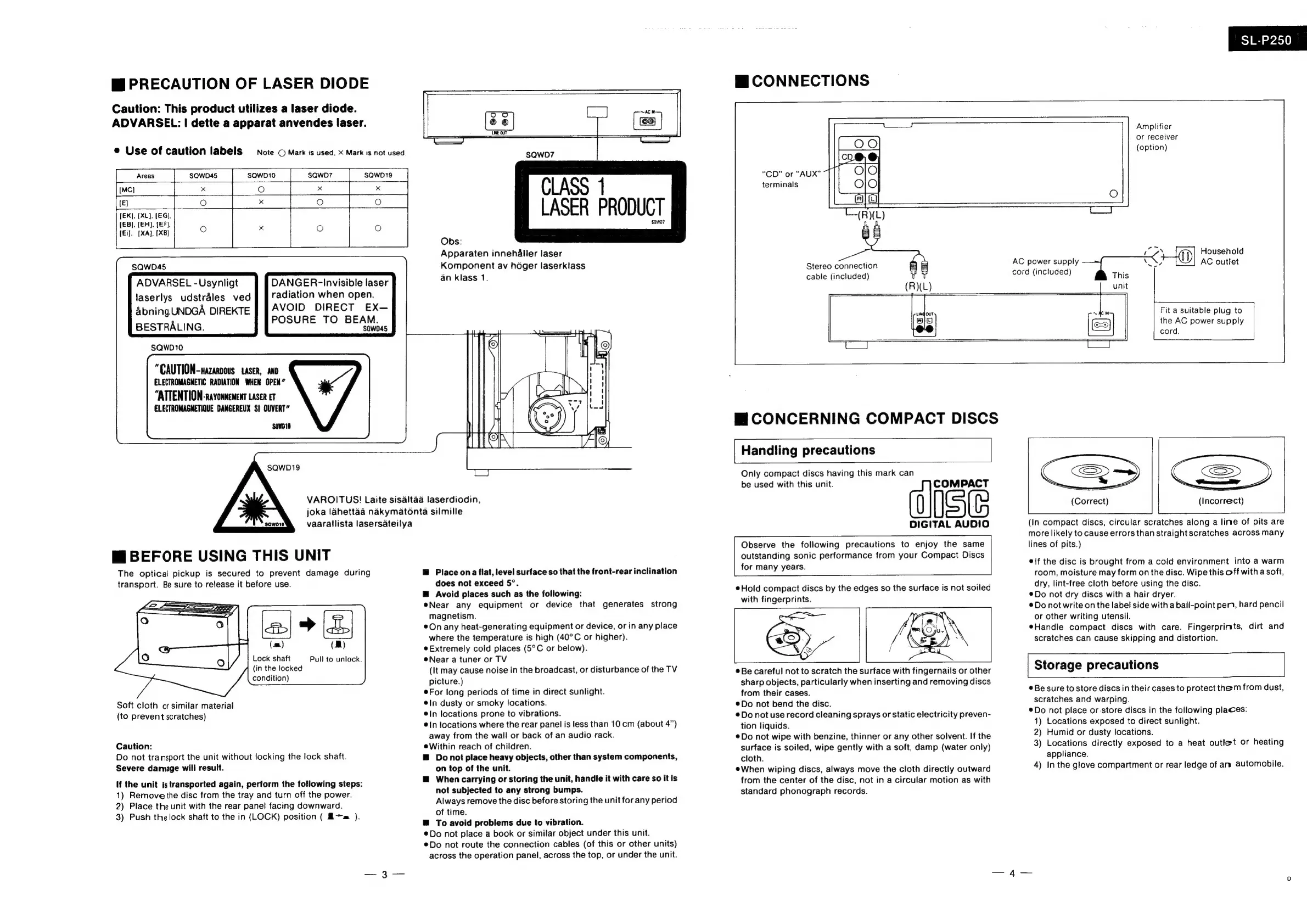
PRECAUTION
OF
LASER
DIODE
Caution:
This
product
utilizes
a
laser
diode.
ADVARSEL:
|
dette
a
apparat
anvendes
laser.
®
Use
of
caution
labels
Note
©
Mark
is
used,
X
Mark
is
not
used
[EK],
[XL],
(EG),
(EB),
(EH),
(EF,
(Ei),
[XA},
[XB]
SQWD45
ADVARSEL
-Usynligt
laserlys
udstrales
ved
Abning
UNDGA
DIREKTE
BESTRALING.
SQw010
DANGER-
Invisible
laser
radiation
when
open.
AVOID
DIRECT
EX—
POSURE
TO
BEAM.
saw045
"CAUTION-nazaroous
Laser,
ano
ELECTROMAGNETIC
RADIATION
WHEN
OPEN”
"ATTENTION-ravonnement
Laser
Er
ELECTROMAGNETIOUE
DANGEREUX
SI
OUVERT”
SQWD19
Mi
BEFORE
USING
THIS
UNIT
The
optical
pickup
is
secured
to
prevent
damage
during
transport.
Be
sure
to
release
it
before
use.
(m)
(MB)
Lock
shaft
(in
the
locked
condition)
Pull
to
unlock.
Soft
cloth
or
similar
material
(to
prevent
scratches)
Caution:
Do
not
transport
the
unit
without
locking
the
lock
shaft.
Severe
damage
will
result.
If
the
unit
is
transported
again,
perform
the
following
steps:
1)
Remove
the
disc
from
the
tray
and
turn
off
the
power.
2)
Place
the
unit
with
the
rear
panel
facing
downward.
3)
Push
thelock
shaft
to
the
in
(LOCK)
position
(
Am
).
VAROITUS!
Laite
sisaltaa
laserdiodin,
joka
lahettaa
nakymatonta
silmille
vaarallista
lasersateilya
CLASS
1
LASER
PRODUCT
‘saw0?
Obs:
Apparaten
innehaller
laser
Komponent
av
hoger
laserklass
an
klass
1,
Place
ona
flat,
level
surface
so
that
the
front-rear
inclination
does
not
exceed
5°.
@
Avoid
places
such
as
the
following:
Near
any
equipment
or
device
that
generates
strong
magnetism.
©
On
any
heat-generating
equipment
or
device,
or
in
any
place
where
the
temperature
is
high
(40°C
or
higher).
Extremely
cold
places
(5°C
or
below).
Near
a
tuner
or
TV
(It
may
cause
noise
in
the
broadcast,
or
disturbance
of
the
TV
picture.)
¢For
long
periods
of
time
in
direct
sunlight.
e|n
dusty
or
smoky
locations.
In
locations
prone
to
vibrations.
@{n
locations
where
the
rear
panel
is
less
than
10
cm
(about
4”)
away
from
the
wall
or
back
of
an
audio
rack.
eWithin
reach
of
children.
@
Donot
place
heavy
objects,
other
than
system
components,
on
top
of
the
unit.
@
When
carrying
or
storing
the
unit,
handle
it
with
care
so
it
is
not
subjected
to
any
strong
bumps.
Always
remove
the
disc
before
storing
the
unit
for
any
period
of
time.
—™
To
avoid
problems
due
to
vibration.
¢Do
not
place
a
book
or
similar
object
under
this
unit.
®Do
not
route
the
connection
cables
(of
this
or
other
units)
across
the
operation
panel,
across
the
top,
or
under
the
unit.
Hi
CONNECTIONS
SL-P250
“CD”
or
“AUX”
terminals
Stereo
connection
Amplifier
or
receiver
(option)
Kila]
Household
AC
power
supply
VN,
AC
outlet
cable
(included)
cord
(included)
This
(R)(L)
unit
ung
out
~
ew
Fit
a
suitable
plug
to
iO]
the
AC
power
supply
CO
cord.
Mi
CONCERNING
COMPACT
DISCS
Handling
precautions
Only
compact
discs
having
this
mark
can
be
used
with
this
unit.
)
ise
DIGITAL
AUDIO
Observe
the
following
precautions
to
enjoy
the
same
outstanding
sonic
performance
from
your
Compact
Discs
for
many
years.
Hold
compact
discs
by
the
edges
so
the
surface
is
not
soiled
with
fingerprints.
©
Be
careful
not
to
scratch
the
surface
with
fingernails
or
other
sharp
objects,
particularly
when
inserting
and
removing
discs
from
their
cases.
®Do
not
bend
the
disc.
Do
not
use
record
cleaning
sprays
or
static
electricity
preven-
tion
liquids.
®Do
not
wipe
with
benzine,
thinner
or
any
other
solvent.
If
the
surface
is
soiled,
wipe
gently
with
a
soft,
damp
(water
only)
cloth.
eWhen
wiping
discs,
always
move
the
cloth
directly
outward
from
the
center
of
the
disc,
not
in
a
circular
motion
as
with
standard
phonograph
records.
(Incorrect)
(Correct)
(In
compact
discs,
circular
scratches
along
a
line
of
pits
are
more
likely
to
cause
errors
than
straight
scratches
across
many
lines
of
pits.)
*\f
the
disc
is
brought
from
a
cold
environment
into
a
warm
room,
moisture
may
form
on
the
disc.
Wipe
this
off
with
a
soft,
dry,
lint-free
cloth
before
using
the
disc.
Do
not
dry
discs
with
a
hair
dryer.
®Do
not
write
on
the
label
side with
a
ball-point
pen,
hard
pencil
or
other
writing
utensil.
Handle
compact
discs
with
care.
Fingerprints,
dirt
and
scratches
can
cause
skipping
and
distortion.
Storage
precautions
Be
sure
to
store
discs
in
their
cases
to
protect
them
from
dust,
scratches
and
warping.
*Do
not
place
or-store
discs
in
the
following
places:
1)
Locations
exposed
to
direct
sunlight.
2)
Humid
or
dusty
locations.
3)
Locations
directly
exposed
to
a
heat
outlet
or
heating
appliance.
4)
In
the
glove
compartment
or
rear
ledge
of
an
automobile.

Related product manuals