EasyManua.ls Logo

Technics SL-P250 - Page 4

Technics SL-P250
56 pages
Print Icon
To Next Page IconTo Next Page
To Previous Page IconTo Previous Page
Loading...
SL-P250
SL-P250
Mi
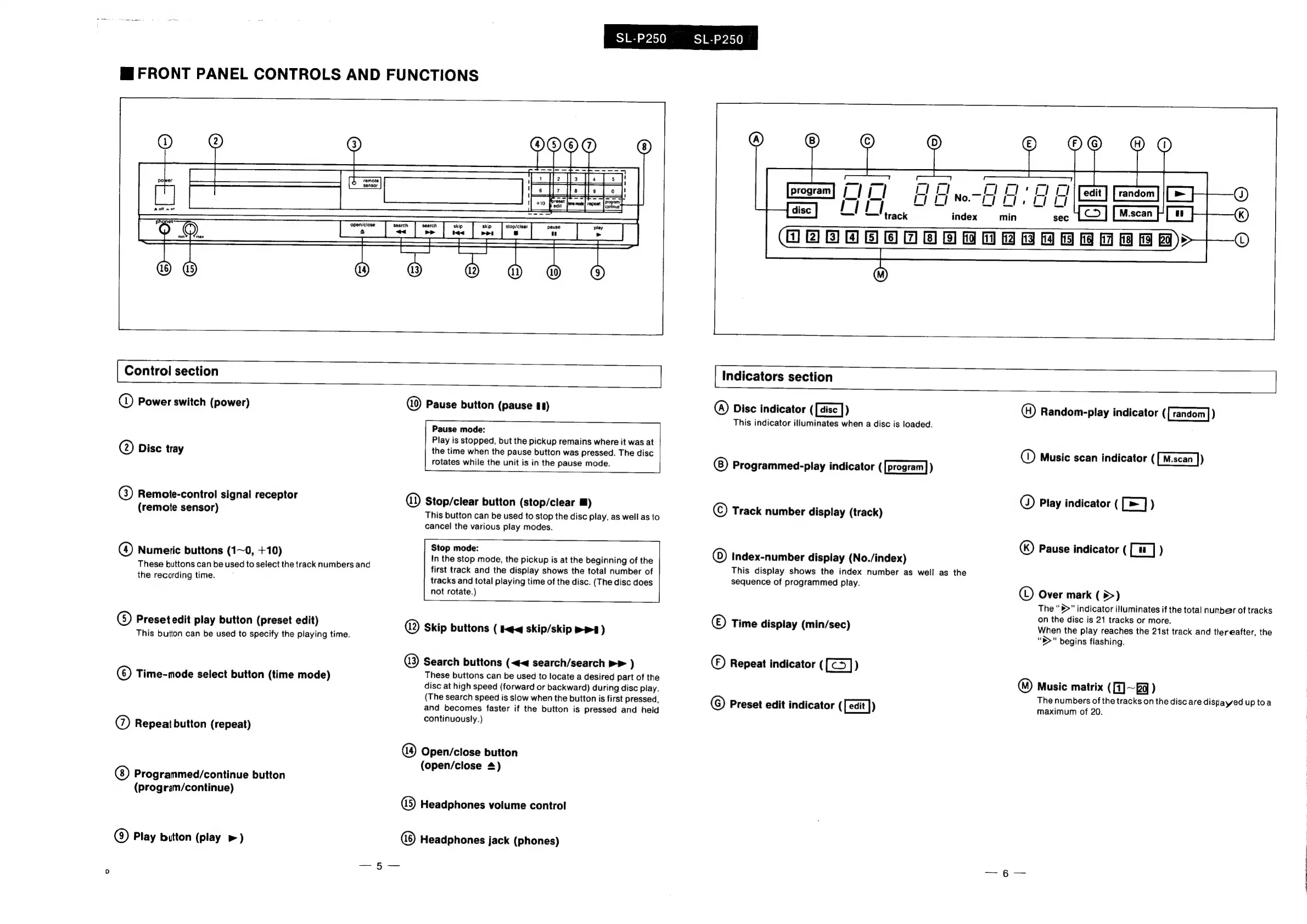
FRONT
PANEL
CONTROLS
AND
FUNCTIONS
Control
section
Q)
Power
switch
(power)
@
Disc
tray
@)
Remote-control
signal
receptor
(remote
sensor)
@)
Numeric
buttons
(1~0,
+10)
These
buttons
can
be
used
to
select
the
track
numbers
and
the
recording
time.
G)
Preset
edit
play
button
(preset
edit)
This
button
can
be
used
to
specify
the
playing
time.
©)
Time-mode
select
button
(time
mode)
@)
Repeat
button
(repeat)
Programmed/continue
button
(program/continue)
@
Play
button
(play
»)
Pause
button
(pause
#1)
Pause
mode:
Play
is
stopped,
but
the
pickup
remains
where
it
was
at
the
time
when
the
pause
button
was
pressed.
The
disc
rotates
while
the
unit
is
in
the
pause
mode.
@
Stop/clear
button
(stop/clear
Ml)
This
button
can
be
used
to
stop
the
disc
play,
as
well
as
to
cancel
the
various
play
modes.
Stop
mode:
In
the
stop
mode,
the
pickup
is
at
the
beginning
of
the
first
track
and
the
display
shows
the
total
number
of
tracks
and
total
playing
time
of
the
disc.
(The
disc
does
not
rotate.)
@
Skip
buttons
(
eq
skip/skip
>
)
@)
Search
buttons
(<<
search/search
»>
)
These
buttons
can
be
used
to
locate
a
desired
part
of
the
disc
at
high
speed
(forward
or
backward)
during
disc
play.
(The
search
speed
is
slow
when
the
button
is
first
pressed,
and
becomes
faster
if
the
button
is
pressed
and
held
continuously.)
Open/close
button
(open/close
4)
(5
Headphones
volume
control
Headphones
jack
(phones)
HABE
ODEROEBBE
eee
eae
©O
@O
|
Indicators
section
@)
Disc
indicator
([aisc
])
This
indicator
illuminates
when
a
disc
is
loaded.
Programmed-play
indicator
([program])
©)
Track
number
display
(track)
0)
Index-number
display
(No./index)
This
display
shows
the
index
number
as
well
as
the
sequence
of
programmed
play.
©
Time
display
(min/sec)
©)
Repeat
indicator
([])
©
Preset
edit
indicator
([eait
})
()
Random-play
indicator
([random])
©)
Music
scan
indicator
(
[u-scan
])
©
Play
indicator
(
[>=]
)
()
Pause
indicator
(
[7
_]
)
(©)
Over
mark
(
>)
The
“b>”
indicator
illuminates
if
the
total
nunber
of
tracks
on
the
disc
is
21
tracks
or
more.
When
the
play
reaches
the
21st
track
and
thereafter,
the
“S>”
begins
flashing.
™)
Music
matrix
([1]~
fq
)
The
numbers
of
the
tracks
on
the
disc
are
dishayed
uptoa
maximum
of
20.

Related product manuals