EasyManua.ls Logo

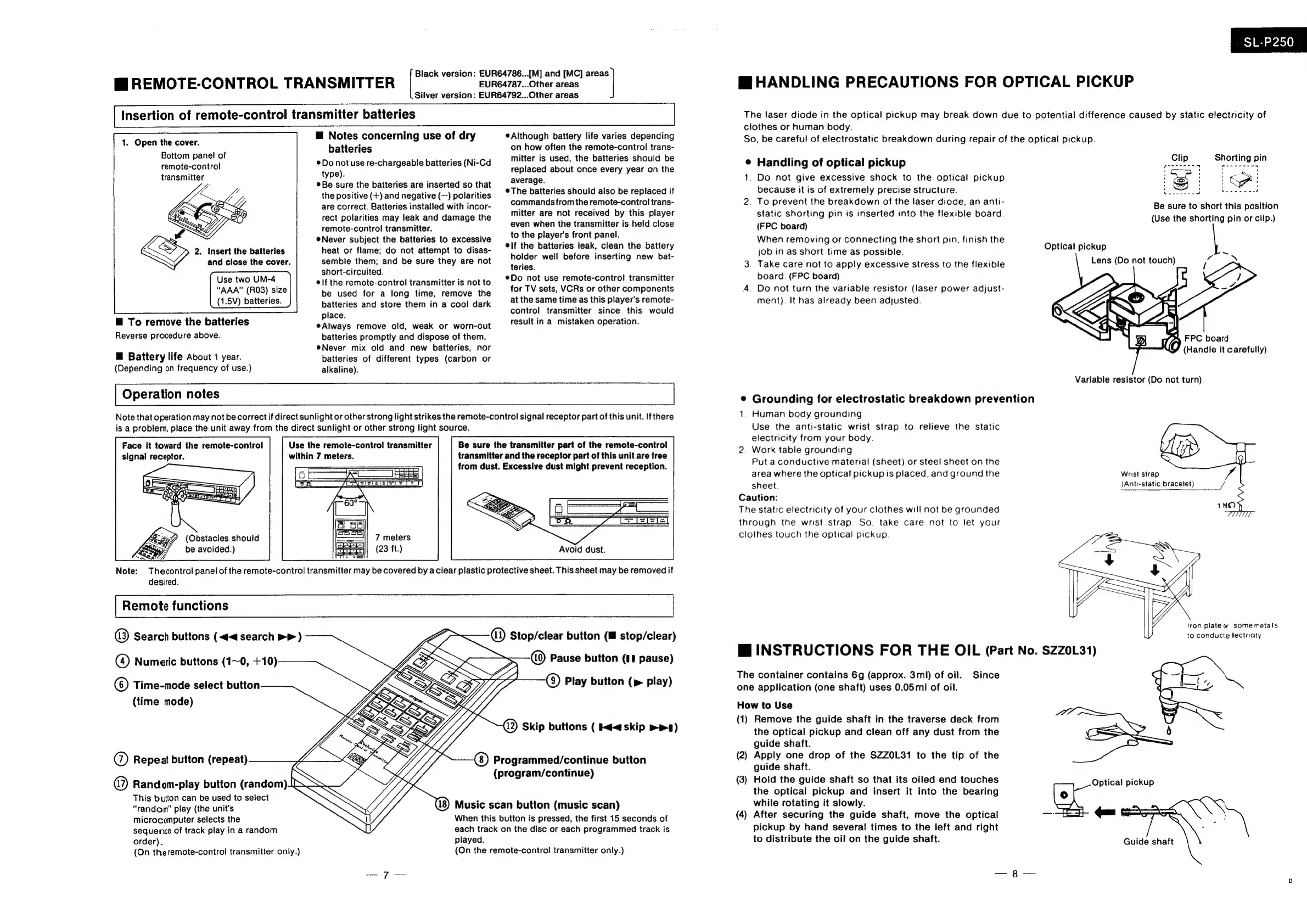
Technics SL-P250 - Page 5

Technics SL-P250
56 pages
Print Icon
To Next Page IconTo Next Page
To Previous Page IconTo Previous Page
Loading...
gi
REMOTE-CONTROL
TRANSMITTER
EUR64787...Other
areas
Black
version:
EUR64786...[M]
and
[MC]
ai
Silver
version:
EUR64792...Other
areas
Insertion
of
remote-control
transmitter
batteries
1.
Open
the
cover.
Bottom
panel
of
remote-control
transmitter
Je
PASS
2.
Insert
the
batteries
and
close
the
cover.
Use
two
UM-4
“AAA”
(RO3)
size
(1.5V)
batteries.
@
To
remove
the
batteries
Reverse
procedure
above.
Hf
Battery
life
About
1
year.
(Depending
on
frequency
of
use.)
@
Notes
concerning
use
of
dry
batteries
®
Do
not
use
re-chargeable
batteries
(Ni-Cd
type).
Be
sure
the
batteries
are
inserted
so
that
the
positive
(+)
and
negative
(—)
polarities
are
correct.
Batteries
installed
with
incor-
rect
polarities
may
leak
and
damage
the
remote-control
transmitter.
Never
subject
the
batteries
to
excessive
heat
or
flame;
do
not
attempt
to
disas-
semble
them;
and
be
sure
they
are
not
short-circuited.
®lf
the
remote-control
transmitter
is
not
to
be
used
for
a
long
time,
remove
the
batteries
and
store
them
in
a
cool
dark
place.
eAlways
remove
old,
weak
or
worn-out
batteries
promptly
and
dispose
of
them.
®Never
mix
old
and
new
batteries,
nor
batteries
of
different
types
(carbon
or
alkaline).
Although
battery
life
varies
depending
on
how
often
the
remote-control
trans-
mitter
is
used,
the
batteries
should
be
replaced
about
once
every
year
on
the
average.
The
batteries
should
also
be
replaced
if
commands
from
the
remote-control
trans-
mitter
are
not
received
by
this
player
even
when
the
transmitter
is
held
close
to
the
player's
front
panel.
elf
the
batteries
leak,
clean
the
battery
holder
well
before
inserting
new
bat-
teries.
@Do
not
use
remote-control
transmitter
for
TV
sets,
VCRs
or
other
components
at
the
same
time
as
this
player’s
remote-
control
transmitter
since
this
would
result
in
a
mistaken
operation.
Operation
notes
Note
that
operation
may
not
be
correct
if
direct
sunlight
or
other
strong
light
strikes
the
remote-control
signal
receptor
part
of
this
unit.
If
there
is
a
problem,
place
the
unit
away
from
the
direct
sunlight
or
other
strong
light
source.
Face
it
toward
the
remote-control
signal
receptor.
(Obstacles
should
be
avoided.)
Use
the
remote-control
transmitter
within
7
meters.
==
7
meters
(23
ft.)
Be
sure
the
transmitter
part
of
the
remote-control
transmitter
and
the
receptor
part
of
this
unit
are
free
from
dust.
Excessive
dust
might
prevent
reception.
Avoid
dust.
Note:
Thecontrol
panel
of
the
remote-control
transmitter
may
be
covered
by
a
clear
plastic
protective
sheet.
This
sheet
may
be
removed
if
desired.
Remote
functions
a)
Search
buttons
(<<
search
PP
)
@)
Numeric
buttons
(1~0,
+10)
©)
Time-mode
select
button
(time
mode)
@
Repeat
button
(repeat)
a)
Random-play
button
(random)
This
button
can
be
used
to
select
“random”
play
(the
unit's
microcomputer
selects
the
sequence
of
track
play
in
a
random
order).
(On
theremote-control
transmitter
only.)
piayed.
@)
Stop/clear
button
(™@
stop/clear)
Pause
button
(II
pause)
®
Play
button
play)
When
this
button
is
pressed,
the
first
15
seconds
of
each
track
on
the
disc
or
each
programmed
track
is
(On
the
remote-control!
transmitter
only.)
|
Si.Pp250_
Mi
HANDLING
PRECAUTIONS
FOR
OPTICAL
PICKUP
The
laser
diode
in
the
optical
pickup
may
break
down
due
to
potential
difference
caused
by
static
electricity
of
clothes
or
human
body.
So,
be
careful
of
electrostatic
breakdown
during
repair
of
the
optical
pickup.
¢
Handling
of
optical
pickup
Bc.
Suen
login
1.
Do
not
give
excessive
shock
to
the
optical
pickup
twee
te
4
P|
because
it
is
of
extremely
precise
structure.
iS
nena
;
2.
To
prevent
the
breakdown
of
the
laser
diode,
an
anti-
static
shorting
pin
is
inserted
into
the
flexible
board.
(FPC
board)
When
removing
or
connecting
the
short
pin,
finish
the
job
tn
as
short
time
as
possible.
3.
Take
care
not
to
apply
excessive
stress
to
the
flexible
board.
(FPC
board)
4.
Do
not
turn
the
variable
resistor
(laser
power
adjust-
ment).
It
has
already
been
adjusted.
Be
sure
to
short
this
position
(Use
the
shorting
pin
or
clip.)
Optical
pickup
Lens
(Do
not
touch)
FPC
board
(Handle
it
carefully)
Variable
resistor
(Do
not
turn)
®
Grounding
for
electrostatic
breakdown
prevention
1.
Human
body
grounding
Use
the
anti-static
wrist
strap
to
relieve
the
static
electricity
from
your
body.
2.
Work
table
grounding
Put
a
conductive
material
(sheet)
or
steel
sheet
on
the
area
where
the
optical
pickup
ts
placed,
and
ground
the
Wrist
strap
sheet.
(Anti-static
bracelet)
Caution:
The
static
electricity
of
your
clothes
will
not
be
grounded
through
the
wrist
strap.
So,
take
care
not
to
let
your
clothes
touch
the
optical
pickup.
tron
plate
or
some
metals
to
conducte
fectricity
INSTRUCTIONS
FOR
THE
OIL
(Part
No.
SZZ0L31)
The
container
contains
6g
(approx.
3ml)
of
oil.
Since
one
application
(one
shaft)
uses
0.05ml
of
oil.
How
to
Use
wa
(1)
Remove
the
guide
shaft
in
the
traverse
deck
from
the
optical
pickup
and
clean
off
any
dust
from
the
guide
shaft.
(2)
Apply
one
drop
of
the
SZZOL31
to
the
tip
of
the
guide
shaft.
(3)
Hold
the
guide
shaft
so
that
its
oiled
end
touches
Optical
pickup
the
optical
pickup
and
insert
it
into
the
bearing
Gg
while
rotating
it
slowly.
—_
(4)
After
securing
the
guide
shaft,
move
the
optical
ties
pickup
by
hand
several
times
to
the
left
and
right
to
distribute
the
oil
on
the
guide
shaft.
Guide
shaft

Related product manuals