EasyManua.ls Logo

Technics SL-P250 - Page 7

Technics SL-P250
56 pages
Print Icon
To Next Page IconTo Next Page
To Previous Page IconTo Previous Page
Loading...
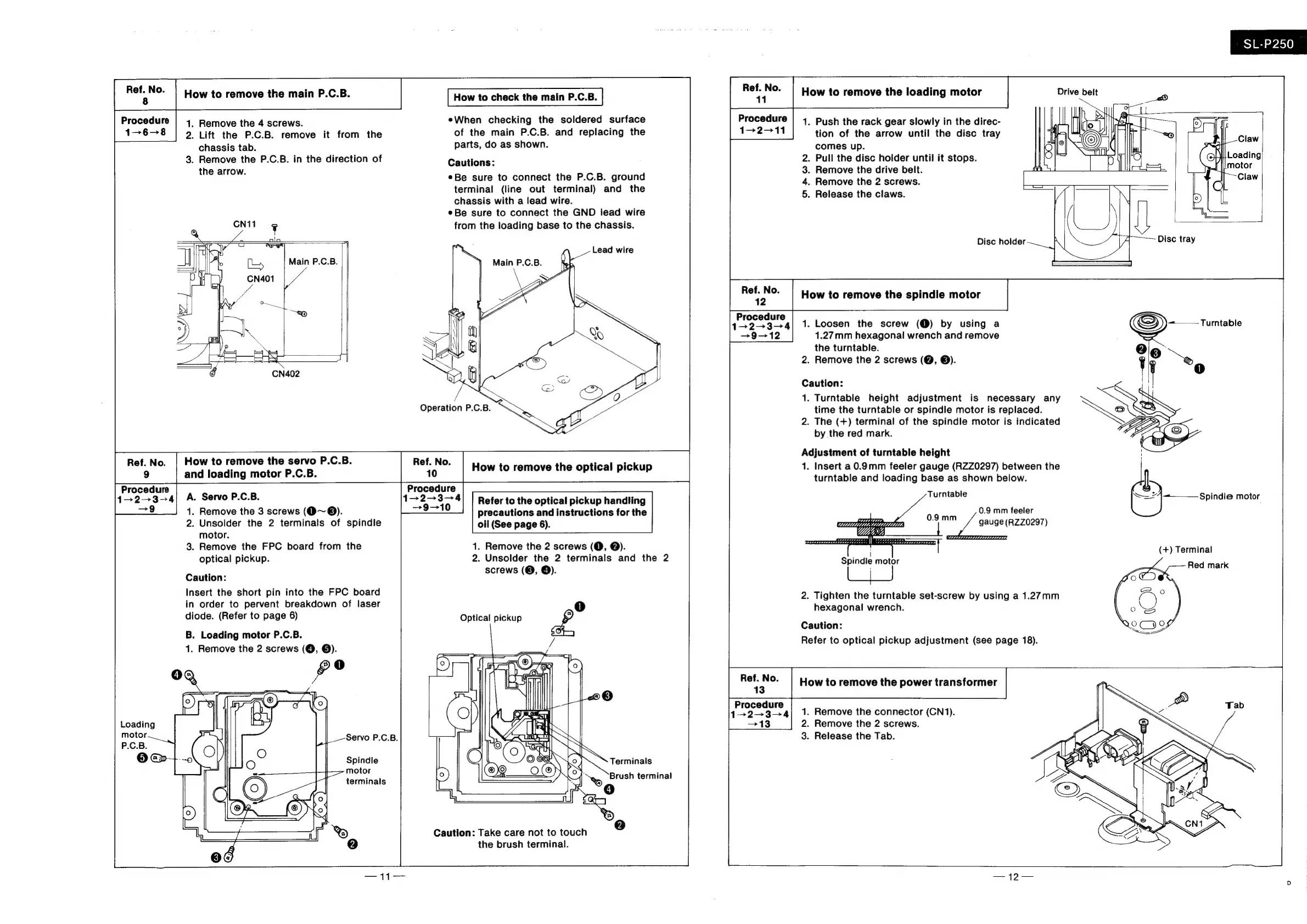
Ref.
No.
8
Procedure
1-6-8
How
to
remove
the
main
P.C.B.
1.
Remove
the
4
screws.
2.
Lift
the
P.C.B.
remove
it
from
the
chassis
tab.
3.
Remove
the
P.C.B.
in
the
direction
of
the
arrow.
Main
P.C.B.
How
to
check
the
main
P.C.B.
eWhen
checking
the
soldered
surface
of
the
main
P.C.B.
and
replacing
the
parts,
do
as
shown.
Cautions:
¢Be
sure
to
connect
the
P.C.B.
ground
terminal
(line
out
terminal)
and
the
chassis
with
a
Jead
wire.
¢Be
sure
to
connect
the
GND
lead
wire
from
the
loading
base
to
the
chassis.
Lead
wire
Ref.
No.
|
How
to
remove
the
servo
P.C.B.
Ref.
No.
and
loading
motor
P.C.B.
10
How
to
remove
the
optical
pickup
Procedure
Procedure
1>2+3-—4|
A.
Servo
P.C.B.
I
aaa
Refer
to
the
optical
pickup
handling
=
1.
Remove
the
3
screws
(@~®).
precautions
and
instructions
for
the
2.
Unsolder
the
2
terminals
of
spindle
oil
(See
page
6).
motor.
3.
Remove
the
FPC
board
from
the
1.
Remove
the
2
screws
(@,
@).
optical
pickup.
2.
Unsolder
the
2
terminals
and
the
2
Caution:
corpus
(@,
@):
Insert
the
short
pin
into
the
FPC
board
in
order
to
pervent
breakdown
of
laser
1)
diode.
(Refer
to
page
6)
Optical
pickup
©)
B.
Loading motor
P.C.B.
1.
Remove
the
2
screws
(@,
©).
©
@O
4
To)
&
Loading
motor
Spindle
motor
terminals
—11—
Terminals
Caution:
Take
care
not
to
touch
the
brush
terminal.
Procedure
1-2--11
Ps)
—_—o
a
°o
Ref.
No.
12
Procedure
1-2-3-
9-12
Ref.
No.
13
Procedure
How
to
remove
the
loading
motor
1.
Push
the
rack
gear
slowly
in
the
direc-
tion
of
the
arrow
until
the
disc
tray
comes
up.
.
Pull
the
disc
holder
until
it
stops.
.
Remove
the
drive
belt.
|
SL-P250__
Loading
motor
.
Remove
the
2
screws.
Claw
On
&
ON
.
Release
the
claws.
Disc
holder
Disc
tray
How
to
remove
the
spindle
motor
1.
Loosen
the
screw
(@)
by
using
a
1.27mm
hexagonal
wrench
and
remove
the
turntable.
2.
Remove
the
2
screws
(Q,
©).
Caution:
1.
Turntable
height
adjustment
is
necessary
any
time
the
turntable
or
spindle
motor
is
replaced.
2.
The
(+)
terminal
of
the
spindle
motor
is
indicated
by
the
red
mark.
Adjustment
of
turntable
height
1.
Insert
a
0.9mm
feeler
gauge
(RZZ0297)
between
the
turntable
and
loading
base
as
shown
below.
Turntable
0.9
mm
feeler
ata
gauge
(RZZ0297)
i
Spindle
motor
2.
Tighten
the
turntable
set-screw
by
using
a
1.27mm
hexagonal
wrench.
Caution:
Refer
to
optical
pickup
adjustment
(see
page
18).
How
to
remove
the
power
transformer
1.
Remove
the
connector
(CN1).
2.
Remove
the
2
screws.
3.
Release
the
Tab.
Turntable
Red
mark

Related product manuals