EasyManua.ls Logo

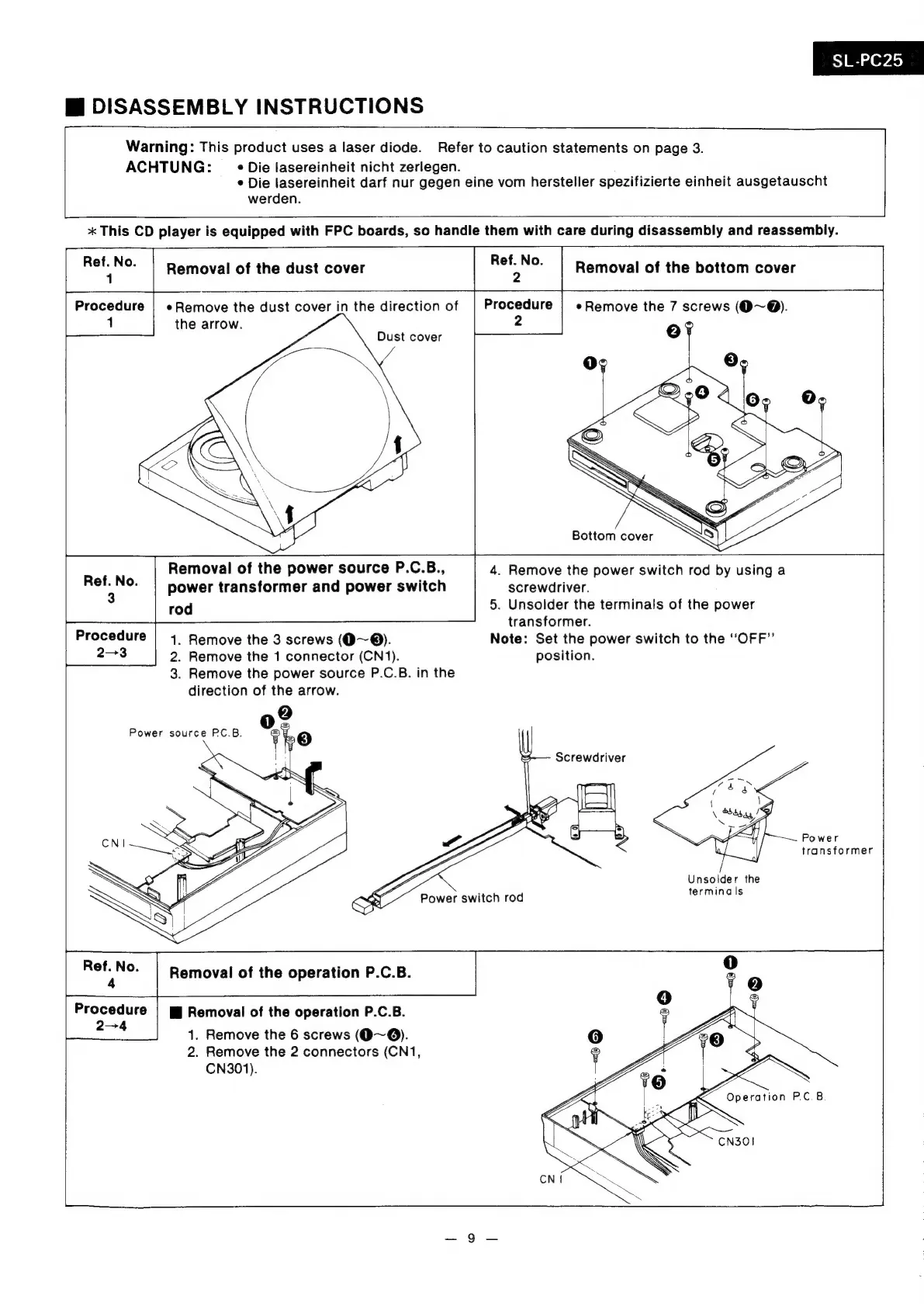
Technics SL-PC25 - DISASSEMBLY INSTRUCTIONS; Removal of Dust Cover; Removal of Bottom Cover; Removal of Power Source P.C.B.

Technics SL-PC25
42 pages
Print Icon
To Next Page IconTo Next Page
To Previous Page IconTo Previous Page
Loading...
ss]
ed
O40)
Mi
DISASSEMBLY
INSTRUCTIONS
Warning:
This
product
uses
a
laser
diode.
Refer
to
caution
statements
on
page
3.
ACHTUNG:
_
«Die
lasereinheit
nicht
zerlegen.
¢
Die
lasereinheit
darf
nur
gegen
eine
vom
hersteller
spezifizierte
einheit
ausgetauscht
werden.
*
This
CD
player
is
equipped
with
FPC
boards,
so
handle
them
with
care
during
disassembly
and
reassembly.
Removal
of
the
bottom
cover
eRemove
the
7
screws
(O~@).
oF
1
the
arrow.
Dust
cover
Bottom
cover
Removal
of
the
power
source
P.C.B.,
power
transformer
and
power
switch
rod
4.
Remove
the
power
switch
rod
by
using
a
screwdriver.
5.
Unsolder
the
terminals
of
the
power
transformer.
Procedure
|
14.
Remove
the
3
screws
(O~®).
Note:
Set
the
power
switch
to
the
“OFF”
2-3
2.
Remove
the
1
connector
(CN1).
position.
3.
Remove
the
power
source
P.C.B.
in
the
direction
of
the
arrow.
Power
transformer
Unsolder
the
terminals
Procedure
2-4
Hi
Removal
of
the
operation
P.C.B.
1.
Remove
the
6
screws
(9~@).
2.
Remove
the
2
connectors
(CN1,
CN301).

Related product manuals