EasyManua.ls Logo

Technics SL-PJ33 - Page 4

Technics SL-PJ33
36 pages
Print Icon
To Next Page IconTo Next Page
To Previous Page IconTo Previous Page
Loading...
SL-PJ33
m@
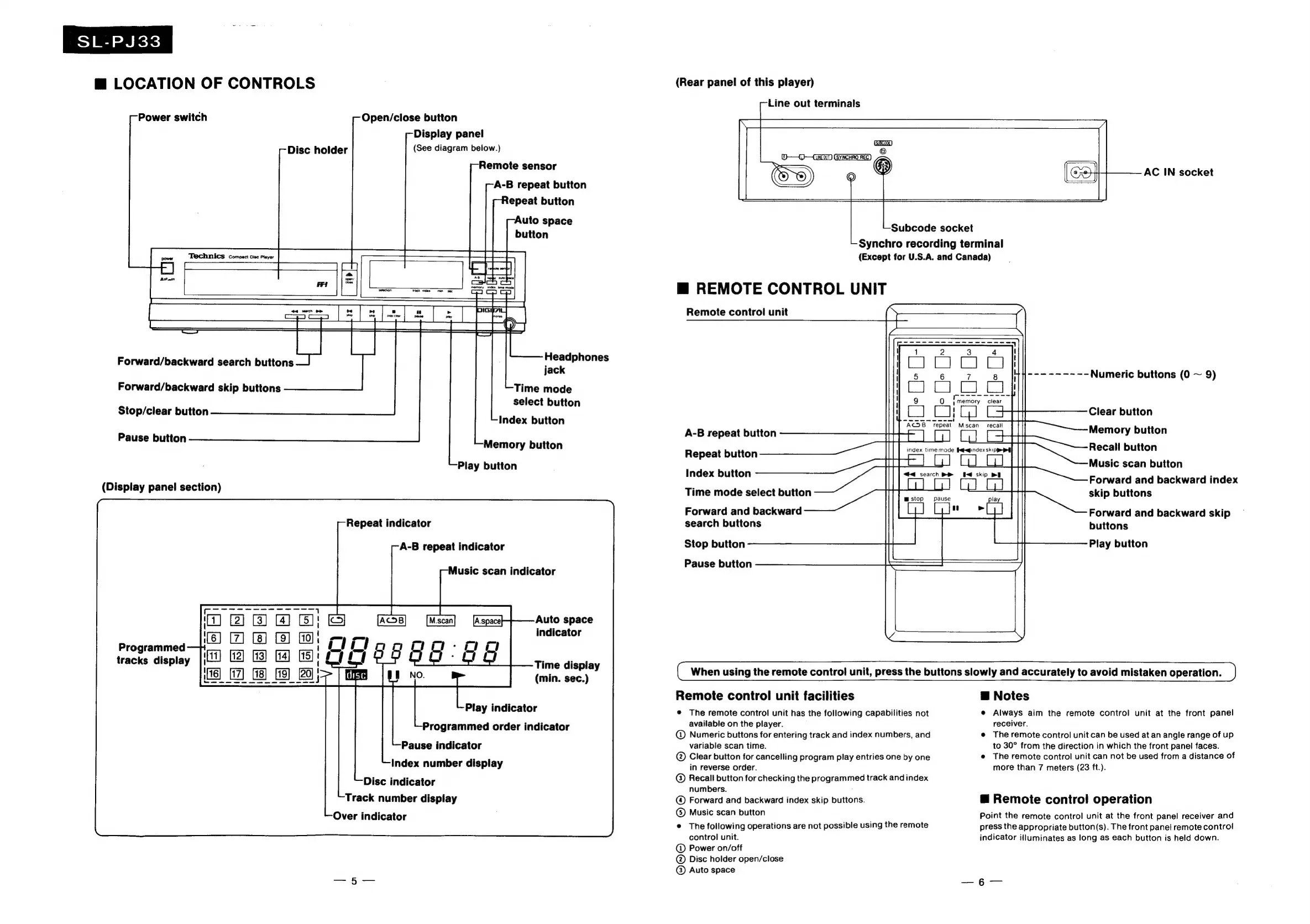
LOCATION
OF
CONTROLS
Power
switch
Disc
holder
Technics
compact
disc
piayer
Open/close
button
Display
panel
(See
diagram
below.)
Remote
sensor
A-B
repeat
button
Repeat
button
Auto
space
button
Forward/backward
search
buttons
Forward/backward
skip
buttons
Stop/clear
button
Pause
button
(Display
panel
section)
Programmed
tracks
display
Headphones
jack
Time
mode
select
button
Index
button
Memory
button
Play
button
Repeat
indicator
A-B
repeat
indicator
Music
scan
indicator
Auto
space
indicator
Time
display
(min.
sec.)
Play
indicator
Programmed
order
indicator
Pause
indicator
Index
number
display
Disc
indicator
Track
number
display
Over
indicator
(Rear
panel
of
this
player)
Line
out
terminals
(SUEC5HE)
AC
IN
socket
Subcode
socket
Synchro
recording
terminal
(Except
for
U.S.A.
and
Canada)
mM
REMOTE
CONTROL
UNIT
Remote
control
unit
A-B
repeat
button
Repeat
button
Index
button
Time
mode
select
button
Forward
and
backward
search
buttons
Stop
button
Numeric
buttons
(0
~
9)
Clear
button
Memory
button
Recall
button
Music
scan
button
Forward
and
backward
index
skip
buttons
Forward
and
backward
skip
buttons
Play
button
Pause
button
{
When
using
the
remote
contro!
unit,
press
the
buttons
slowly
and
accurately
to
avoid
mistaken
operation.
Remote
control
unit
facilities
@
The
remote
control
unit
has
the
following
capabilities
not
available
on
the
player.
@
Numeric
buttons
for
entering
track
and
index
numbers,
and
variable
scan
time.
©®
Clear
button
for
cancelling
program
play
entries
one
by
one
in
reverse
order.
Recall
button
for
checking
the
programmed
track
and
index
numbers.
Forward
and
backward
index
skip
buttons.
Music
scan
button
©
The
following
operations
are
not
possible
using
the
remote
control
unit.
@
Power
on/off
@
Disc
holder
open/close
®
Auto
space
B
Notes
e
Always
aim
the
remote
control
unit
at
the
front
panel
receiver.
e
The
remote
control
unit
can
be
used
at
an
angle
range
of
up
to
30°
from
the
direction
in
which
the
front
panel
faces.
e@
The
remote
control
unit
can
not
be
used
from
a
distance
of
more
than
7
meters
(23
ft.).
@
Remote
control
operation
Point
the
remote
control
unit
at
the
front
panel
receiver
and
press
the
appropriate
button(s).
The
front
panel
remote
control
indicator
illuminates
as
long
as
each
button
is
held
down.

Related product manuals