EasyManua.ls Logo

Technics SX-E33 - Page 7

Technics SX-E33
58 pages
Print Icon
To Next Page IconTo Next Page
To Previous Page IconTo Previous Page
Loading...
4
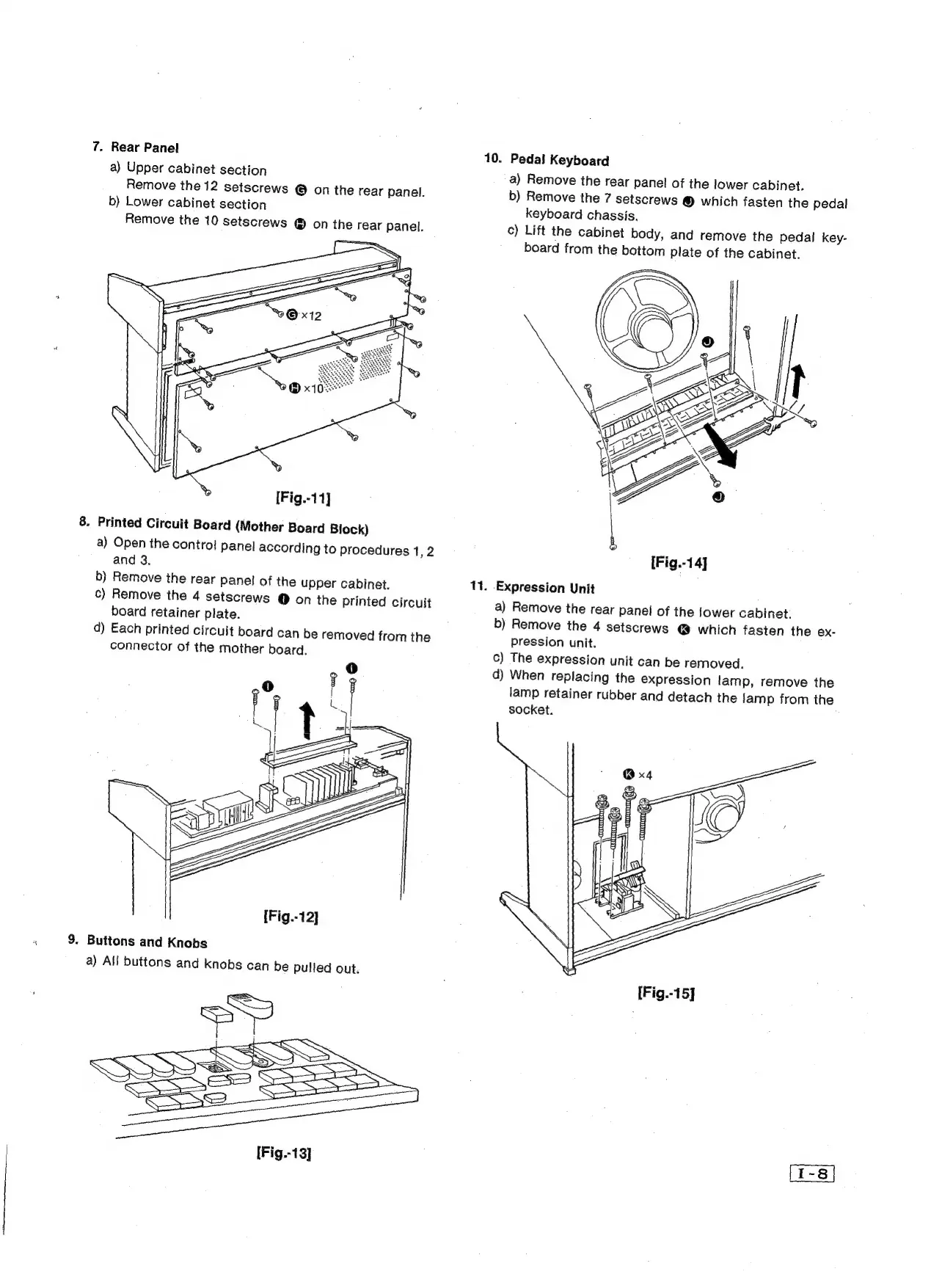
7.
Rear
Panel
a)
Upper
cabinet
section
Remove
the
12
setscrews
©
on
the
rear
panel.
b)
Lower
cabinet
section
Remove
the
10
setscrews
®
on
the
rear
panel.
8.
Printed
Circuit
Board
(Mother
Board
Block)
a)
Open
the
contro!
panel
according
to
procedures
1,2
and
3.
b)
Remove
the
rear
panel
of
the
upper
cabinet.
c)
Remove
the
4
setscrews
@
on
the
printed
circuit
board
retainer
plate.
d)
Each
printed
circuit
board
can
be
removed
from
the
connector
of
the
mother
board.
[Fig.-12]
9.
Buttons
and
Knobs
a)
All
buttons
and
knobs
can
be
pulled
out.
[Fig.-13]
10.
11.
Pedal
Keyboard
a)
Remove
the
rear
panel
of
the
lower
cabinet.
b)
Remove
the
7
setscrews
©
which
fasten
the
pedal
keyboard
chassis.
c)
Lift
the
cabinet
body,
and
remove
the
pedal
key-
board
from
the
bottom
plate
of
the
cabinet.
[Fig.-14]
-Expression
Unit
a)
Remove
the
rear
panel
of
the
iower
cabinet:
b)
Remove
the
4
setscrews
@
which
fasten
the
ex-
pression
unit.
c)
The
expression
unit
can
be
removed.
d)
When
replacing
the
expression
lamp,
remove
the
lamp
retainer
rubber
and
detach
the
lamp
from
the
socket.
,