EasyManua.ls Logo

Technics SX-G5 - Page 13

Technics SX-G5
44 pages
Print Icon
To Next Page IconTo Next Page
To Previous Page IconTo Previous Page
Loading...
upper
organ
presets
x
N
harmonic
coupler
upper
harmonic
coupler
lower
cancel
2%
program
volume
slow
attack
volume
tong
cancel
2"
program
pone
FIFE]
©
&§)
©
T>EF
Ee],
G
oa
==
a
f
Tigtal
Grawbare
22
voles
yp
porcussive
tone
L___
(———=
aigiat
orawo
lt?
Youre
ot
nee
(ne
a
LY
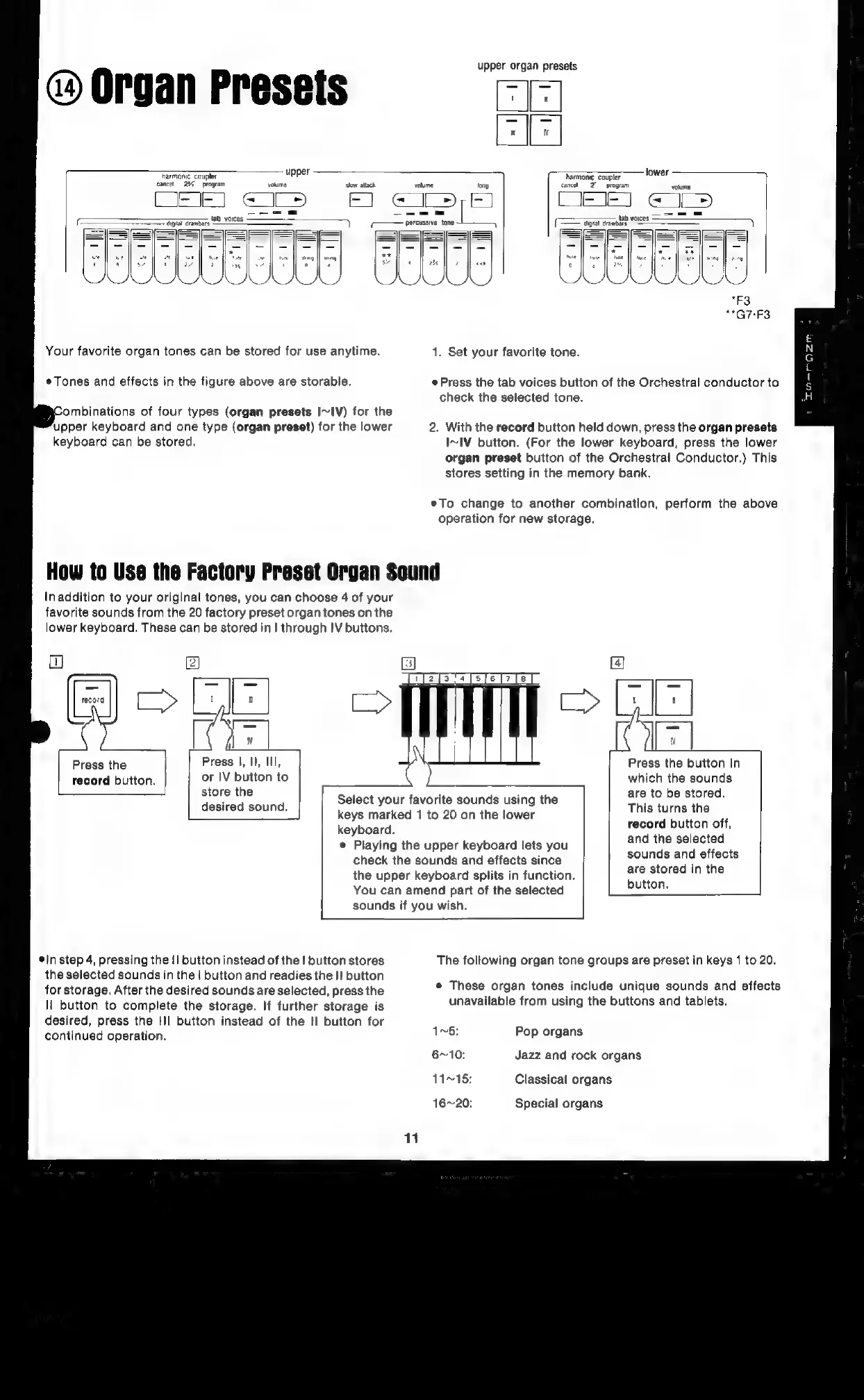
Your
favorite
organ
tones
can
be
stored
for
use
anytime.
1.
Set
your
favorite
tone.
Tones
and
effects
in
the
figure
above
are
storable.
«Press
the
tab
voices
button
of
the
Orchestral
conductor
to
check
the
selected
tone.
ombinations
of
four
types
(organ
presets
I~IV)
for
the
upper
keyboard
and
one
type
(organ
preset)
for
the
lower
2.
With
the
record
button
held
down,
press
the
organ
presets
keyboard
can
be
stored.
I~IV
button.
(For
the
lower
keyboard,
press
the
lower
organ
preset
button
of
the
Orchestral
Conductor.)
This
stores
setting
in
the
memory
bank.
eTo
change
to
another
combination,
perform
the
above
operation
for
new
storage.
How
to
Use
the
Factory
Preset
Organ
Sound
Inaddition
to
your
original
tones,
you
can
choose
4
of
your
favorite
sounds
from
the
20
factory
preset
organ
tones
on
the
lower
keyboard.
These
can
be
stored
in
|
through
IV
buttons.
ote
[fd]
Press
the
Press
|,
II,
lll,
record
button.
or
IV
button
to
store
the
a
Press
the
button
in
which
the
sounds
are
to
be
stored.
This
turns
the
record
button
off,
Select
your
favorite
sounds
using
the
keys
marked
1
to
20
on
the
lower
keyboard.
e
Playing
the
upper
keyboard
lets
you
check
the
sounds
and
effects
since
the
upper
keyboard
splits
in
function.
You
can
amend
part
of
the
selected
sounds
if
you
wish.
desired
sound.
and
the
selected
sounds
and
effects
are
stored
in
the
button,
*In
step
4,
pressing
the
I
button
instead
of
the
|
button
stores
The
foltowing
organ
tone
groups
are
preset
in
keys
1
to
20.
the
selected
sounds
in
the
|
button
and
readies
the
I!
button
for
storage.
After
the
desired
sounds
are
selected,
press
the
Il
button
to
complete
the
storage.
If
further
storage
is
desired,
press
the
III
button
instead
of
the
II
button
for
e
These
organ
tones
include
unique
sounds
and
effects
unavailable
from
using
the
buttons
and
tablets.
continued
operation.
1v5:
Pop
organs
6~10:
Jazz
and
rock
organs
11~15:
Classical
organs
16~20:
Special
organs
11

Related product manuals