EasyManua.ls Logo

Technics SX-G5 - Page 40

Technics SX-G5
44 pages
Print Icon
To Next Page IconTo Next Page
To Previous Page IconTo Previous Page
Loading...
-—
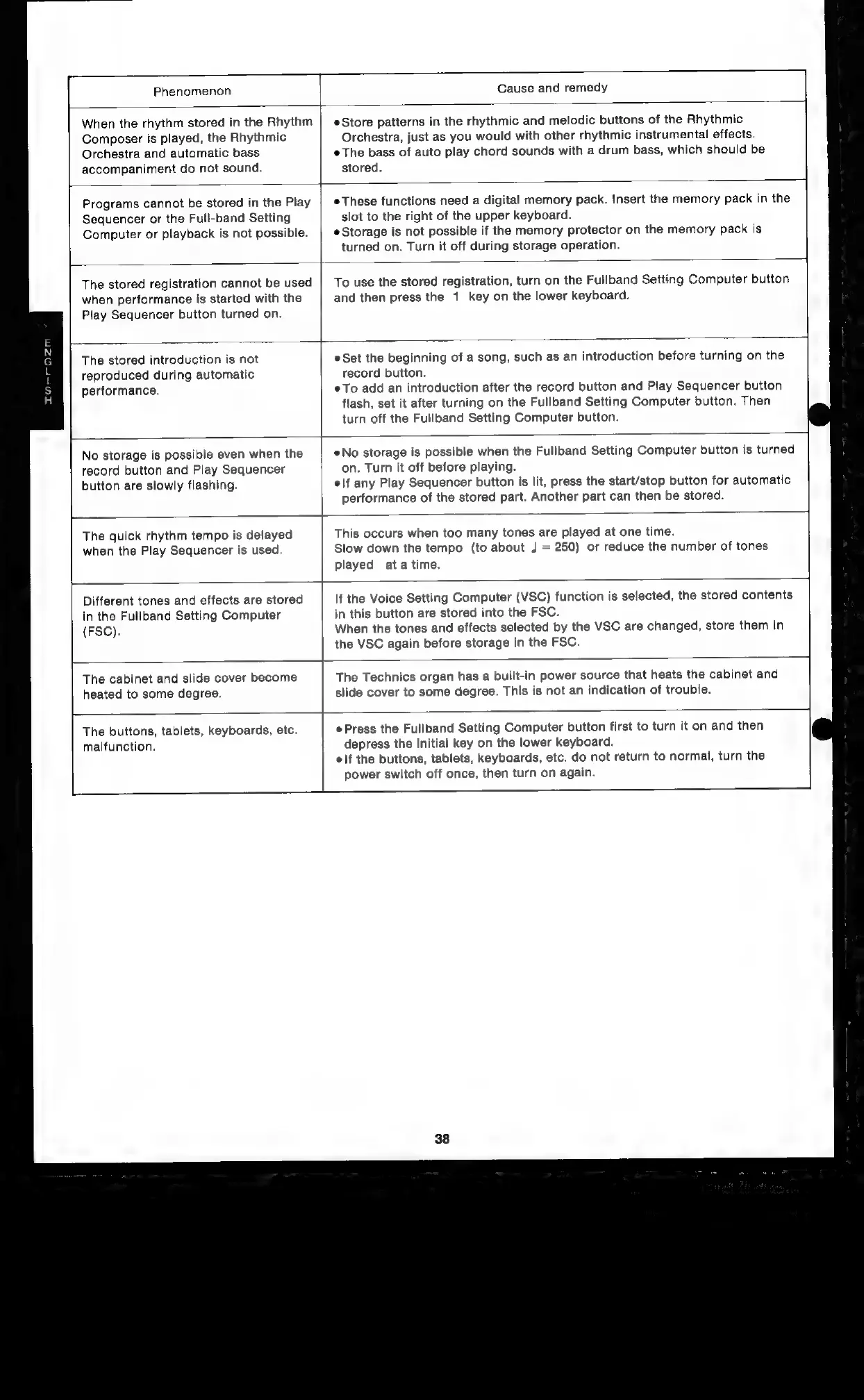
Phenomenon
Cause
and
remedy
When
the
rhythm
stored
in
the
Rhythm
Composer
is
played,
the
Rhythmic
Orchestra
and
automatic
bass
accompaniment
do
not
sound.
Store
patterns
in
the
rhythmic
and
melodic
buttons
of
the
Rhythmic
Orchestra,
just
as
you
would
with
other
rhythmic
instrumental
effects.
¢
The
bass
of
auto
play
chord
sounds
with
a
drum
bass,
which
should
be
stored.
Programs
cannot
be
stored
in
the
Play
Sequencer
or
the
Full-band
Setting
Computer
or
playback
is
not
possible.
e
These
functions
need
a
digital
memory
pack.
Insert
the
memory
pack
in
the
slot
to
the
right
of
the
upper
keyboard.
¢
Storage
is
not
possible
if
the
memory
protector
on
the
memory
pack
is
turned
on.
Turn
it
off
during
storage
operation.
The
stored
registration
cannot
be
used
when
performance
is
started
with
the
Play
Sequencer
button
turned
on.
To
use
the
stored
registration,
turn
on
the
Fullband
Setting
Computer
button
and
then
press
the
1
key
on
the
lower
keyboard.
The
stored
introduction
is
not
reproduced
during
automatic
performance.
Set
the
beginning
of
a
song,
such
as
an
introduction
before
turning
on
the
record
button.
To
add
an
introduction
after
the
record button
and
Play
Sequencer
button
flash,
set
it
after
turning
on
the
Fullband
Setting
Computer
button.
Then
turn
off
the
Fullband
Setting
Computer
button.
No
storage
is
possible
even
when
the
record
button
and
Play
Sequencer
button
are
slowly
flashing.
®No
storage
is
possible
when
the
Fullband
Setting
Computer
button
is
turned
on.
Turn
it
off
before
playing.
|f
any
Play
Sequencer
button
is
lit,
press
the
start/stop
button
for
automatic
performance
of
the
stored
part.
Another
part
can
then
be
stored.
The
quick
rhythm
tempo
is
delayed
when
the
Play
Sequencer
is
used.
This
occurs
when
too
many
tones
are
played
at
one
time.
Slow
down
the
tempo
(to
about
J
=
250)
or
reduce
the
number
of
tones
played
ata
time.
Different
tones
and
effects
are
stored
in
the
Fullband
Setting
Computer
(FSC).
If
the
Voice
Setting
Computer
(VSC)
function
is
selected,
the
stored
contents
in
this
button
are
stored
into
the
FSC.
When
the
tones
and
effects
selected
by
the
VSC
are
changed,
store
them
in
the
VSC
again
before
storage
in
the
FSC.
The
cabinet
and
slide
cover
become
heated
to
some
degree.
The
Technics
organ
has
a
built-in
power
source
that
heats
the
cabinet
and
slide
cover
to
some
degree.
This
is
not
an
indication
of
trouble.
The
buttons,
tablets,
keyboards,
etc.
malfunction.
Press
the
Fullband
Setting
Computer
button
first
to
turn
it
on
and
then
depress
the
initial
key
on
the
lower
keyboard.
elf
the
buttons,
tablets,
keyboards,
etc.
do
not
return
to
normal,
turn
the
power
switch
off
once,
then
turn
on
again.

Related product manuals