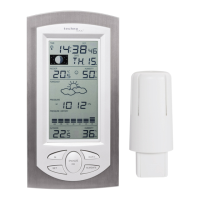
EasyManua.ls Logo

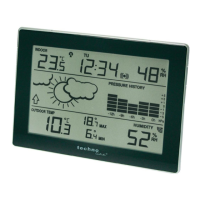
Techno Line WS 9255 - User Manual

Techno Line WS 9255
9 pages
Print Icon
To Next Page IconTo Next Page
Loading...
EN1
WS9255 Manual
Features:
DCF Radio control time function
12/24 hour format
Daily Alarm Function
Snooze function(OFF or 1~60min)
Low battery indicator
Humidity: Indoor & Outdoor measurable range: 20%RH ~ 95%RH
Temperature:
o Indoor temperature measurement ranges: -9.9°C (14.1°F) ~ 50°C (122°F)
o Outdoor temperature measurement ranges: -25°C (-13°F) ~ 50°C (122°F)
o Temperature alternatively in or .
o Outdoor thermometer and ice alert
Maximum /minimum value query of temperature and humidity
Wireless Outdoor Sensor:
o Wall Mount or Table Stand
o 3 Channel selectable
o 433.92MHz RF transmitting frequency
o Maximum transmission power: 13 dBm
o 30 meter transmission range in an open area
Weather forecasting function
Power Supply:
Weather Station:
Battery: 2 x LR6 AA
Wireless Outdoor Sensor:
Battery: 2 x LR6 AA
Question and Answer IconNeed help?

Do you have a question about the Techno Line WS 9255 and is the answer not in the manual?

Overview

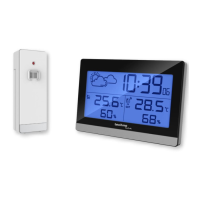
This document describes the WS9255 Weather Station, a device designed to provide comprehensive environmental monitoring and timekeeping functionalities.

Function Description:

The WS9255 Weather Station is a multi-functional device that offers accurate time display, environmental monitoring, and weather forecasting. Its core functions include:

  • Timekeeping: It features a DCF Radio controlled time function, ensuring precise time synchronization. Users can choose between 12/24 hour formats.
  • Alarm and Snooze: The device includes a daily alarm function with a customizable snooze duration, ranging from OFF to 60 minutes.
  • Temperature and Humidity Monitoring: It measures both indoor and outdoor temperature and humidity. The indoor temperature range is -9.9°C (14.1°F) to 50°C (122°F), while the outdoor temperature range is -25°C (-13°F) to 50°C (122°F). Humidity is measured within a range of 20%RH to 95%RH. Temperature can be displayed in either Celsius or Fahrenheit.
  • Weather Forecasting: The station provides a weather forecasting function, calculated based on fluctuations in barometric pressure. It displays various weather symbols (sunny, slightly cloudy, cloudy, rainy) to indicate weather fluctuations over the next eight hours.
  • Ice Alert: An ice alert symbol appears and flashes next to the outdoor temperature when it falls between -1°C to +3°C (30°F to 37°F).
  • Maximum/Minimum Values: Users can query the maximum and minimum recorded values for temperature and humidity. These values can be reset to current readings.
  • Low Battery Indicator: The device includes a low battery indicator to alert users when the batteries need replacement.
  • Wireless Outdoor Sensor: The weather station communicates wirelessly with an outdoor sensor, which can be wall-mounted or placed on a table. This sensor supports 3 selectable channels and transmits data at 433.92MHz RF frequency.

Important Technical Specifications:

  • Time Zone: -12 to 12 hours.
  • Indoor Temperature Range: -9.9°C to 50°C (14.2°F to 122°F).
  • Outdoor Temperature Range: -25°C to 50°C (-13°F to 122°F).
  • Temperature Resolution: 0.1°C / 0.1°F.
  • Temperature Accuracy:
    • 0°C to 40°C: ±1°C
    • -25°C to -0°C, 40°C to 50°C: ±2°C
    • 32°F to 104°F: ±1.8°F
    • -13°F to 32°F, 104°F to 122°F: ±3.6°F
  • Humidity Measuring Range: 20-95%.
  • Humidity Resolution: 1%.
  • Humidity Accuracy:
    • 40-80%: ±5%
    • 20-39%, 81-95%: ±8%
  • Maximum Transmission Power: 13 dBm.
  • RF Receiving Distance: 30 meters (in an open area).
  • Power Supply:
    • Weather Station: 2 x LR6 AA batteries.
    • Wireless Outdoor Sensor: 2 x LR6 AA batteries.

Usage Features:

  • Initial Setup: To begin, insert 2 x AA batteries into both the Weather Station and the Wireless Outdoor Sensor, observing correct polarity. The LCD display will light up, and the station will detect indoor temperature and humidity. The outdoor sensor reception process takes approximately 3 minutes, indicated by a flashing RF antenna symbol.
  • DCF Signal Reception: The clock automatically searches for the DCF (radio controlled time) signal after 3 minutes of startup or battery change. A flashing radio mast icon indicates active search, while a continuously displayed icon signifies successful reception. Synchronization attempts occur automatically at 1:00, 2:00, and 3:00 am. Manual DCF signal reception can be initiated by pressing and holding the "WAVE" button for two seconds.
  • Manual Time Setting: Press and hold the "MODE" button for 2 seconds to enter time setting mode. Users can adjust temperature units (°C/°F), 12/24 hour mode, time zone, hour, minute, and weather forecast pattern using the "+" and "-" buttons, confirming each setting with the "MODE" button. If no operation occurs within 20 seconds, the station returns to normal time mode.
  • Alarm Setting: Press the "+" button once to display the alarm icon, and again to turn it OFF. To set the alarm time, press "MODE" once to display the alarm time, then press and hold "MODE" for 2 seconds. Adjust the hour, minute, and snooze time (OFF to 60 minutes) using the "+" and "-" buttons, confirming with "MODE".
  • Alarm Deactivation: Press any button except "SNOOZE/LIGHT" to stop the alarm. The alarm automatically resets for the next day.
  • Snooze Function: Touch the "SNOOZE/LIGHT" button during an alarm to activate snooze mode. The alarm will sound again after the set snooze duration. If snooze time is set to OFF, the alarm will not repeat.
  • RF Transmission: The weather station automatically receives data from the outdoor sensor. If reception fails, press and hold the "-/CH" button for 3 seconds to manually initiate transmission reception. For multiple outdoor sensors (2 or 3), press "-/CH" briefly to cycle through channels CH2, CH3, or cyclic display.
  • Maximum/Minimum Values: Press the "MEM" button once to display maximum values, and again to display minimum values. Press and hold "MEM" for 3 seconds to reset these values.
  • Background Lighting: Touch the "SNOOZE/LIGHT" button to illuminate the backlight for 8 seconds.

Maintenance Features:

  • Battery Replacement: Always replace a complete set of batteries. Do not mix used and new batteries. Remove exhausted batteries immediately and remove batteries when the device is not in use.
  • Environmental Considerations:
    • Battery Disposal: Old batteries should not be disposed of with domestic waste due to potential environmental and health damage. They must be returned to dealers or collection points.
    • Electrical Device Disposal: The device should be disposed of separately from general household waste at the end of its useful life. Take it to a local waste collection point or recycling center.

Precautions:

  • The main unit is intended for indoor use only.
  • Avoid subjecting the unit to excessive force, shock, extreme temperatures, direct sunlight, dust, or humidity.
  • Do not immerse the unit in water or allow contact with corrosive materials.
  • Do not dispose of the unit in fire.
  • Do not open the inner back case or tamper with components.
  • Use only alkaline batteries; do not use rechargeable batteries.
  • Do not recharge batteries or dispose of them in fire, as they may explode.
  • Store batteries away from metal objects to prevent short circuits.
  • Avoid exposing batteries to extreme temperatures or humidity.
  • Keep batteries out of reach of children due to choking hazard.
  • Ensure the product is used only for its intended purpose.

The WS9255 Weather Station is designed to be compliant with essential requirements and other relevant provisions of Directive 2014/53/EU and ROHS 2011/65/EC.

Techno Line WS 9255 Specifications

General IconGeneral
BrandTechno Line
ModelWS 9255
CategoryWeather Station
LanguageEnglish

Related product manuals