EN11
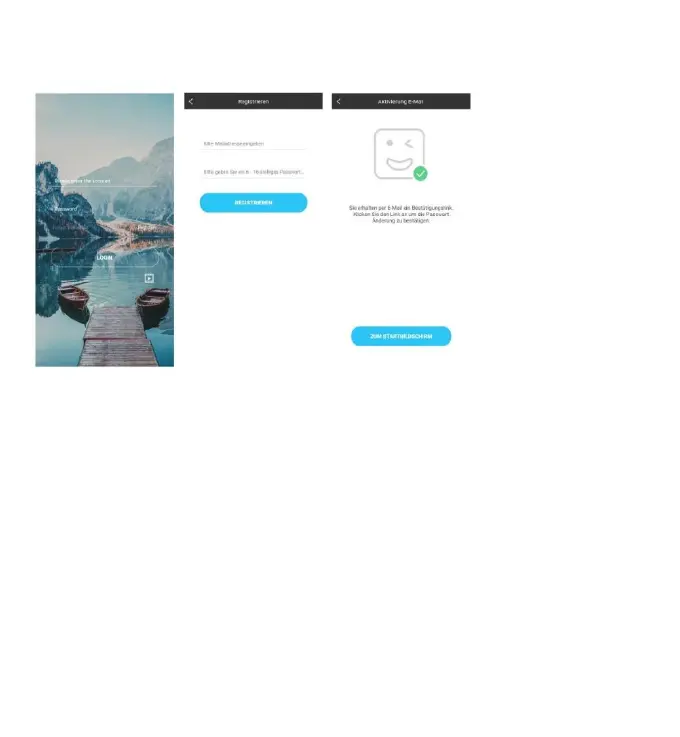
interface, according to the registration shown below. After registration is completed,
open the mailbox for account activation.
Account login interface ->
Account registration interface ->
Prompt mailbox account activation ->
Pairing with weather station device
1. Login user account
2. Make sure your phone is connected to a 2.4GHz Wi-Fi network. and Bluetooth
function is turned on. (WiFi weather station currently only support 2.4GHz Wi-Fi
network during configuration)
3. Plug in weather station with AC/DC power, Press and hold “WIFI” button for 3
seconds until “WI-FI AP” blinking on the device display. If the device is first ena-
bled, it will automatically enter AP mode, and “WI-FI AP” blinks on the display.
4. Please find and select “Weathertyp”.
5. Select the correct Wi-Fi network SSID and Make sure Wi-Fi password you’re
inputting is correct.
6. Follow the in-App instructions to pair the weather station device:
When the notice of Device binding successful Appears in the App. The weather











 To Next Page