5 6
INSTRUCTION MANUAL OF ELECTRONIC DIGITAL SAFE
TECHNOSAFE MOD. TT/3 NEW – TT/4 NEW
1. USEFUL INFORMATIONS:
7. CHARGING CHECK OF THE INTERNAL BATTERIES
8. EMERGENCY OPENING BY DISCHARGED INTERNAL BATTERIES
9. OPEN THE DOOR USING A MECHANICAL EMERGENCY KEY (only by door closed/bolts out:
2. INITIAL SETTINGS:
3. OPENING/CLOSING USING THE SERVICE CODE “1234” (with door open and bolts retracted)
4. PERSONAL CODE PROGRAMMING (with the door open and the bolts retracted)
5. TO CLOSE:
6. TO OPEN USING A PERSONAL CODE:
• Read the instructions carefully before using the safe.
• The safe is supplied with a service code “
1234
”
• Keep your personal code in a safe place.
• Do not use personal data like birthdays, telephone numbers…etc.
• It will be convenient to replace the batteries every year using a 9V alkaline battery type LR61.
• The safe is supplied with 2 emergency keys to use in case of emergency. Please, never leave the keys in the safe
itself.
• If the safe will not be used for a long time, please, take out the batteries.
• Before installing the safe, please, verify the opening and closing with the door open utilizing a service code 1234.
• At any time, the battery level of the safe can be checked by pressing the “
LOCK
” key when the door is closed (bolts
out). Yellow indicator light shine means that the level of the internal batteries is low and you need to change the
batteries using
4 x 1,5 V. AA size alkaline batteries.
* If the internal batteries goes completely discharged, it is necessary to open the safe using the external batteries or
the emergency key.
• It is necessary to have a new
9V LR61
alkaline battery
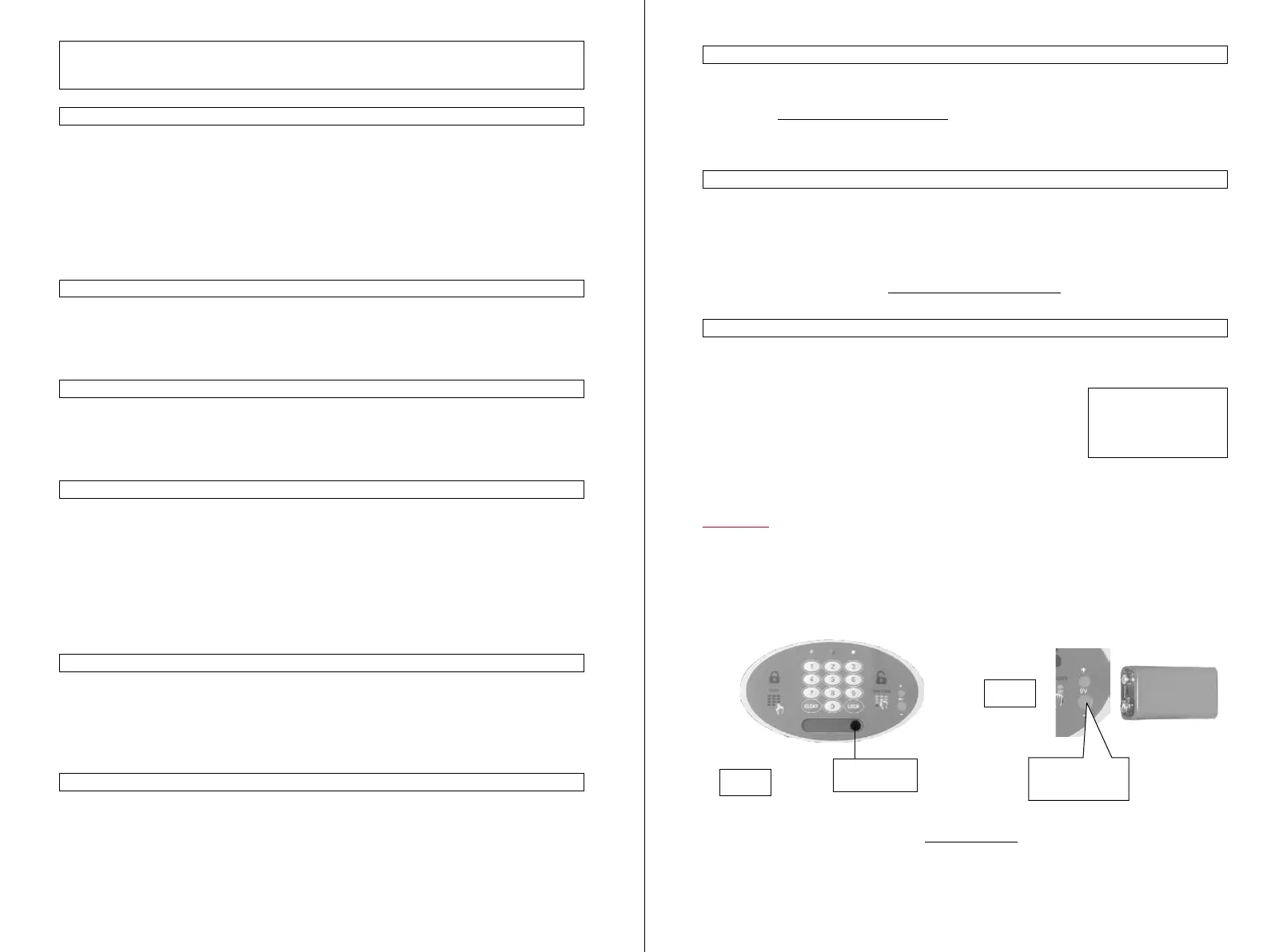
• Press the 9V battery contacts firmly on the corresponding contacts on the keyboards, ensuring that they are
positioned correctly the “-“ of the battery touching the bigger contact and the “+” of the battery touching the small
contact (
see Pic. 2
).
• Digit your personal code to open the door.
• Change the internal batteries using new
4 x 1,5 V. AA size alkaline batteries.
When the safe is closed and you cannot open it by your Code or for change the batteries, then you have an emergency
opening with an override key
• Remove the adhesive label marked with “
TECHNOSAFE
”.
• Insert the emergency key with the cut on the top-side in the hole (
see Pic. 1
).
• Turn the key clockwise until the stop point. The green indicator light will shine.
• Turn the key anti-clockwise and take out the key.
• Press the “LOCK” key and the bolts will be automatically retract.
• Now, you need to program your new personal code following the instructions below at the point 4.
• The safe is delivered with the door unlocking. Put the safe in his normal position, so the spring open the door.
• Remove the battery cover located on the back of the door and install the 4 batteries included, ensuring they are
tted with correct polarity (+ and -) and close the battery compartment. One beep tone will sound and all LED will
shine, to indicate that the electronic system is activated.
• Close the door completely and press the “
LOCK
” key. The bolts will be automatic out. The red LED will shine to
signal that the door now is locked.
• Digit the service code “
1234
” and the door will be automatic open. The green LED will shine to signal that the
door now is opened.
• Close the door completely.
• Press “
LOCK
” key. The bolts will be automatic out and the red LED will shine to signal that the door now is
locked.
* If yellow indicator light shine after red light, that means the bolts are blocked by closing and the bolts return in the
open position. Please, remove the obstacle and repeat the operation from the beginning.
• Digit your personal code. The bolts will be automatic retract and the green indicator light will shine.
• If something block the return of the bolts, yellow indicator light shine after green light. This could happen, for
example, if the bolts are bended and they force on the internal part of the frame. In this case, it is necessary to push
the door and repeat the opening procedure from the beginning.
* After 4 attempts with incorrect codes, the keyboard will be disabled for 15 minutes. After 15 minutes, you can use
the safe again. Before wait-time, it will be possible to open the door using the emergency key.
• Press twice the “
CLEAR
” key. The green and red LED will shine.
• With both LED illuminated, digit your personal code with a
minimum of 3 to maximum of 6 digits
and press
“
LOCK
” key
• Digit your personal code again and press the “
LOCK
” key. The green and red LED will turn off and your personal
code is programmed.
If errors have been made while setting your new code, repeat the procedure for setting your new personal code
again, starting from the beginning.
*
Before close the safe, it is advisable to check that everything it is OK by operating the opening and closing
procedure for a number of times with door open. If all it will be good, you can close the door.
WARNING!
NEVER LEAVE YOUR
EMERGENCY KEY IN
THE SAFE
CAUTION
It must be remembered that even new, packed batteries can sometimes be defective, for various reasons, or have a
brief duration. In the event of failure of the motor release, or other faults, rst, replace the battery with new alkaline
batteries.
The manufacture declines all responsibility for failure to observe the instructions given, or for improper use of the
safe, thus causing the warranty to lapse.
Pic. 1
Emergency key
After sales service :
ASK TO YOUR RETAIL STOCKIST
Contacts for
external battery
Pic. 2


 To Previous Page
 Loading...