The Action Sports Camera Set, model TS-SV-CAM01, is a compact and versatile device designed for capturing high-quality video and photos in various environments, particularly suited for action sports and outdoor activities. It features a durable, waterproof casing that allows for underwater use up to 30 meters, making it ideal for diving, surfing, and other water sports.
Function Description
The camera functions as a digital video recorder and still camera, capable of capturing full HD 1080p video and high-resolution images. It is equipped with a 2-inch LCD screen for easy framing, playback, and menu navigation. The camera supports various modes including video recording, photo capture, playback, and system settings. It also offers features like video loop recording, exposure adjustment, record audio options, date stamp, and image size resolution settings. The device is designed for ease of use with clearly labeled buttons for power, OK/shutter, mode, and navigation (up/down).
Important Technical Specifications
- Battery: Integrated rechargeable 3.7 VDC - 200 mAh Li-Ion (0.74Wh) battery.
- Display: 2-inch LCD screen.
- Camera Angle: 90-degree wide angle.
- Focus: 20 cm to infinity.
- Image Resolution: 3M (2048x1536 pixels), 2M (1600x1200 pixels), 1.3M (1280x960 pixels), VGA (640x480 pixels).
- Video Resolution: 1080P (1920x1080 pixels) at 30 fps (interpolated); 720P (1280x720 pixels) at 30 fps; VGA (640x480 pixels) at 30 fps.
- Video Format: AVI.
- Video Output: 50/60Hz.
- Capture Resolution: 1M, 3M, 5M.
- Audio: Built-in microphone and speaker.
- USB Port: Micro USB 2.0.
- Storage: Micro SD card slot (supports up to 32GB).
- Water Resistance: Waterproof up to 30 meters (with waterproof casing).
- Dimensions: 5.9 cm x 2.5 cm x 4.0 cm (LxWxH).
- Weight: 54.5 grams (device only).
- Supported Computer Systems: Microsoft Windows 2000, XP, VISTA, Windows 7/8/10.
Usage Features
The camera comes with a comprehensive set of accessories for various mounting options, including a waterproof casing, mount for straps, connection mounts, handle bar/pole mount, mount with adhesive tape, straps, clips, and USB charging cables.
- Battery Installation and Charging: The battery is inserted by sliding the battery cover lock and opening the cover. The device is powered by a rechargeable battery, which can be charged via the micro USB port using the provided USB charging cable. A red LED indicator signifies charging, and it turns off when charging is complete. It takes approximately 4 hours for a full charge. The device can be used while charging.
- Micro SD Card Installation: A Micro SD card (not included) is inserted into the Micro SD card slot. Gently press the Micro SD card to remove it. The device is not equipped with built-in memory, so a Micro SD card is always required for recording videos.
- Power ON/OFF: To power on the device, press and hold the POWER button for ± 3 seconds; the LED indicator will turn blue. To power off, press and hold the POWER button for ± 3 seconds until the LED indicator switches off. The device automatically powers off when it reaches the idle time set by the user (1, 3, or 5 minutes). If the battery is low, a battery icon will appear on the LCD screen, and the device will automatically power off.
- Switching Between Modes: The device supports three modes: Video, Capture (still pictures), and Playback. The MODE button is used to switch between these modes.
- Video Recording: In video mode, press the OK button to start recording. A red dot indicator on the LCD screen and a red LED indicator will flash during recording. Press the OK button again to stop recording. The device will automatically stop recording if the battery is low.
- Photo Capture: In capture mode, press the OK button to take a picture.
- System Setup: The system setup menu allows users to configure various settings such as video size, video loop recording, exposure, record audio, date stamp, image size resolution, quality, date/time, auto power off, screen saver, beep sound, language, frequency, and format. Navigation through the menu is done using the UP and DOWN buttons, and selections are confirmed with the OK button.
- Connecting to Computer/Notebook: The device can be synchronized with computers via the USB cable. When connected, the LED indicator will turn blue, and "Disk Drive" will appear on the LCD display, indicating a successful connection. The device will appear in the list of connected devices on your computer. The Micro SD card can also be removed and inserted into a card reader for direct access.
- Applications: The manual illustrates various mounting configurations, showing how the camera can be attached to helmets, handlebars, and other surfaces using the included accessories.
Maintenance Features
- General Safety: The manual emphasizes several safety precautions, including not exposing the device to direct sunlight, heat sources, excessive humidity, or corrosive environments. It also warns against dropping the device, immersing it in water without the waterproof casing, or attempting to disassemble or repair it.
- Cleaning: Do not use abrasive cleaning solvents. Clean the exterior of the device with a damp cloth. A commercial lens cleaner is recommended for the lens surface.
- Battery and Heat: Avoid exposing the device to excessive heat sources like fire or direct sunlight. Do not crush, puncture, or dismantle the device, as this might damage the battery. Damaging the casing of the device and/or piercing it might lead to explosion or fire.
- Disposal: The device should not be disposed of in household waste. It should be taken to a local recycling station. The packaging materials are also recyclable. The crossed-out wheeled bin symbol on the product indicates that it must not be disposed of with unsorted municipal waste but collected separately for recycling. Batteries should also be disposed of at local collection points.
The Action Sports Camera Set is designed for users who need a reliable and robust camera for capturing their adventures, offering a balance of performance, durability, and user-friendliness.

 Need help?
 General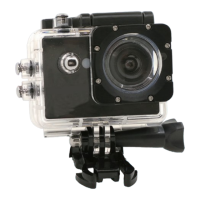

 To Next Page