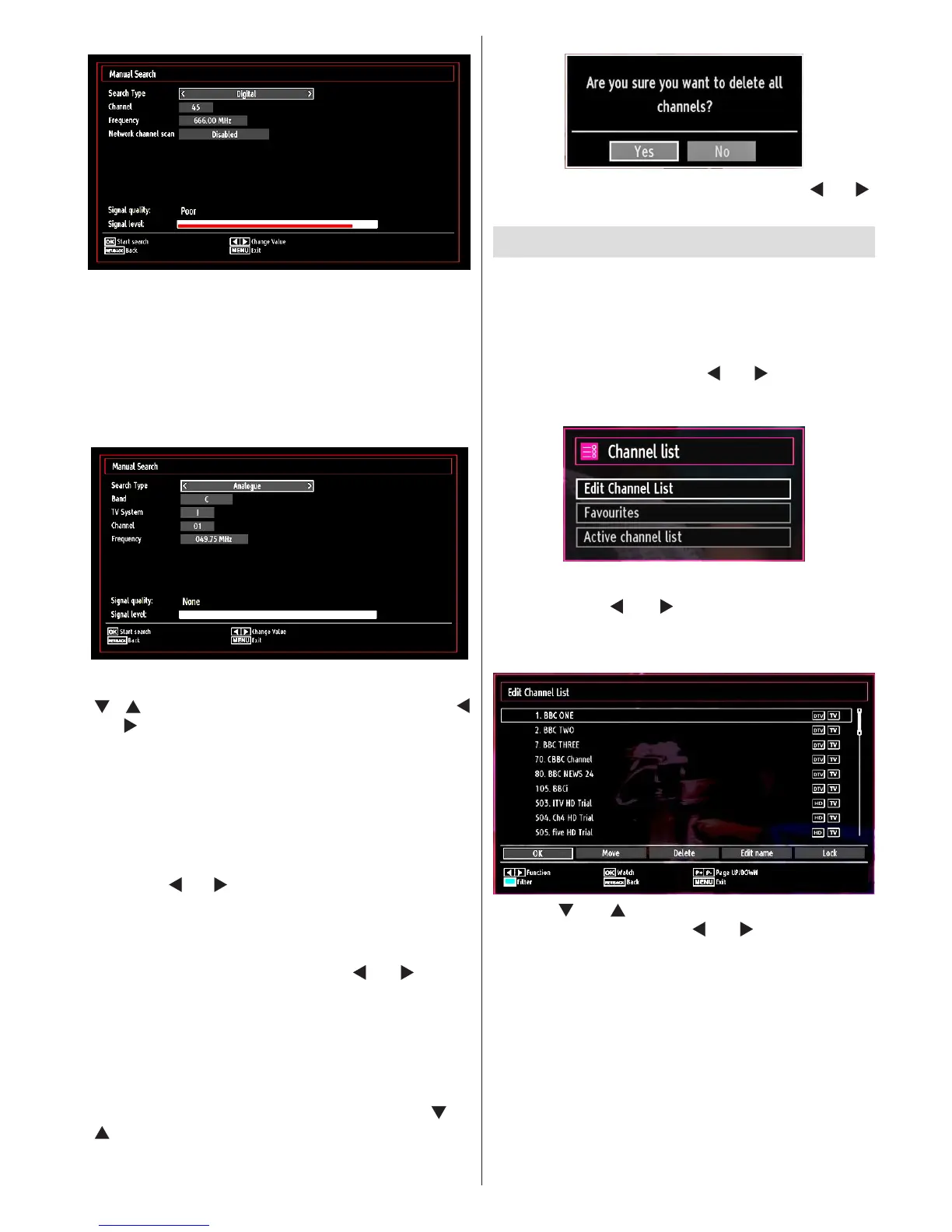
Digital Manual Search
In manual channel scan, the number of the multiplex
or frequency are entered manually and only that
multiplex or frequency are searched for the channels.
After selecting search type as Digital, you can enter
the multiplex or frequency number using the numeric
buttons and press OK button to search.
Analogue Manual Search
After selecting search type as analogue, you can use
“ ”/“ ” button to highlight an item and then press “
” or “ ” button to set an option.
Enter the channel number or frequency using the
numeric buttons. You can then press OK button
to search. When the channel is located, any new
channels that are not on the list will be stored.
Analog Fine Tune
Select • Analog Fine Tune from the Installation menu
by using “ ” or “ ” and OK buttons. Analog ne tune
screen will be displayed. Analog Fine Tune feature
will not be available if there are no analog channels,
digital channels and external sources stored.
Press • OK button to proceed. Use “ ” or “ ” button
to set Fine Tune. When nished, press OK button
again.
Clear Service List (*)
(*) This setting is visible only when the Country option
is set to Denmark, Sweden, Norway or Finland.
Use this setting to clear channels stored. Press “ ” or
“ ” button to select Clear Service List and then press
OK. The following OSD message will be displayed
on the screen:
Press OK to cancel. Select Yes by pressing “ ” or “ ”
button and press OK to delete all of the channels.
Managing Stations: Channel List
The TV sorts all stored stations in the Channel List.
You can edit this channel list, set favourites or set
active stations to be listed by using the Channel List
options.
Press • “M” button to view main menu. Select
Channel List item by using “ ” or “ ” button. Press
OK to view menu contents.
Select Edit Channel List to manage all stored
channels. Use “ ” or “ ” and OK buttons to select
Edit Channel List.
Operating the Channel List
Press “• ” or “ ” button to select the channel that
will be processed. Press “ ” or “ ” button to select
a function on Channel List menu.
Use • P+/P- buttons to move page up or down.
Press • BLUE button to view ltering options.
Press • “M” button to exit.
Note: The channels listed are mixed at the channel
list. Channel types can be differentiated by the icons
next to them: DTV (digital tv), HD (HD TV) , ATV
(Analogue TV) ,TV (TV), RD (Radio), encrypted, lock,
and at the favourite list.



 To Next Page