What this warranty covers.
Shenzhen Unichain Technology Co., LTD. (Manufac-
turer: “Unichain”) warrants to the original purchaser
of this TeckNet product that the product shall be free of defects
in design, assembly, material, or workmanship.
What the period of coverage is.
Unichain warrants the TeckNet product for 18 Months.
What will we do to correct problems?
Unichain will repair or replace, at its option, any defective
product free of charge (except for shipping charges for the
product).
What is not covered by this warranty?
All above warranties are null and void if the TeckNet product is
not provided to Unichain for inspection upon Unichain’s
request at the sole expense of the purchaser, or if Unichain
determines that the TeckNet product has been improperly
installed, altered in any way, or tampered with. The TeckNet
Product Warranty does not protect against acts of God such as
flood, earthquake, lightning, war, vandalism, theft, normal-use
wear and tear, erosion, depletion, obsolescence, abuse, damage
due to low voltage disturbances (i.e. brownouts or sags),
non-authorized program, or system equipment modification or
alteration.
How to claim the warranty
Please contact retailers or visit TeckNet website
www.tecknet.co.uk for more information.
Disclaimer
Every effort has been made to ensure that the information and
procedures in this guide are accurate and complete, no liability
can be accepted for any errors or omissions and we reserve the
right to make any changes without further notice to any
products mentioned herein.
Package Contents:
User
Manual
x 1 x 1
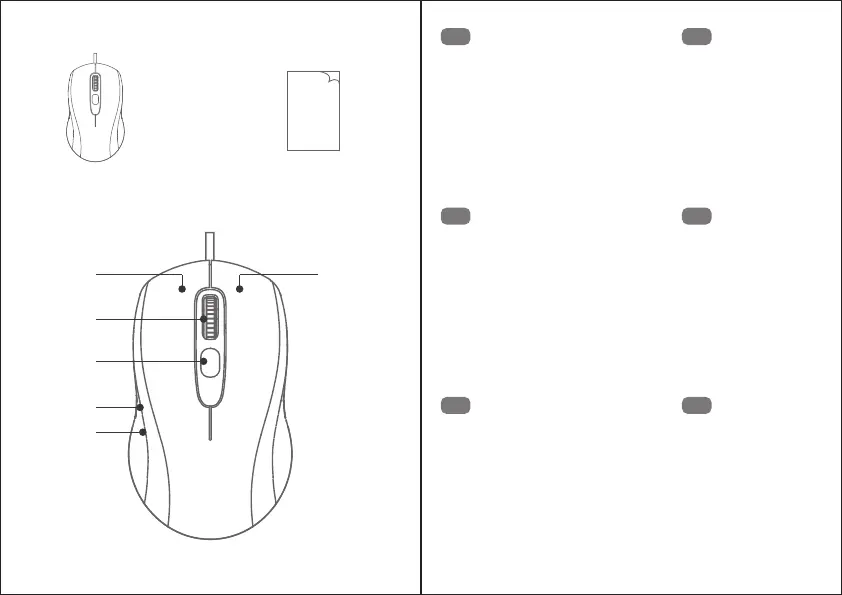
Product Layout:
①
③
④
⑤
⑥
②
Left Click Button
Right Click Button
Scroll Wheel
DPI Switch Button
Forward Button
Backward Button
①
②
③
④
⑤
⑥
EN
Linksklick-Taste
Rechtsklick-Taste
Scrollrad
DPI-Umschalttaste
Vorwärts-Taste
Rückwärts-Taste
①
②
③
④
⑤
⑥
DE
Bouton gauche
Bouton droit
Molette de défilement
Bouton DPI
Bouton avancer
Bouton retour
①
②
③
④
⑤
⑥
FR
Bouton gauche
Bouton droit
Molette de défilement
Bouton DPI
Bouton avancer
Bouton retour
①
②
③
④
⑤
⑥
ES
Cliquez sur le bouton gauche de bouton
Cliquez sur le bouton droit de bouton
Parchemin Volant
le département de l'information
l'interrupteur
Méthode bouton
l'arrière bouton
①
②
③
④
⑤
⑥
IT
左クリックボタン
右クリックボタン
スクロールホイール
DPI スイッチボタン
進むボタン
戻るボタン
①
②
③
④
⑤
⑥
JP



 To Next Page